9. STANDARD ADJUSTMENTS
41
KE-436C
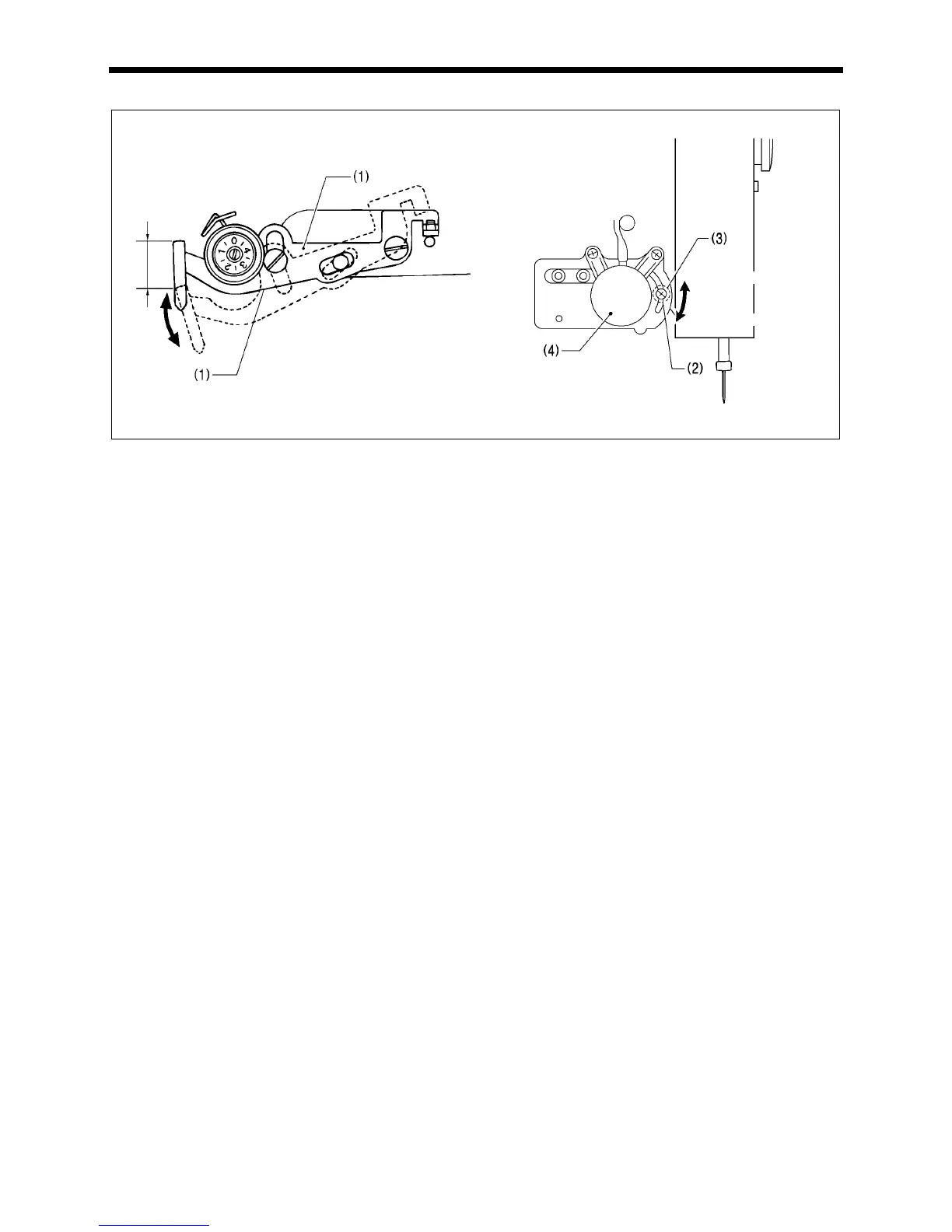
9-6. Adjusting the thread take-up amount
At the time of shipment from the factory, the thread take-up amount (stroke) of the thread take-up lever (1) is set to the
standard setting of 5 mm. You may need to adjust this setting depending on the sewing conditions to prevent the thread from
pulling out at the sewing start.
Adjustment method
Loosen the screw (2) and move the stopper (3.57 nut) (3) to adjust the operating angle of the thread take-up solenoid (4).
* To reduce the thread take-up amount, move the stopper (3) downward.
* To increase the thread take-up amount, move the stopper (3) upward.
Note:
Do not increase the stroke of the thread take-up lever any more than is necessary.
If the sub-thread tension is too high, the needle thread length may become too short and the thread may come out of the
needle. Furthermore, if the sub-thread tension is too weak, the needle thread length may become too long and the
underside of the article being sewn may become untidy.
2722Q
2559Q
Thread take-up amount (stroke)
Become



 To Next Page
 Loading...




