33
1
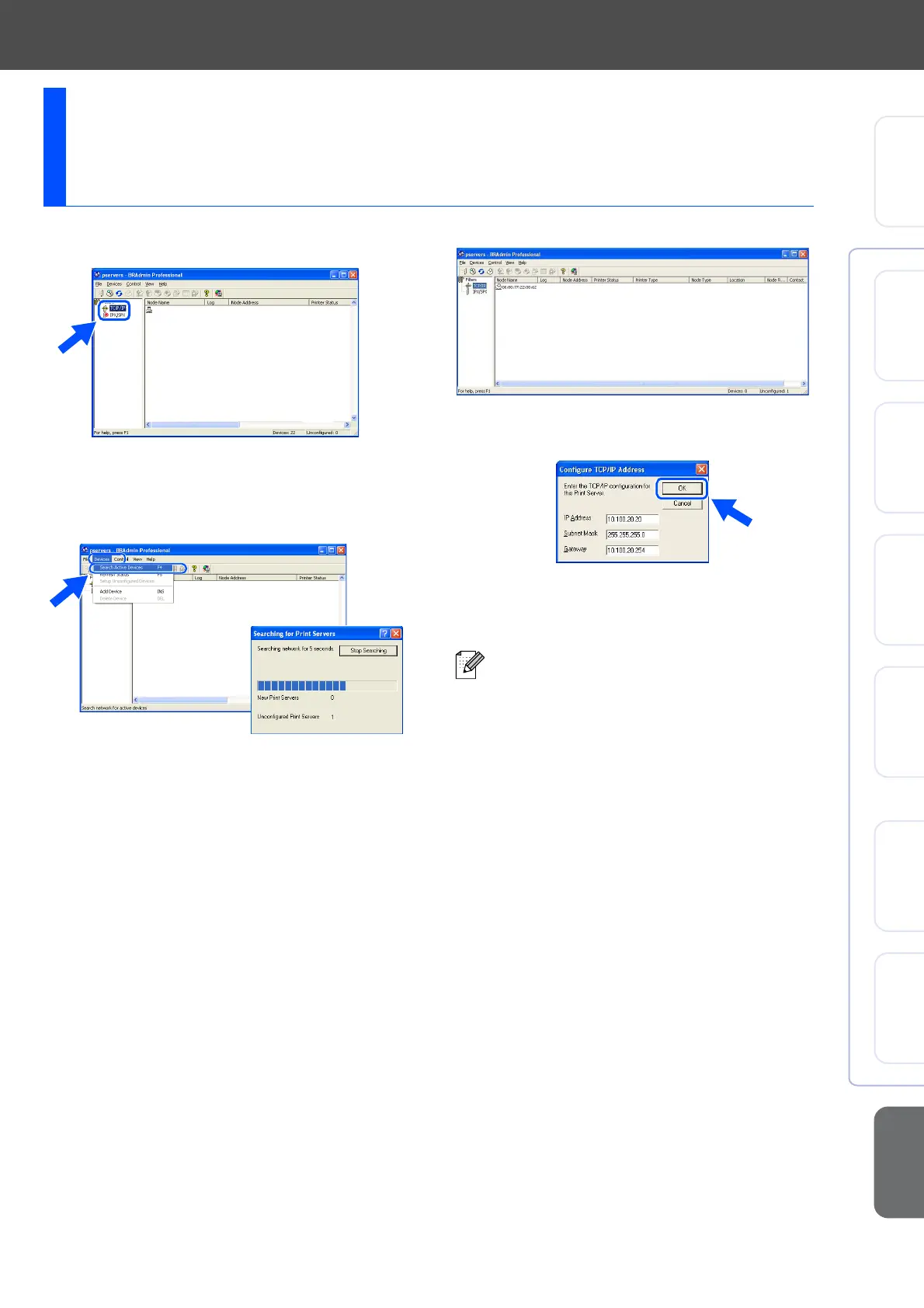
Start BRAdmin Professional, and select
TCP/IP.
2
Select Search Active Devices from the
Devices menu.
BRAdmin will search for new devices
automatically.
3
Double-click the new device.
4
Enter the IP Address, Subnet Mask and
Gateway, and then click the OK button.
5
The address information will be saved to the
printer.
Setting your IP Address, Subnet Mask and
Gateway using BRAdmin Professional
(Windows
®
Users Only)
For more information on network
administration, please see the Network
User’s Guide in the programs menu or go
to http://solutions.brother.com
Setting Up
the Machine
Windows
®
USB
Windows
®
Parallel
Windows
NT
®
4.0
Parallel
Macintosh
®
USB
Macintosh
®
Network
Windows
®
Network
For
Network Users



 To Next Page
 Loading...