Home > Copy > Copy on Both Sides of the Paper (2-sided Copy)
Copy on Both Sides of the Paper (2-sided Copy)
Reduce the amount of paper you use by copying onto both sides of the paper.
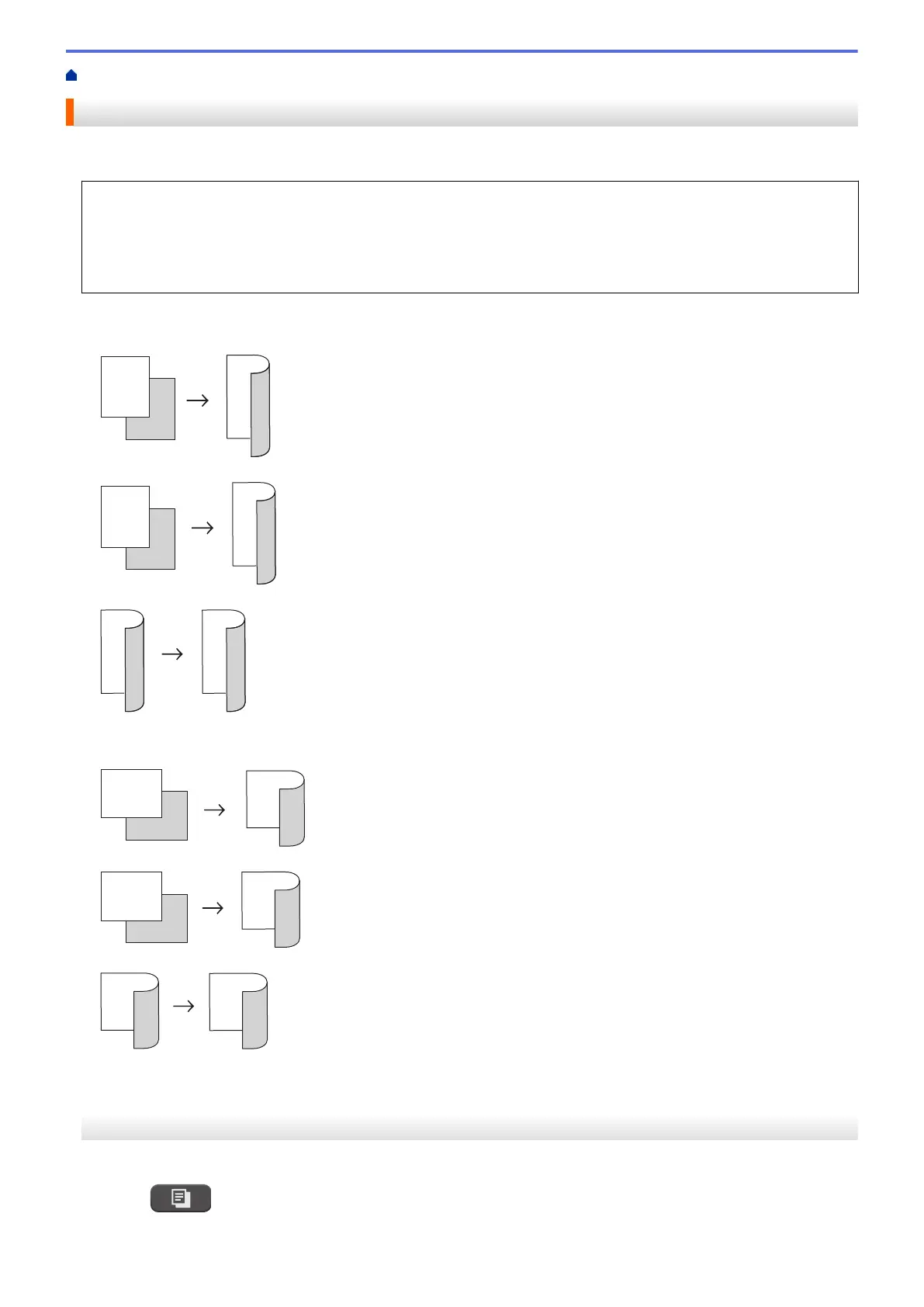
• You must choose a 2-sided copy layout from the following options before you can start 2-sided copying.
• The layout of your original document determines which 2-sided copy layout you should choose.
• When you manually make 2-sided copies from a 2-sided document, use the scanner glass.
• You can use only Letter, A4, A5, or Executive size plain paper.
Portrait
1–sided to 2–sided (Long Edge Flip)
1–sided to 2–sided (Short Edge Flip)
2–sided to 2–sided
Landscape
1–sided to 2–sided (Long Edge Flip)
1–sided to 2–sided (Short Edge Flip)
2–sided to 2–sided
>> MFC-J4335DW/MFC-J4345DW
>> MFC-J4535DW
MFC-J4335DW/MFC-J4345DW
1. Load your document.
2. Press (COPY).
3. Enter the number of copies using the dial pad.
167



 To Next Page
 Loading...