Home > Fax > Receive a Fax > Fax Preview > Preview New Faxes
Preview New Faxes
Related Models: MFC-J4535DW
When a fax is received, a message appears on the LCD.
• This feature is available only for black and white faxes.
• To see a fax you already previewed, press
[Fax] and [Received Faxes].
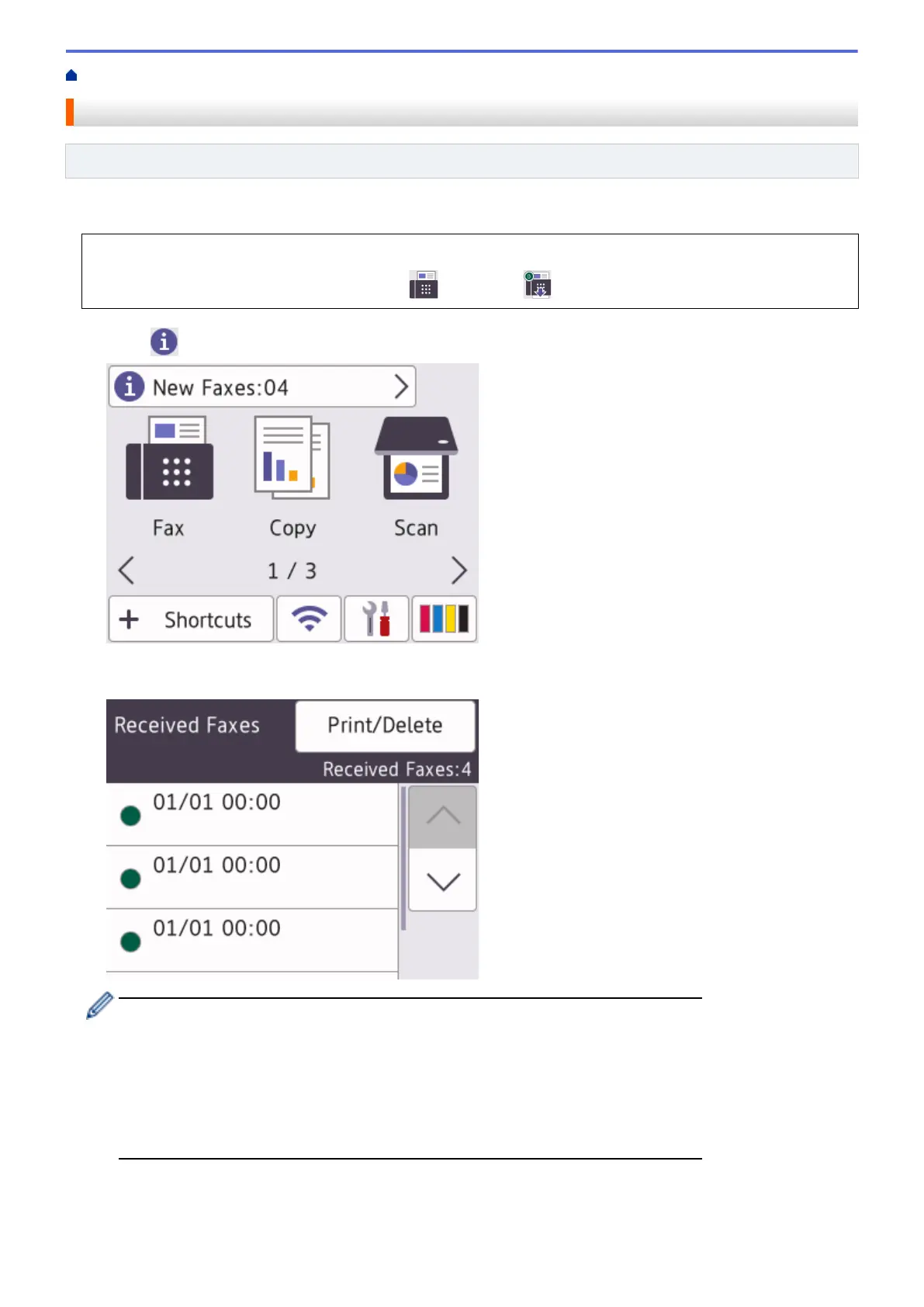
1. Press to view new faxes.
2. The fax list includes old and new faxes. A green mark appears next to new faxes.
Press the fax you want.
If you want to print or delete all the faxes in the list, press [Print/Delete].
Do one of the following:
• Press [Print All(New Faxes)] to print all faxes you have not yet viewed.
• Press [Print All(Old Faxes)] to print all faxes you have viewed.
• Press [Delete All(New Faxes)] to delete all faxes you have not yet viewed.
• Press [Delete All(Old Faxes)] to delete all faxes you have viewed.
3. Perform the following operations by pressing the buttons shown in the table:
203


 To Next Page
 Loading...