(Callie
4)
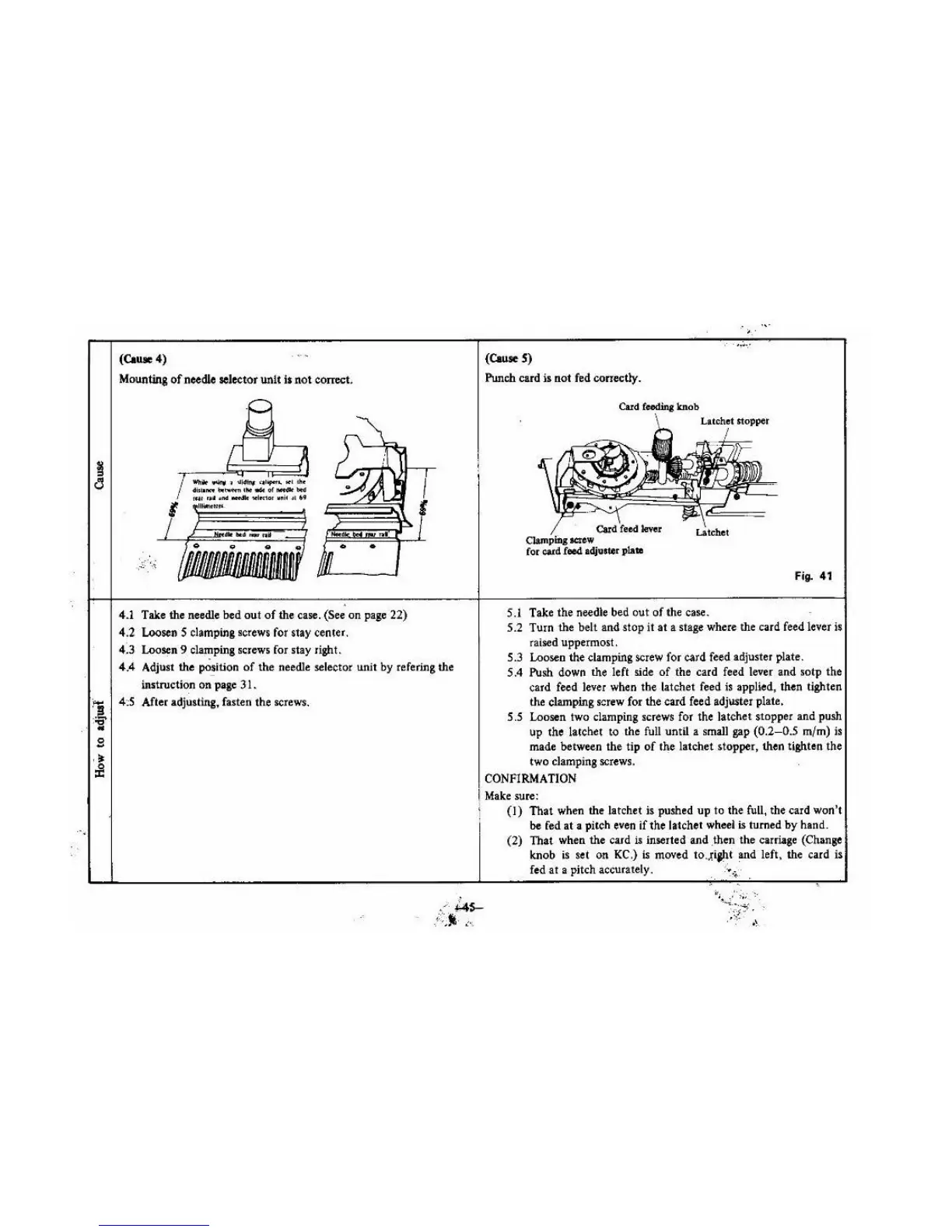
Mounting
of
needle selector unit
ll
not
com>et.
/ wtrik
....,.
l
~~,.,.
•"'""""
l'tl
lhc
J
4
iJI•rat.~tM
..
ol-*~
IU
f
Uf
• ttd
.....
WI«1
0f
VII
i~
~~
.,
nl
•
4.1 Take the needle bed out
of
the case. (See
on
page 22)
4.2
LoosenS clamping screws for stay center.
(3
Loo~n
9 clamping screws for stay right.
4.4 Adjust the
po~ition
of
the needle selector unit
by
refering the
instruction
on
page 31.
fg
4:5 After adjusting, fasten the screws.
:
;s'
..
g
(CauseS)
Punch
card is
not
fed cortectly.
Card
CJampiilg
II<UW
Card
feodina
knob
for
catd
feed
adjosr.or
plate
5
.I
Take
the
needle bed
out
of
the case.
..
..
. ..
~
.·
Fig. 41
5.2 Turn the belt and
stop
it
at
a stage where the card feed lever is
raised uppermost.
5
.3
Looseo
the
clamping screw for card feed adjuster plate.
5.4
PUsh
down the left side
of
the card feed lever and sotp
the
card feed lever when tbe latchet feed is applied, then tighten
the clamping
screw for the card feed adjuster plate.
5.5 Loosen two clamping screws for the latchet stopper and push
up the latchet to the full until a small gap
(0.2-0.5
m{m)
is
made between
the
tip
of
the latchet stopper, then tighten the
two clamping screws.
CONFIRMATION
I
Make
sure:
1
(I)
Tha
t when the latchet is pushed
up
to
the full, the card won't
'
be
fed
at
a pitch even
if
the latch
et
wheel is turned
by
hand.
(2)
That when the card is inserted and .then
the
carriage (Chan
ge
knob is set
on
KC.)
is
moved to.;.iaJ!i and left, the card
is
fed
at
a pitch accurately.
~
~.
~·
.





 To Next Page