9LVLWXVDWVXSSRUWEURWKHUFRP for the latest battery recommendations.
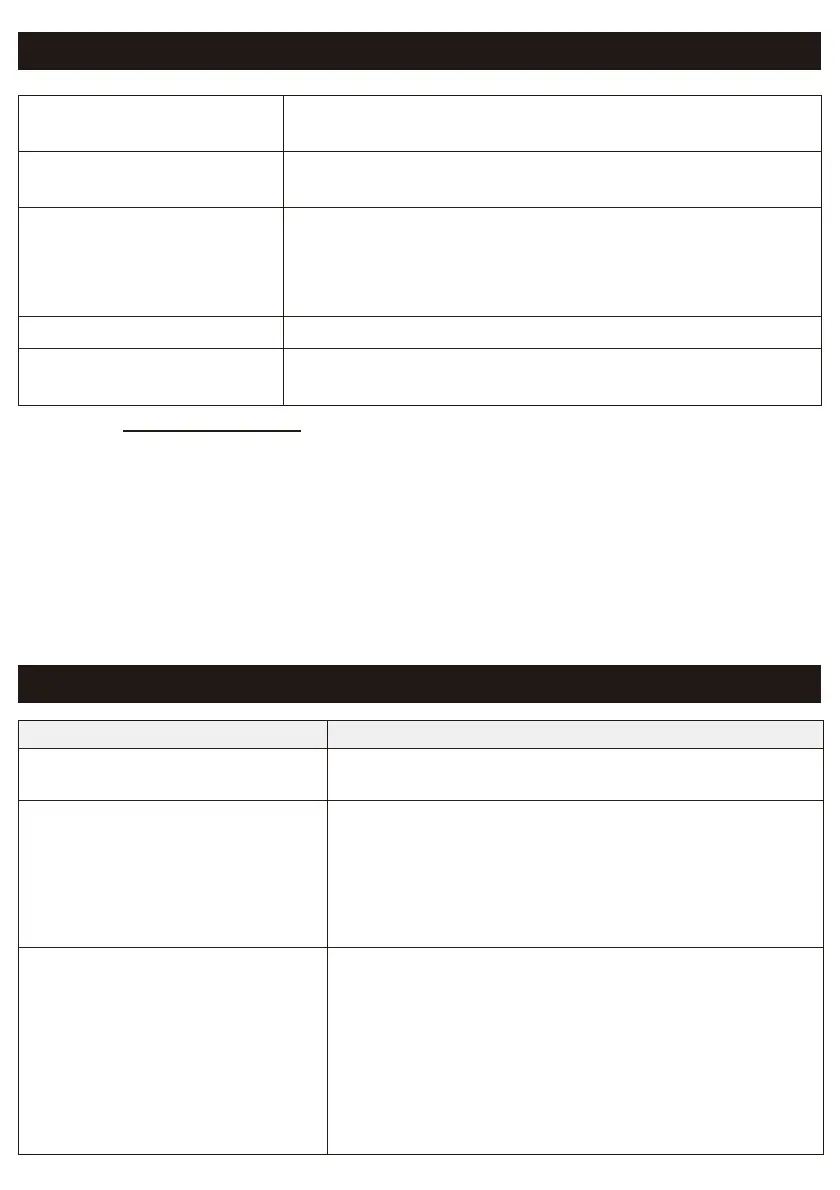
Specifications
'LPHQVLRQV:î'î+ $SSUR[LPDWHO\:î'î+
PP:îPP'îPP+
:HLJKW $SSUR[LPDWHO\OEJ
(without batteries and Tape Cassette)
Power Supply Optional AC Adapter (AD-24ESA/AD-24ESAW/
AD-24ESA-01/AD-24ESAW-01)
6L[$$$$ONDOLQHEDWWHULHV/5
&KDUJHDEOHVL[$$$1L0+EDWWHULHV+5
,QWHUIDFH %OXHWRRWK9HU('5&ODVV
Brother TZe Tape Cassette
Compatible widths
PPPPPPPP
Troubleshooting
Problem Solution
I cannot turn on my machine. Check to see that the batteries are installed correctly,
or that the optional AC Adapter is securely connected.
A horizontal space runs through
the middle of printed labels.
Streaks or poor quality characters on printed labels
generally indicate that the Print Head is dirty. For
instructions on how to clean the Print Head, see the
Performing Routine Maintenance section in this
guide.
* Do not touch the Print Head with your hands.
0\PDFKLQHGRHVQRWSULQWRUWKH
characters are printed incorrectly.
&KHFNWKDWWKH7DSH&DVVHtte is inserted correctly.
,IWKH7DSH&DVVHWWHLVHPSW\UHSODFHLW
&KHFNWKDWWKH&DVVHWWHCover is securely closed.
&KHFNWKDWWKHFKDUJHLVQRWORZ
&KHFNWKDWWKHODEHOSULQWHULVRQ
&KHFNWKDWWKHPRELOHGHYLFHLVQRWLQVOHHSPRGH
&KHFNWKDWWKHSULQWHUDQGPRELOHGHYLFHDUH
connected via Bluetooth.



 To Next Page
 Loading...