198
APPENDIX — — — — — — — — — — — — — — — — — — — — — — — — — — — — — — — — — — — — — — — — — — — — — —
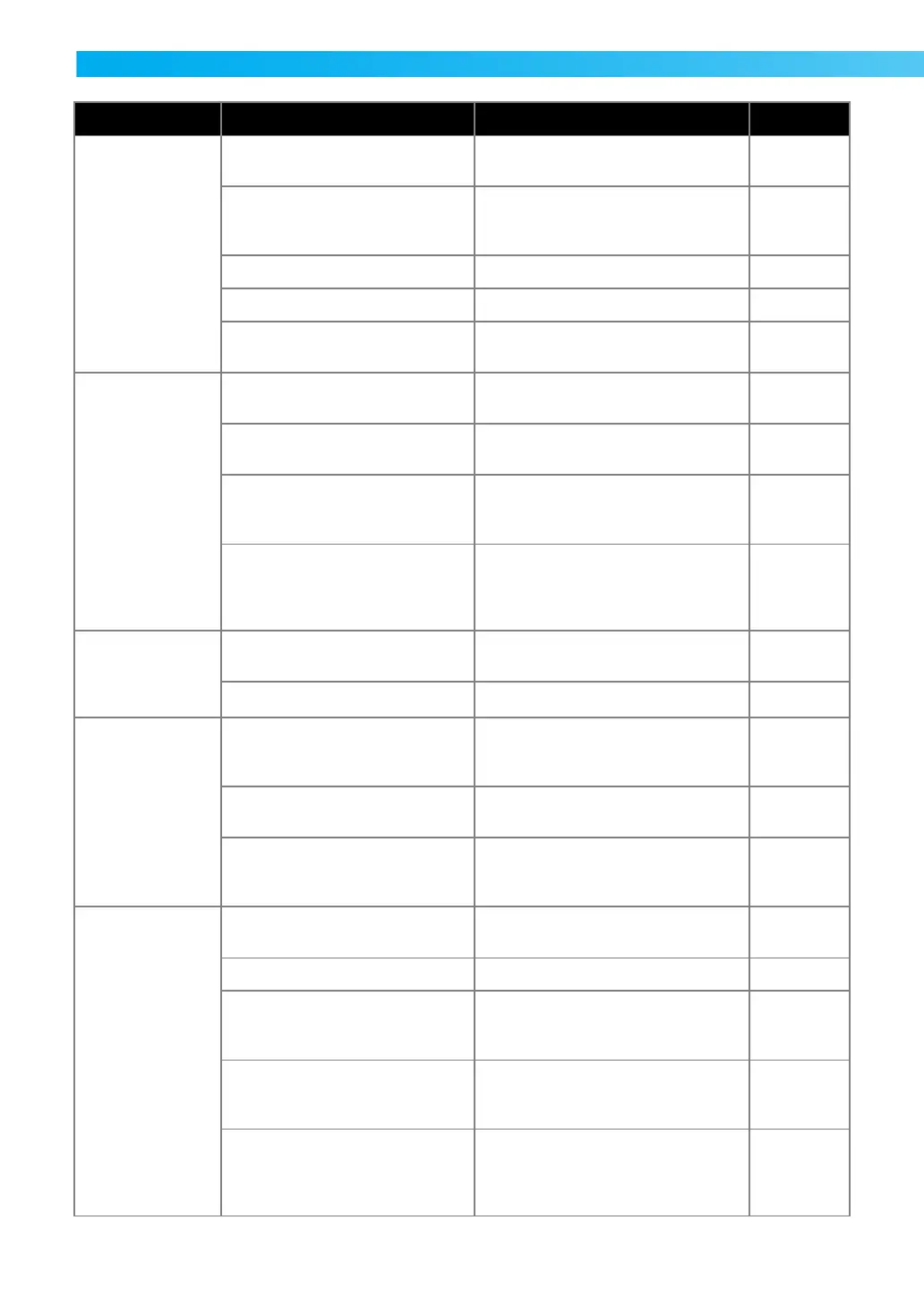
Stitches are
skipped.
The upper thread was not
threaded correctly.
Correct the upper threading. page 31
The combination of fabric, thread
and needle is not correct.
Select a thread and needle that are
appropriate for the type of fabric
being sewn.
page 41
The needle is bent or blunt. Replace the needle. page 42
The needle is incorrectly installed. Correctly install the needle. page 42
Dust has accumulated under the
needle plate or in the bobbin case.
Remove the needle plate cover and
clean the race.
page 184
A high-pitched
noise is made
while sewing.
Dust has accumulated in the feed
dogs or in the bobbin case.
Clean the race. page 184
The upper thread was not
threaded correctly.
Correct the upper threading. page 31
The bobbin case is scratched, or
has a burr on it.
Replace the bobbin case. Contact
your retailer or the nearest authorized
service center.
–
A bobbin designed specifically for
this machine is not used.
Incorrect bobbins will not work
properly. Only use a bobbin
designed specifically for this
machine.
page 25
The thread does
not pass through
the eye of the
needle.
The needle has not been raised to
the correct position.
Press the “Needle Position” button. page 34
The needle is incorrectly installed. Correctly install the needle. page 42
The stitch is not
sewn correctly.
The presser foot that is used is not
appropriate for the type of stitch
that you wish to sew.
Attach the presser foot that is
appropriate for the type of stitch that
you wish to sew.
page 70
The thread tension is incorrect.
Adjust the tension of the upper
thread.
page 59
The thread is tangled, for example,
in the bobbin case.
Remove the tangle thread. If the
thread is tangled in the bobbin case,
clean the race.
page 184
The fabric does
not feed.
The feed dogs are lowered.
Slide the drop feed lever to the right
(as seen from the rear of machine).
page 110
The stitch is too short. Lengthen the stitch length. page 59
The presser foot that is used is not
appropriate for the type of stitch
that you wish to sew.
Attach the presser foot that is
appropriate for the type of stitch that
you wish to sew.
page 70
The thread is tangled, for example,
in the bobbin case.
Remove the tangled thread. If the
thread is tangled in the bobbin case,
clean the race.
page 184
Zigzag foot “J” is slanted on a
thick seam at the beginning of
stitching.
Use the presser foot locking pin
(black button on the left side) on
zigzag foot “J” to keep the presser
foot level while sewing.
page 65
Symptom Probable Cause Remedy Reference











 To Next Page