ROLL-UP CONVEYOR - SWING AND DUMP,
AND NETTING SWITCH.
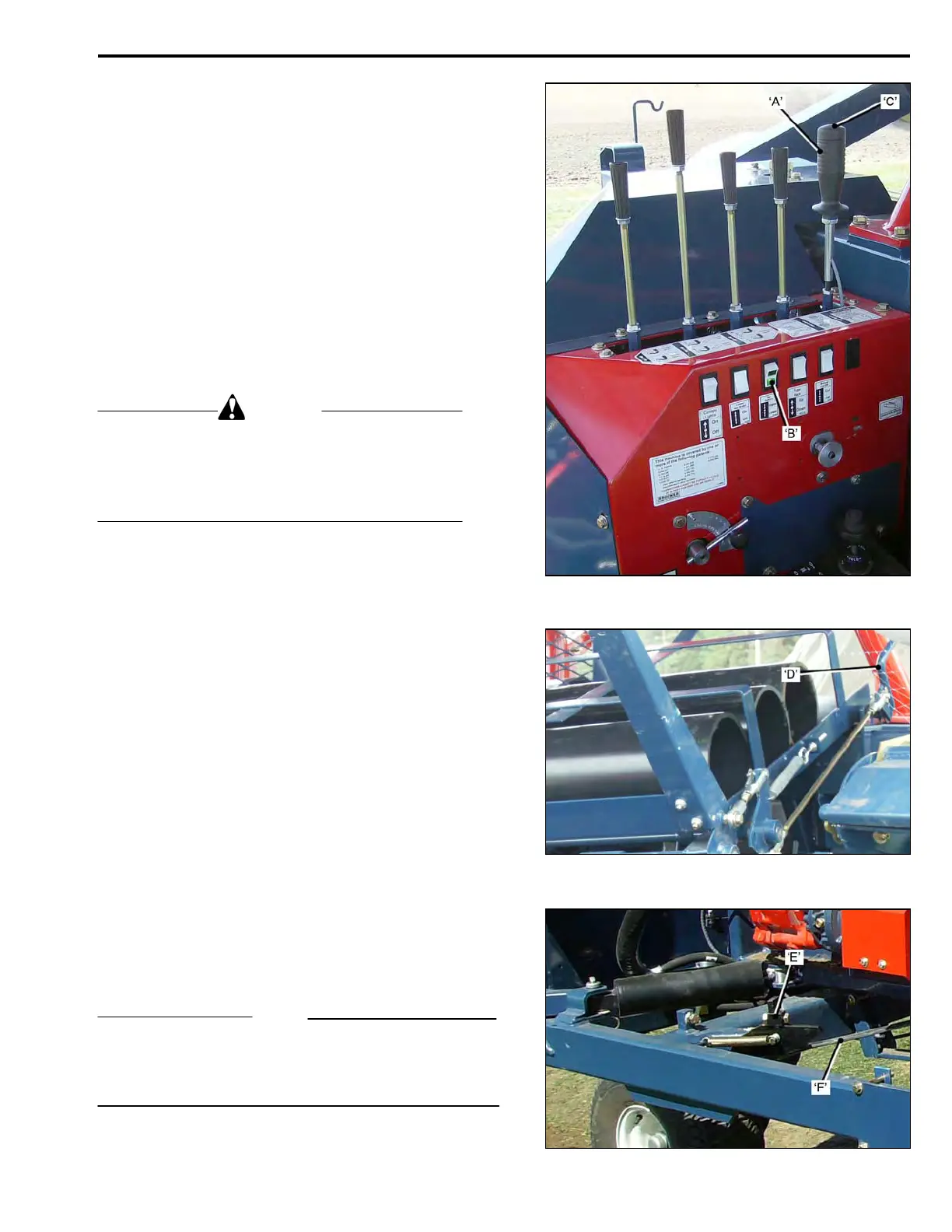
The Roll-Up Conveyor Swing and Dump Control Lever
and Netting Switch ‘A’.
• PULL – to swing the Conveyor and Dump the
finished Roll of Sod.
• PUSH – to return the Conveyor to the Roll-Up
position.
With Netting Selector Switch ‘B’, set on ‘LOWER’.
• Depress the switch button ‘C’, on the end of
the lever, to clamp the netting at the start of
‘swing’, so that the netting is cut as the
conveyor swings.
With Netting Selector Switch ‘B’, set on ‘UPPER’.
• Depress the Switch Button ‘C’, on the end of
the lever, to ‘start’ the upper netting.
DANGER
The Roll-Up Conveyor ‘dumps’ automatically at
the end of the swing. Ensure that any bystanders
are a safe distance from the rear left side of the
harvester before swinging the Roll-Up Conveyor
to ‘dump’ the sod roll.
When the Sod Roll is ready to ‘dump’:
• Depress the Switch Button ‘C’.
With the Netting Selector Switch ‘B’, on
‘LOWER’,
Hold the Switch Button down, while the
Conveyor swings, and the netting is cut-off.
• Swing the Roll-Up Conveyor to the
‘DUMP’ position. The Roll is automatically
dumped, and the Dump Conveyor Return
Spring re-sets the dump latches.
• Return the Roll-Up Conveyor toward the
roll-up position. A stop latch will stop the
Roll-Up cavity in position to receive a Core
Tube from the tube dispenser.
• Pull Lever ‘D’, to dispense a tube. Only
when the Roll-Up Conveyor is properly
positioned on the return swing. The
dispenser holds five tubes and is manually
loaded from the tube rack.
• Swing the Roll-Up Conveyor ‘UP’, approx-
imately six inches, toward the dump pos-
ition, to release the Stop Latch. The Roll-Up
Conveyor can then be returned all the way
to the roll-up position.
NOTE
If Core Tubes are not being used, the Stop Latch ‘E’, can
be disabled by removing the rubber strap ‘F’.
If netting is not being used, it will not be necessary to
depress the net clamp button ‘C’.
OPERATION
3-05



 To Next Page