AUTO-STEER
Auto-Steer Operation.
When the Auto-Steer System has been initially set-up,
ready to start harvesting, it is important that the final set-up
is done, and a ‘Starting Strip of turf is cut, as follows.
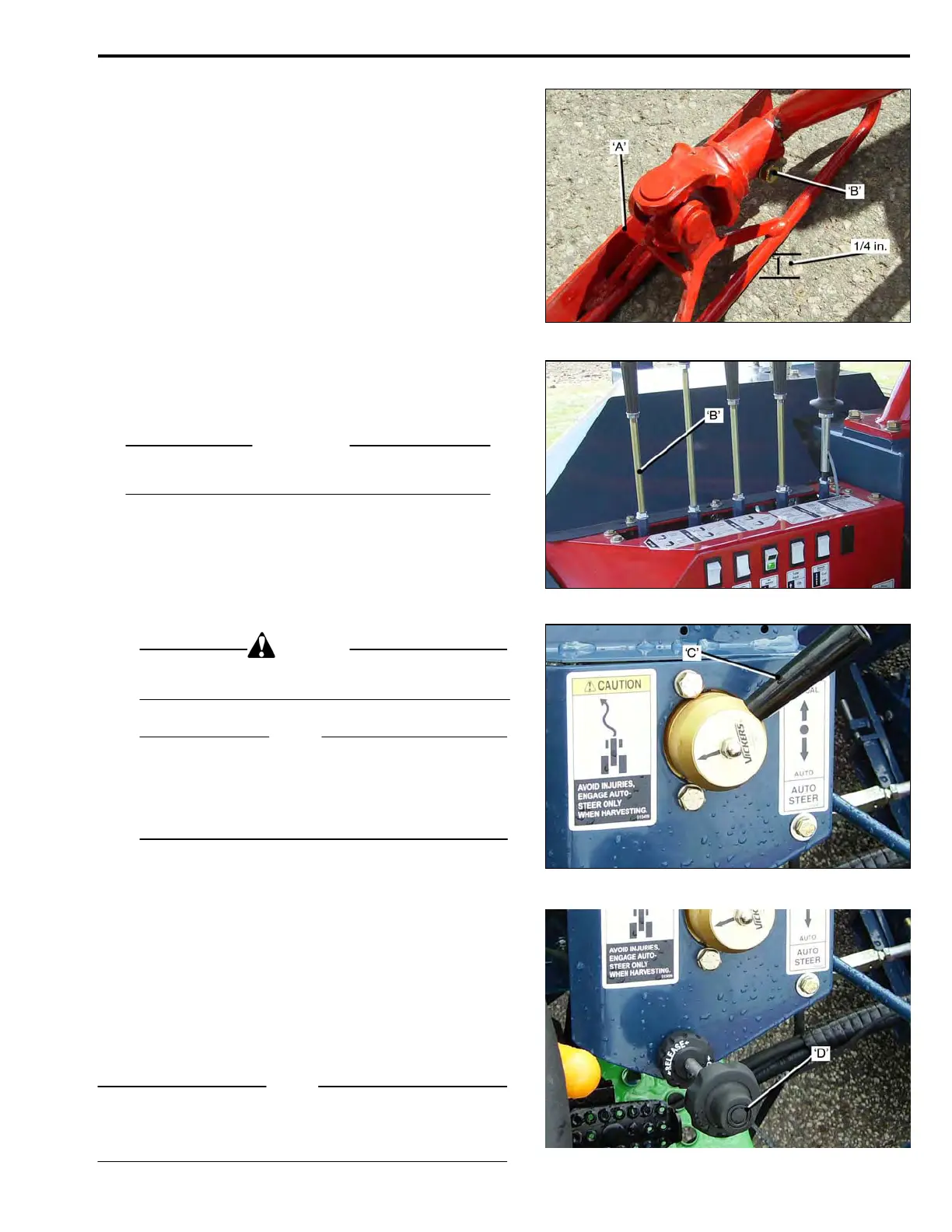
The Auto-Steer Guide Shoe ‘A’, must be set relative to the
ground by loosening the Bolt ‘B’, and turning the Shoe on
the Shoe Arm until the inner edge of the Shoe is ¼ inch
from the ground.
A Starting Strip’ of turf must be cut with ‘manual steering’,
this creates the turf ‘edge’ that the Guide Shoe must follow.
• Start the tractor and set the engine RPM at 1400.
Engage 1
st
Gear, the tractor will move forward.
• Push the Cutter Head Lever ‘B’, ‘forward’, to lower
the Cutter Head.
• Using manual steering and proceed to cut the
starting strip.
IMPORTANT
The starting strip must be cut straight to ensure the
correct operation of the Auto-Steer.
When the Starting Strip has been cut :
• Position the Harvester parallel to the Starting Strip,
with the Side Blade aligned to the cut edge of the
turf.
• Engage the Auto-Steer with Control Lever ‘C’.
CAUTION
To avoid accidents or injuries, the Auto-Steer must be
engaged only when harvesting.
NOTE
If the Guide Shoe lowers onto the ‘uncut’ turf, when the
Auto-Steer is engaged, disengage the Auto-Steer, the
Re-set Cylinder will lift the Guide Shoe off the uncut turf.
Engage the Auto-Steer again, to correctly position the
Guide Shoe.
To continue cutting :
• Select 1
st
Gear, set the engine RPM to 1400.
• Lower the Cutter Head, Control Lever ‘B’.
• Continue cutting the second strip, using the Fine
Adjust Control ‘D’, to trim the waste strip.
Each revolution of the Control Knob gives approxi-
mately ¼ inch of Guide Shoe lateral movement.
If the Auto-Steer works satisfactorily but the Fine Adjust
Control Cable has run out of adjustment, the cable should
be re-set.
NOTE
If a problem with the Auto-Steer should arise during
harvesting, it must be re-set as shown on the
following pages.
5-01



 To Next Page