First steps with your room controller 3
7
We reserve the right to make any changes due to technical modifications.
Operating instructions RC20 room controller • Issue 08/2006
Display (Fig. 1, Item 1)
The display shows set and actual values and temperature, e.g. the
actual room temperature (standard display in factory setting).
The display shows four dashes if you try to change a value that
cannot be modified of if no setting is possible.
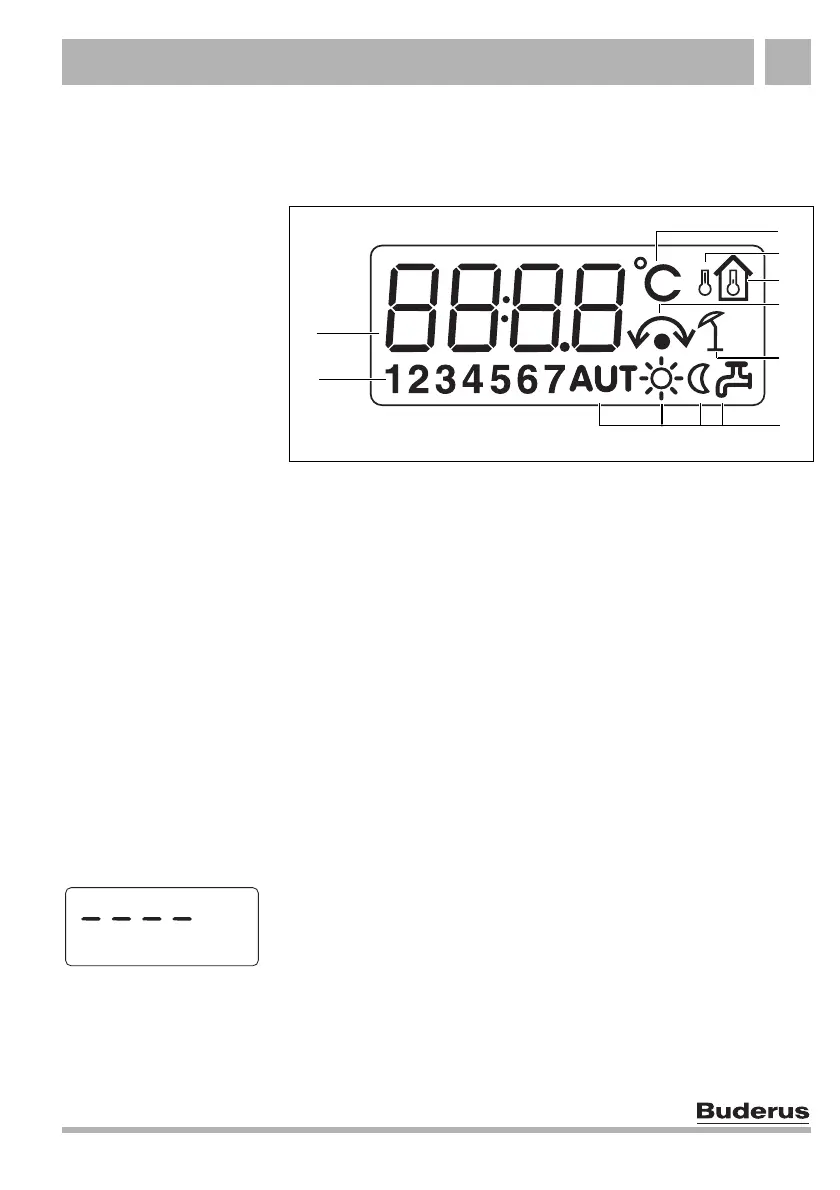
Fig. 2 Explanation of the display elements
Item 1: Day (1 = Mo, 2 = Tu,... 7 = Su)
Item 2: Set or actual value or temperature
Item 3: "Temperature in °C" display
Item 4: "Outdoor temperature" display (only in conjunction with a
programming unit, for example RC30/RC35, see page 23,
RC20 as remote control)
Item 5: "Actual room temperature" display
Item 6: Display:
a) Room temperature can now be adjusted or
b) Room temperature has temporarily changed (temporary room
setting, see section 4.2.2, page 15)
Item 7: "Summer mode" display (only in conjunction with a programming
unit, e.g. RC30/RC35, that provides a summer mode for the
heating system)
Item 8: Operating status symbols (see Tab. 1, page 8)
6
3
1
7
2
4
5
8



 To Next Page