First steps with your RC30
5
15
We reserve the right to make any changes due to technical modifications.
Operating instructions RC30 programmable room thermostat • Issue 02/2006
5 First steps with your RC30
5.1 Controls
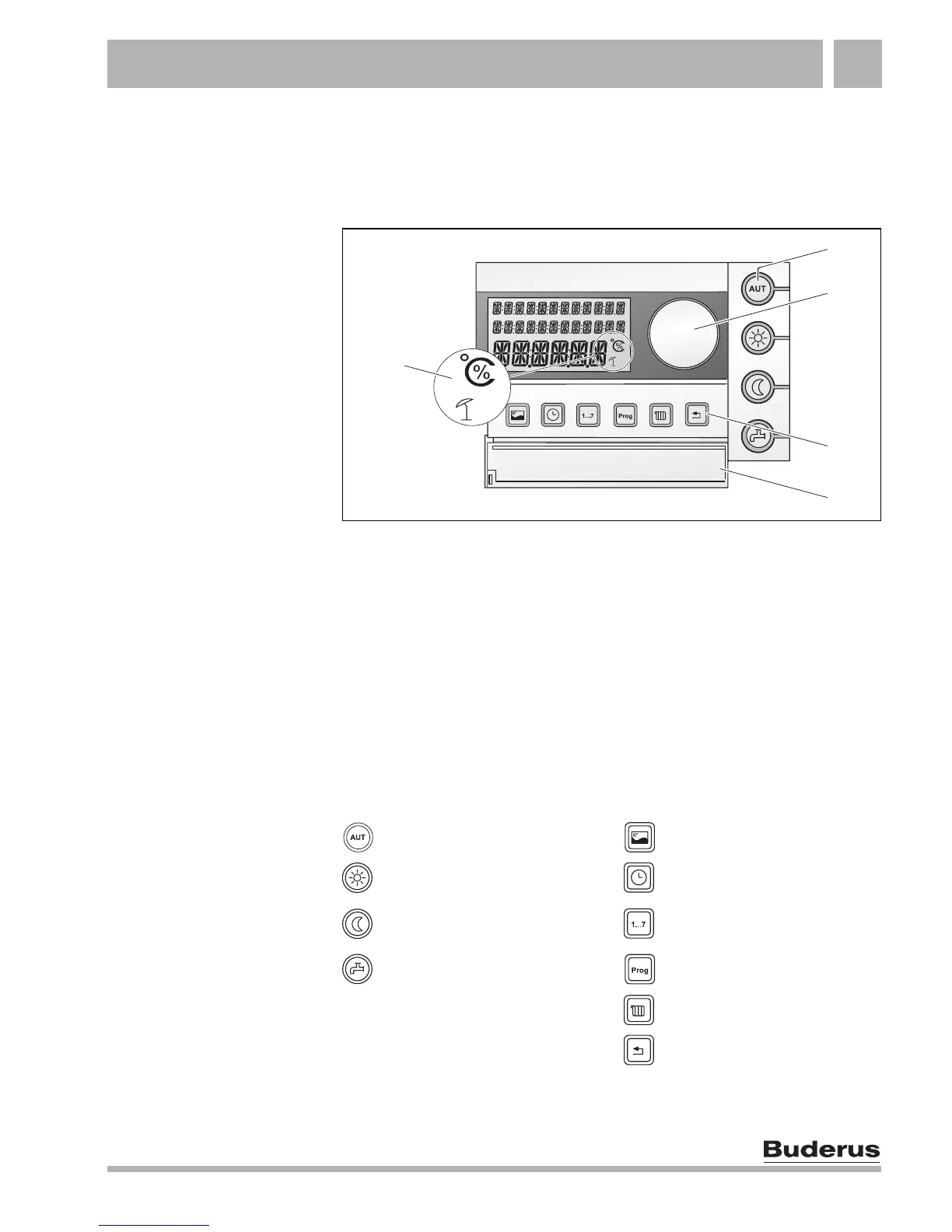
Fig. 3 Controls on the RC30
Item 1: Temperature, percentage and summer mode display
Item 2: Buttons for basic functions with LEDs
Item 3: Dial for changing values and temperatures or for navigating
through the menus
Item 4: Buttons for extended functions and special functions
Item 5: Hinged flap covering the buttons for extended functions and
special functions
Buttons for basic functions
(Fig. 3, Item 2)
Buttons for extended functions
(Fig. 3, Item 4)
"AUT" button (Automatic) "Display" button
"Day mode" button (normal
heating mode)
"Time" button
"Night mode" button
(reduced heating mode)
"Weekday" button (Day / Date)
"DHW" button "Prog" button (Program)
"Heating circuit" button
"Back" button
1
2
3
5
4



 To Next Page