5
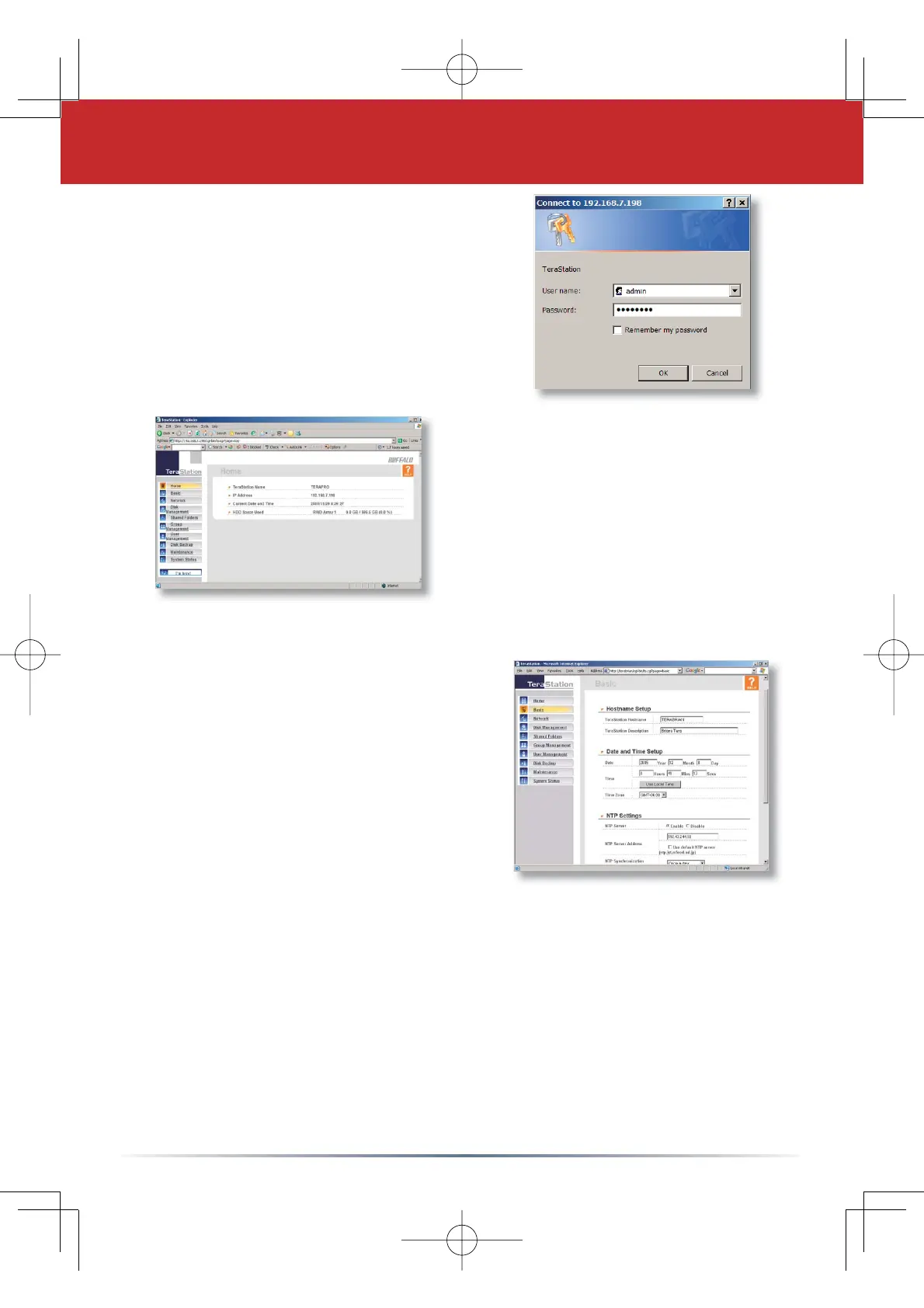
This login prompt will appear.
The user name is
admin.
The password is
password, until
you change it.
Press
OKZKHQÀQLVKHG
You’re now logged in. Bookmark
this Page in your browser for
easy future access. For detailed
explanations of each menu and
setting, refer to your TeraStation
manual, available on your
TeraNavigator CD.
Click on the
Basic button on the
left side.
6WHS7HUD6WDWLRQ&RQ¿JXUDWLRQ8WLOLW\
Here on the Basic Page, begin
by changing the name of your
TeraStation in the TeraStation
+RVWQDPHÀHOG$IULHQGO\
easy-to-remember name is highly
recommended. The name cannot
contain any spaces or special
characters. If you cannot think of
a name, we recommed you name
it TeraStation.
Enter a short description of your
TeraStation in the
TeraStation
Description
ÀHOG<RX·OOWKHQVHHWKLVGHVFULSWLRQLQ1HWZRUN
Neighborhood.
Make sure that the date and time are correct in
Date and time
setup. To synchronize clock settings with your computer, press
Use Local time.
Press
ApplyDWWKHERWWRPRIWKH3DJHZKHQWKHGHVLUHGÀHOGVDUH
completed.









 To Next Page