12
operating manual
operating manual Product appearance and specications are subject to change without notice
Quality: The recorded le size depends on the complexity of the moving objects and background. Slow moving
objects or still backgrounds will usually generate a smaller le size, while fast moving objects require more memory
storage. The following recording times are an estimation based on this explanation:
MODE SPEED DURATION ( For 1Gb)
LQ 1 Mb/s 80 minutes
EP 2 Mb/s 60 minutes
LP 4 Mb/s 40 minutes
SP 6 Mb/s 20 minutes
HQ 8 Mb/s 15 minutes
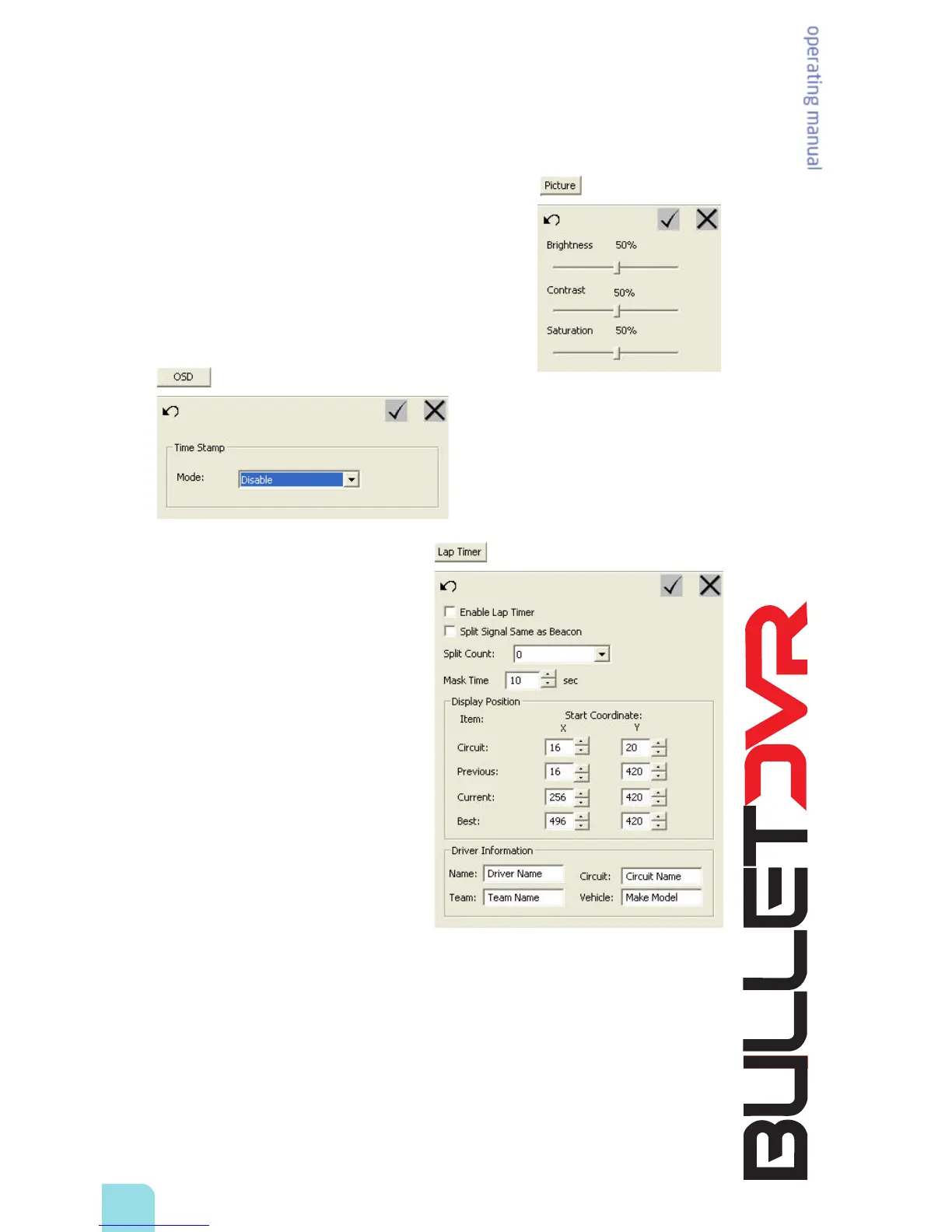
Picture Adjustment: You can adjust the brightness, contrast and saturation of the picture to get the
best quality for any given environment. The default value is 50%.
OSD: Click this tab to congure the
On-Screen Display (OSD) which is the
timestamp to display the date and time
information, over the recorded video. This
feature is similar, but dierent than the OSD
containing the racer/lap time information.
When this option is disabled there will be no
timestamp printed over the recorded video.
Lap Timer: Click this tab to congure the lap
timer options.
Enable Lap Timer: When you check this box, the
lap timer feature will become active and you will
be able to record the lap times along with your
videos. The IR receiver needs to be connected
to the Bullet DVR unit, and a compatible beacon
(not included) must be positioned properly on
the side of the racetrack.
Split Signal Same as Beacon: Select this option
when you need to setup split timing, when you
only have main beacons available. This will let
you use the same IR frequency for both main
and split beacons, the only dierence being that
the rst beacon will be automatically recognized
as the main unit, and all others will be set as split.
If you want the Bullet DVR to dierentiate
between the main beacon and other split
beacons, you will need to purchase true split
beacons, and disable this option.
Split Count: Allows you to select the number of
split beacons which are positioned on the racetrack. The maximum allowed is one main beacon and up
to 4 split beacons.
Mask Time: Set the amount of time where the lap timer will be inactive, so that the IR receiver does not
pick-up the signal of another beacon positioned nearby.
Display Position: Allows you to manually set where the Lap Timer data will be displayed on your
TV screen. The coordinates are dened horizontally by the X value and vertically by the Y value. The
numbers correspond to the number of pixels which are visible on the screen:
NTSC = 720x480 (X value can be set from 0 to 720, Y value 0 to 480)
PAL = 720x576 (X value can be set from 0 to 720, Y value 0 to 576)
Driver Information: Congure the 4 elds to change the names and information related to the recorded
event, for later reference.


 To Next Page