Standard features
Simple everyday use
Standard features22
If you require any technical guidance or find that your TV is not operating as intended, a simple solution can often be found in the Troubleshooting section of these instructions,
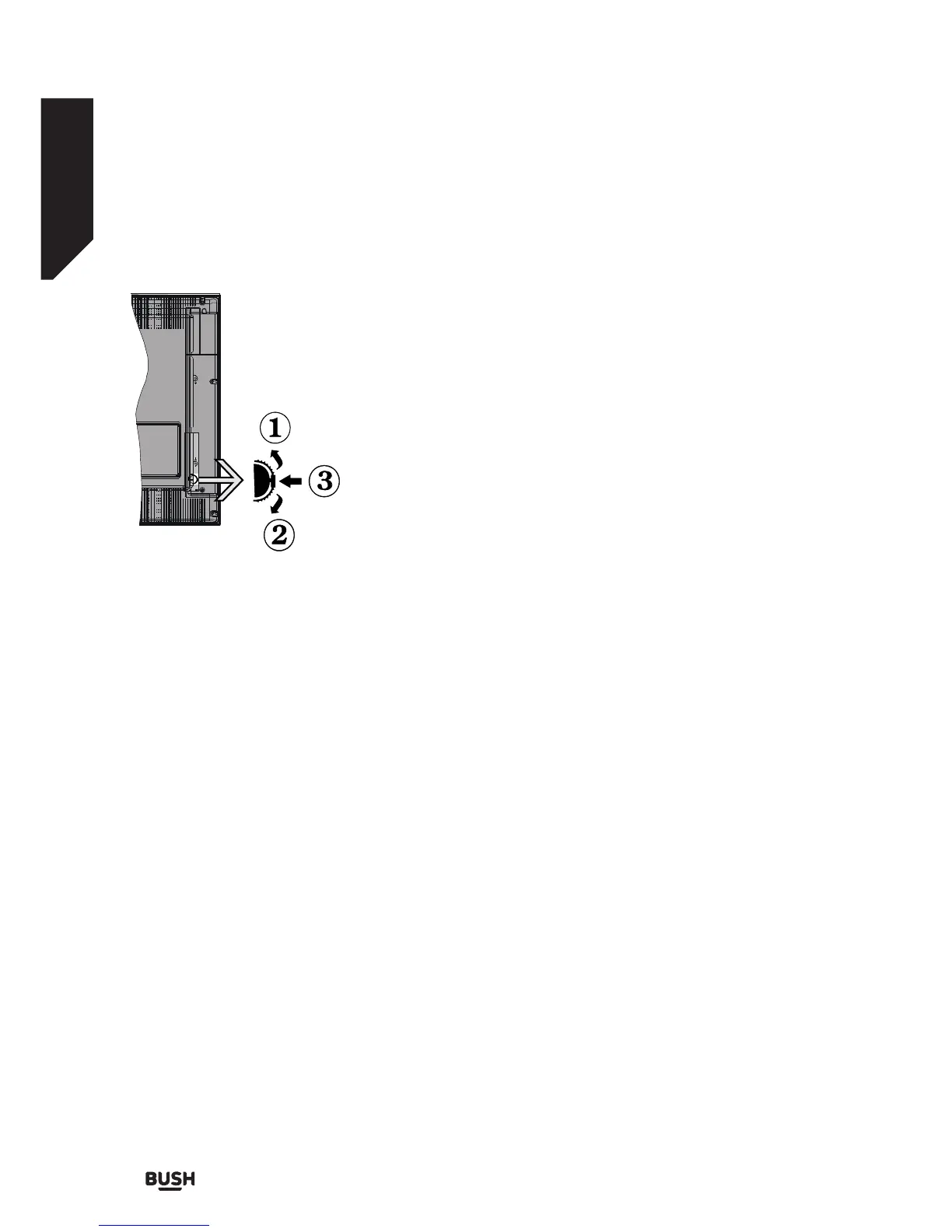
TV Control Switch & Operation
1. Up direction
2. Down direction
3. Volume / Info / Sources List selection and Standby-
On switch
The Control button allows you to control the Volume /
Programme / Source and Standby-On functions of the
TV.
To change volume: Increase the volume by pushing
the button up. Decrease the volume by pushing the
button down.
To change channel: Press the middle of the button,
the information banner will appear on the screen. Scroll
through the stored channels by pushing the button up
or down.
To change source: Press the middle of the button
twice (for the second time in total), the source list will
appear on the screen. Scroll through the available
sources by pushing the button up or down.
To turn the TV off: Press the middle of the button
down and hold it down for a few seconds, the TV will
turn into standby mode.
Notes:
• If you turn the TV off, this circle starts again beginning
with the volume setting.
• Main menu OSD cannot be displayed via control
button.
Operation with the Remote Control
Press the Menu button on your remote control to
display main menu screen. Use the directional buttons
to select a menu tab and press OK to enter. Use the
directional buttons again to select or set an item. Press
Return/Back or Menu button to quit a menu screen.
Input Selection
Once you have connected external systems to your
TV, you can switch to different input sources. Press the
Source button on your remote control consecutively
to select the different sources.
Standby Notifi cations
If the TV does not receive any input signal (e.g. from
an aerial or HDMI source) for 5 minutes, it will go into
standby. When you next switch-on, the following
message will be displayed: “TV switched to stand-by
mode automatically because there was no signal for a
long time.” Press OK to continue.
If the TV is on and it hasn’t been operated for a while
it will go into standby. When you next switch-on, the
following message will be displayed. “TV switched to
stand-by mode automatically because no operation
was made for a long time.” Press OK to continue.
Fig 4.














 To Next Page