Lightning Series Fiber Laser User Manual
21
Figure 16 Cleaning QBH connector and laser processing head
c) Cleaning the laser processing head: Take out the laser processing head and put it into
a dust-free box, and clean the surface of the laser head with a dust-free cloth, especially the
surface of the QBH interface, the surface of the collimation protection lens module, and the
surface of the focusing protection lens module , making sure there is no dust (as shown in
Figure 16).
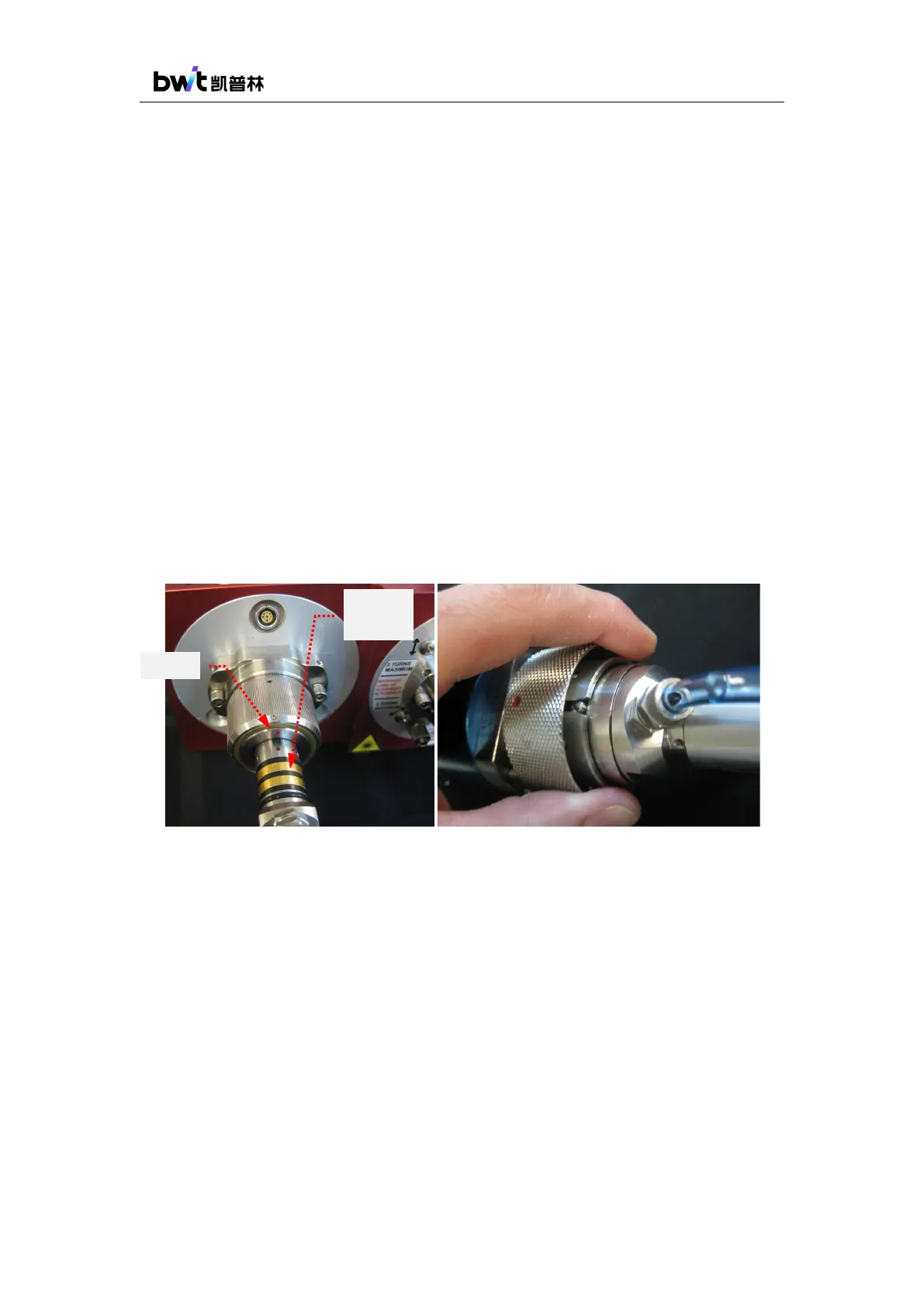
d) Insert QBH into laser processing head: Place the laser head horizontally to prevent
dust from falling into it, and align the clean QBH connector horizontally with the QBH
interface. Find the red dots on the QBH and the connector of laser head, align the red dots to
connect them into a straight line, and plug the QBH into the laser head. Rotate the QBH
locking ring clockwise to fix it, lift the locking ring up, and turn the locking ring clockwise
again to complete the locking. Check whether the QBH locking ring is secure, as shown in
Figure 17.
Figure 17 QBH insertion into the laser head
4.4. Cooling system requirements
For the stable and reliable operation of the laser, a dual-temperature-controlled chiller (with
both heating and cooling functions) must be used and works uninterrupted.
When installing and using the cooling system for the first time, you should check the entire
water loop and joints for any water leakage. The water tubes from the chiller must be connected
correctly to the ports on the laser rear panel, otherwise the laser may not work normally.
The Lightning Series fiber laser products have two places that require cooling water for heat
removing, as shown in Figure 18. The first is the laser itself, and the water inlet and outlet ports
are located on the rear panel of the laser. The second place is the QBH output cable.



 To Next Page