3-1 Keys and Doors 55
● The key is left in the vehicle.
● If the intelligent key is too close to an exterior door handle or window, the
entry function may not be activated.
Locking/unlocking with Bluetooth key (if any)
Refer to the user manual of electronic format for the specific method to operate
the vehicle with Bluetooth key.
Locking/unlocking with console door lock
Unlocking and locking all vehicle doors with console door lock buttons
Refer to "Front Left Door Switch Set" in this chapter.
Automatic locking and unlocking of doors
■ When the vehicle speed is over 20km/h, all doors will lock automatically.
■ When the START/STOP button is pressed and the power is switched from
OK to OFF mode, all doors will unlock automatically.
The buttons can be used to lock and unlock all doors at the same time.
Press the console door lock switch to lock all vehicle doors at the same time. In
this case, the doors cannot be opened from outside the vehicle. To open a door,
pull the interior door handle once to unlock the door and pull the interior door
handle again to open the door.
Emergency mechanical locking of vehicle
When the console door lock fails or the intelligent key battery is low, you may
use the mechanical key for emergency locking.
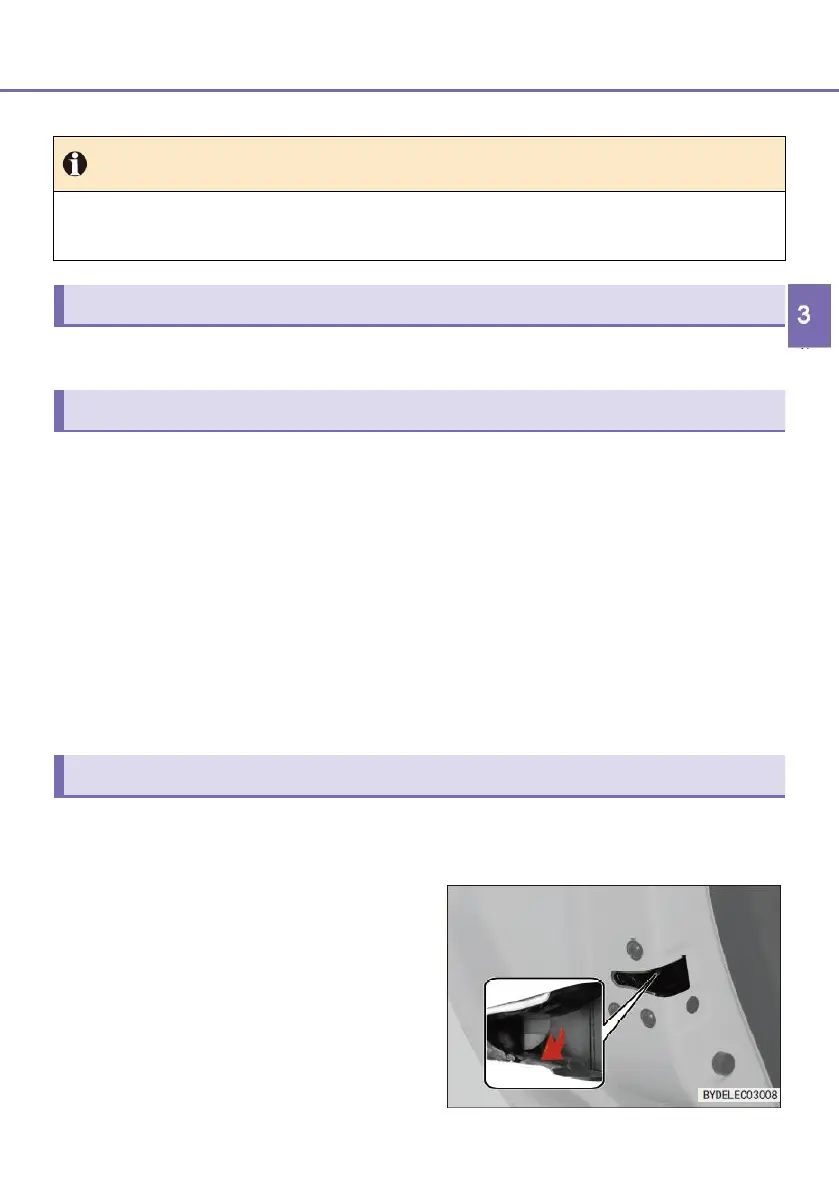
■ Insert the mechanical key into the
gap inside the lock tongue, and turn
the mechanical lock to pull
downward the locking mechanism
(white plastic block shown in the
figure) of the three doors other than
the driver's door to lock the three
doors.



 To Next Page