Company Address: Room 601, Floor 6, Building F, Songbai Road 1008, Sunshine Community,Xili Street, Nanshan District, Shenzhen(518108)
Factory Address: Fl1, Bldg B, Wentao Industrial zone, Yingrenshiyongxin Village, Shiyan Street, Baoan district, Shenzhen, Guangdong, China (518055)
Tel: +86-755-26014509/4710/4711 Fax:+86-755-26014506
Website: www.cdatatec.com
20
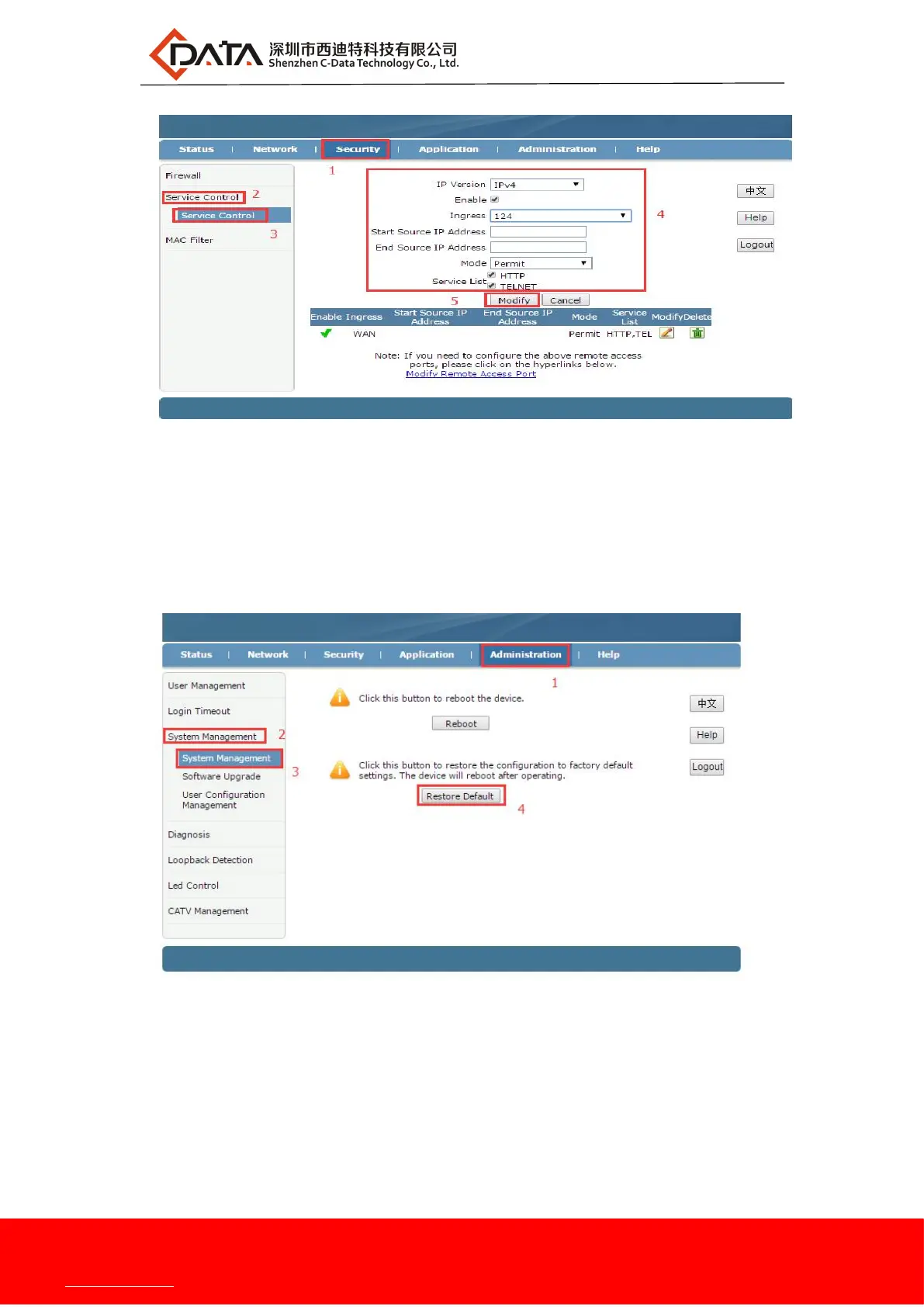
9.2 Restore Default
web login ONU and select the Administration -> System Management ->
System Management. Click the "Restore Default" button to restore the ONU
factory settings:
9.3 Software Upgrade
web login ONU and select the Administration -> System Management ->
Software Upgrade. Click the "Choose File" button to select an upgrade file, and
then click the "Upgrade" button to upgrade:
Note: ONU upgrade will automatically restart, do not need to manually restart the
ONU, upgrade time is about 3 minutes.


 To Next Page