Company Address: Room 601, Floor 6, Building F, Songbai Road 1008, Sunshine Community,Xili Street, Nanshan District, Shenzhen(518108)
Factory Address: Fl1, Bldg B, Wentao Industrial zone, Yingrenshiyongxin Village, Shiyan Street, Baoan district, Shenzhen, Guangdong, China (518055)
Tel: +86-755-26014509/4710/4711 Fax:+86-755-26014506
Website: www.cdatatec.com
6
of the ONU and the home device, ie, the computer, IPTV set-top box.
Connecting the coaxial cable: Connect the coaxial cable to the RF connector of
the ONU.
Connect the AC adapter: Plug the AC / DC adapter into the AC wall jack and the
ONU 12V DC power jack.
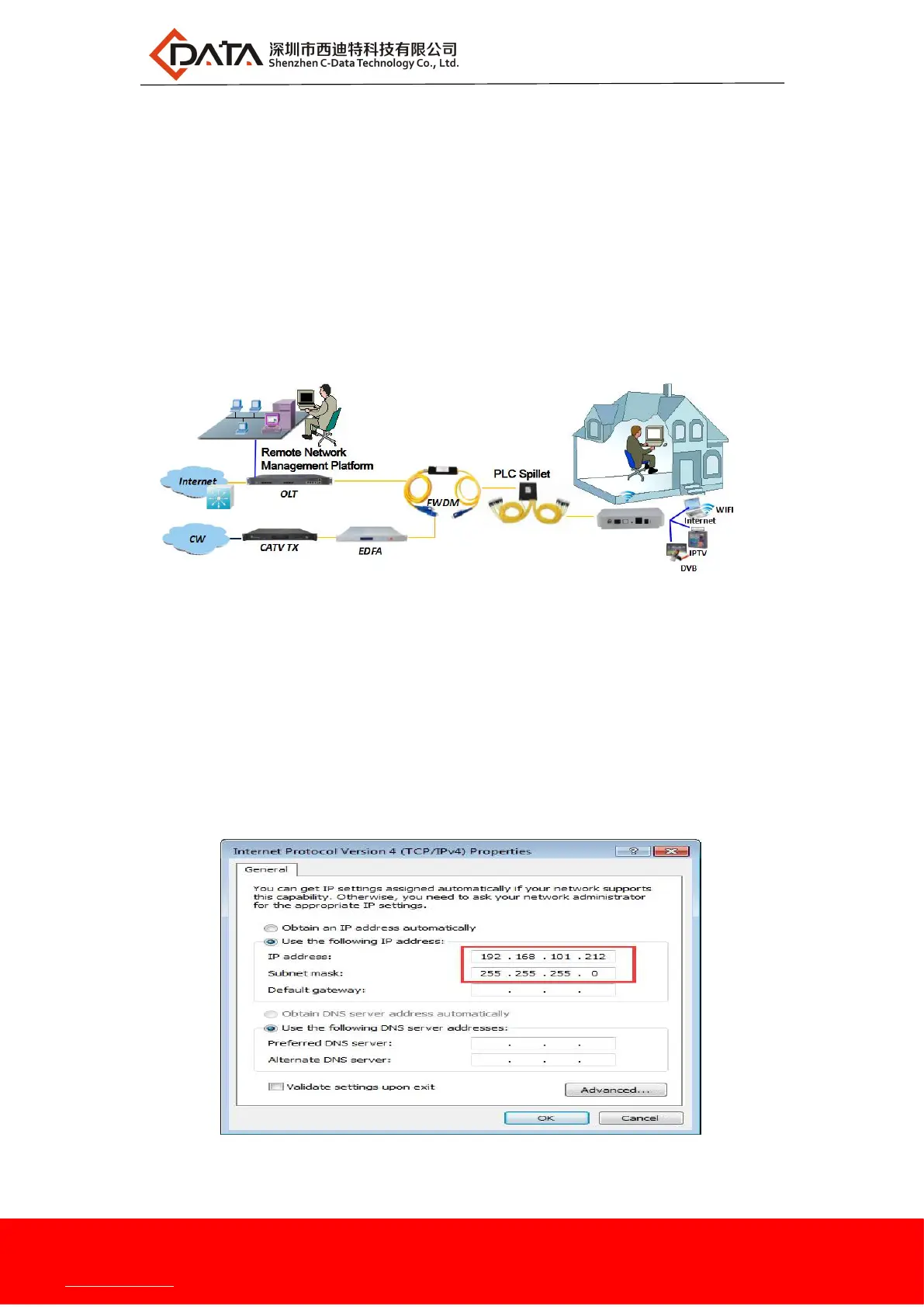
2.6 Network Application
【1GE + CATV ONU networking applications】
3 ONU Local WEB login
3.1 ONU and PC physical Connection
a) Connect your computer's local network card to the LAN port or ETH port of the ONU via a
network cable.
b) Set the IP address of the computer's local network card to 192.168.101.X (X: 2-254).
c) The computer opens the cmd window. To ensure that the computer can ping ONU


 To Next Page