Company Address: Room 601, Floor 6, Building F, Songbai Road 1008, Sunshine Community,Xili Street, Nanshan District, Shenzhen(518108)
Factory Address: Fl1, Bldg B, Wentao Industrial zone, Yingrenshiyongxin Village, Shiyan Street, Baoan district, Shenzhen, Guangdong, China (518055)
Tel: +86-755-26014509/4710/4711 Fax:+86-755-26014506
Website: www.cdatatec.com
5
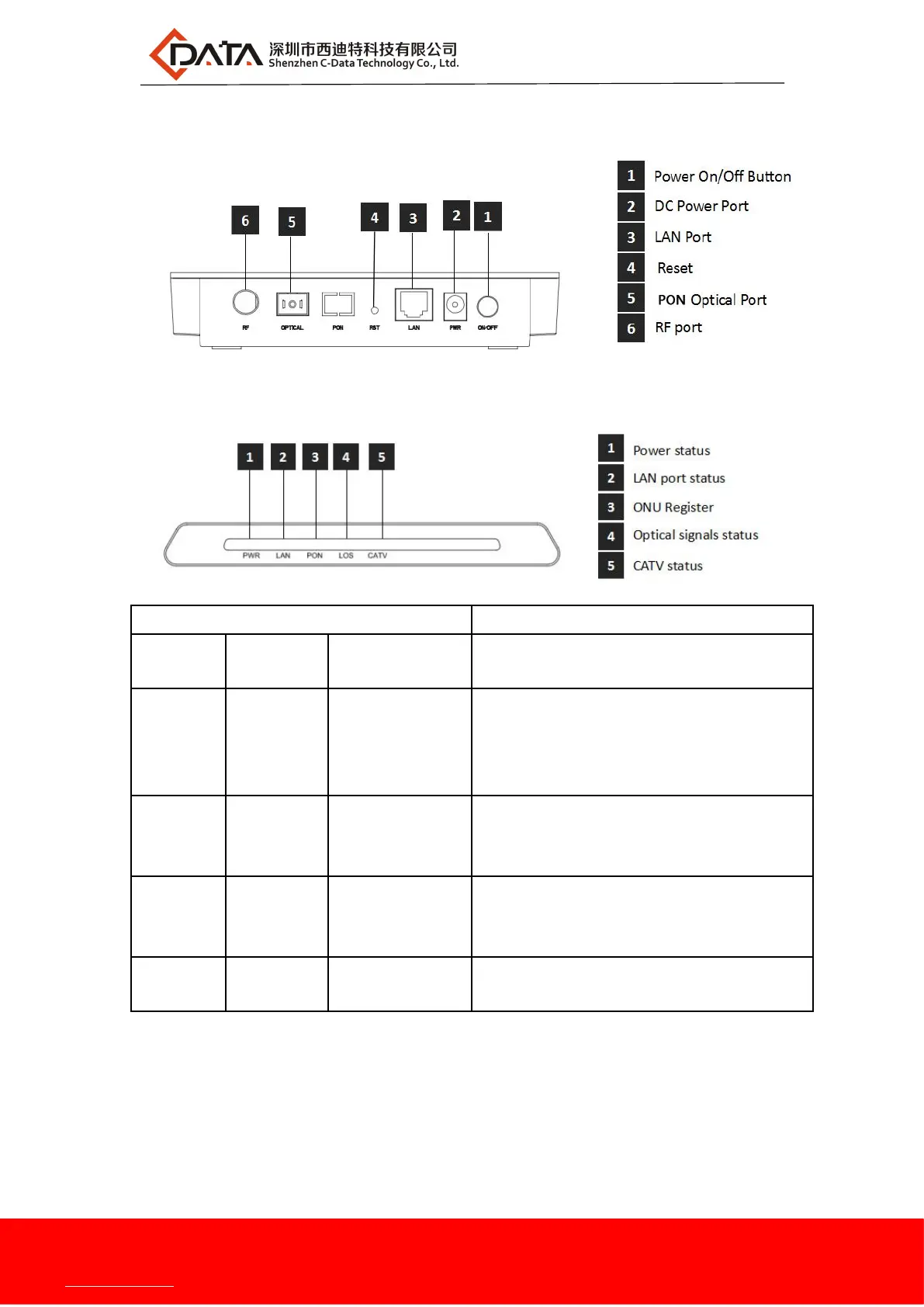
2.3 Product Interface Definitions
2.4 Product LED Definitions
On: The ONU is power on
Off: The ONU is Power off
On: Ethernet connection is normal
Blinking: Data is being transmitted through
theEthernet port
Off: Ethernet connection is not set up
On: Success to register to OLT
Blinking: In process of registering to OLT
Off: Failed to register to OLT;
On: Optical power lower than receiver
sensitivity ;
Off: Optical in normal
On
:
CATV optical normal
Off:The CATV signals are not received
2.5 Device Connection
Connecting the fiber: Insert the SC fiber connector into the PON connector on
the rear panel of the ONU.
Connect the Ethernet cable: Connect the RJ-45 Ethernet cable to any LAN port


 To Next Page