Pag. 74 MIRIAM-NICE-DIANA-PRETTY-MARY
5.2. CONTROL PANEL
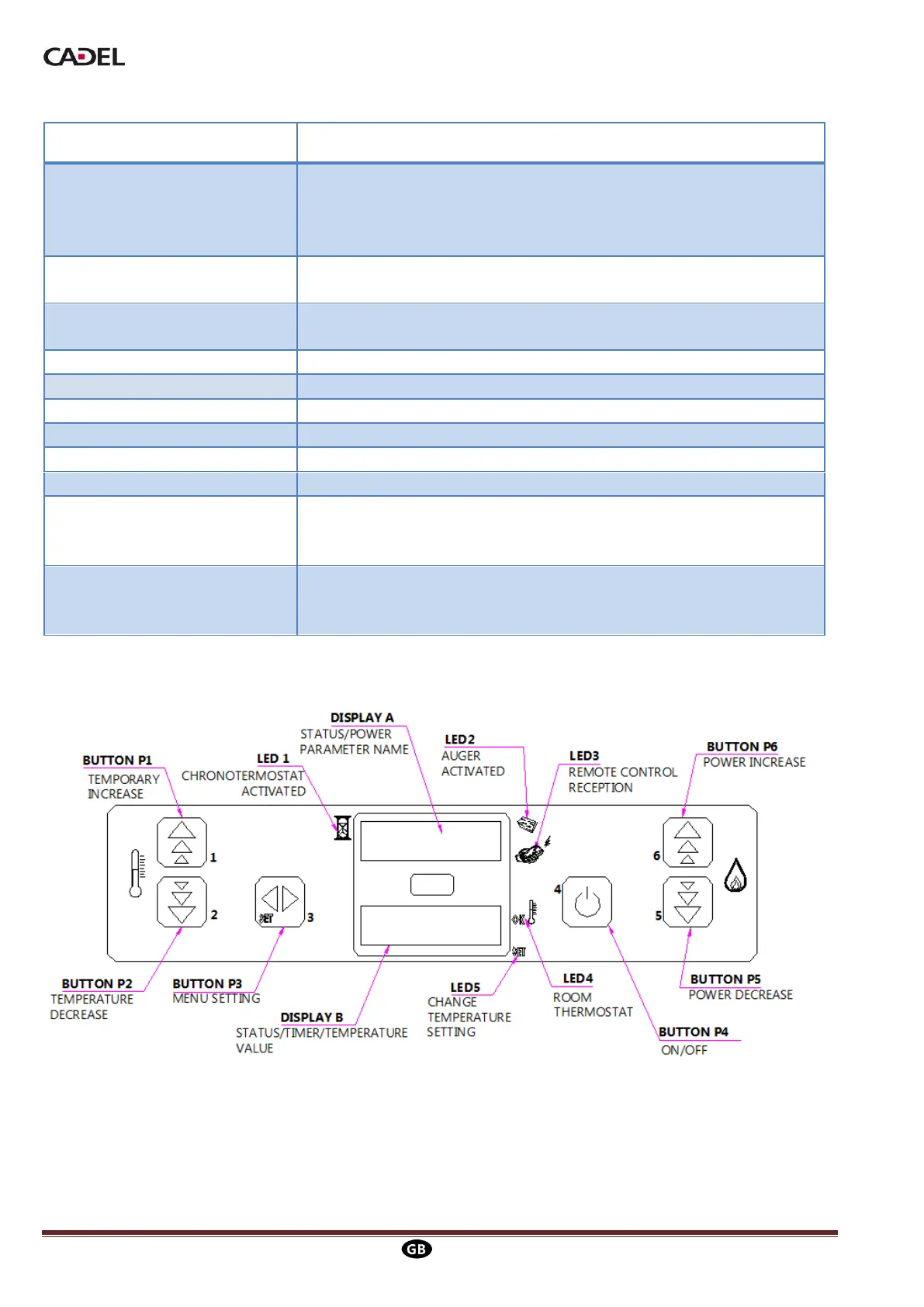
In temperature setting mode they increase or decrease the
thermostat value from a minimum of 6°C to a maximum of 41°C.
Hold down P1 to view the temperature of exhaust fumes. Both
buttons are used for programming.
Use to access temperature setting and user and technical
parameters menu.
Turns the stove on and off, releases any alarms and quits
programming.
Increase and decrease the power from 1 to 5.
Receives data from the remote control.
Flashes during temperature setting or when you are in the menu.
During start-up shows the circuit board status. During operation
shows the power. When altering parameters shows the label for the
parameter in question.
During start-up shows the circuit board status. During operation
shows the temperature set by the user. When altering parameters
shows the value of the parameter in question.
Picture 12


 To Next Page