www.cafection.com 800-561-6162
24
DE2112INSA Rev. 0 2022-01
SERVICE & INSTALLATION MANUAL - Emblem
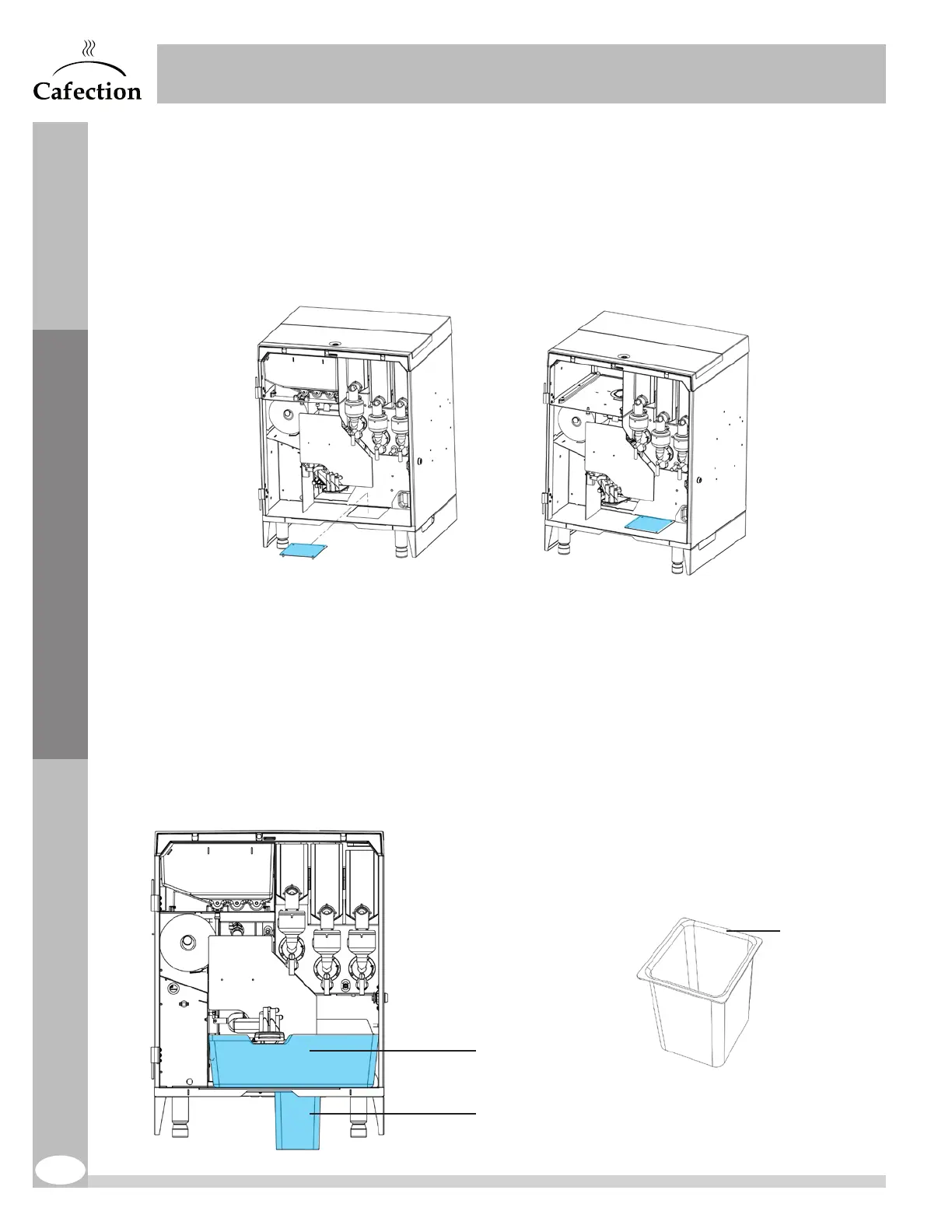
4.11 Chute Hole Hiding Plate Installation
1. Open the brewer’s door and remove the internal waste bin.
2. Insert the chute hole hiding plate in the chute hole of the cabinet.
3. Use the 4 thumb nuts to fix the plate under the brewer.
4.12 Chute Kit Installation (Optional)
1. Open the brewer’s door and remove the internal waste bin.
2. Remove and discard the chute hole hiding plate (if installed).
3. Insert the chute base inside the chute hole of the cabinet. Make sure the shortest side points
to the back of the machine.
4. Insert the waste chute into the chute base.
5. Verify that the filter paper runs through the chute to a garbage.
Initial Setup
Short side
Waste chute
Chute base


 To Next Page