27
www.cafection.com 800-561-6162
DE2112INSA Rev. 0 2022-01
SERVICE & INSTALLATION MANUAL - Emblem
5.2 Carafe Mode
Carafe mode is only available for users with level2 access or above (see
section6.1) and for users that have been granted access in the Users List and
Rights Management section of the Admin sub tab (see section 6.6.6).
Carafe mode is always free, and each drink is counted as a free vend in the sales counters.
When pressing the "Fill up a Carafe" button in Service mode, the screen will automatically return to
the selection interface.
The notice "Carafe mode" (bottom left corner) confirms that the machine is in Carafe mode.
To quit Carafe mode, go back to Service mode and press the "Carafe Mode is ON" button. It will
turn back to white and display "Fill up a Carafe".
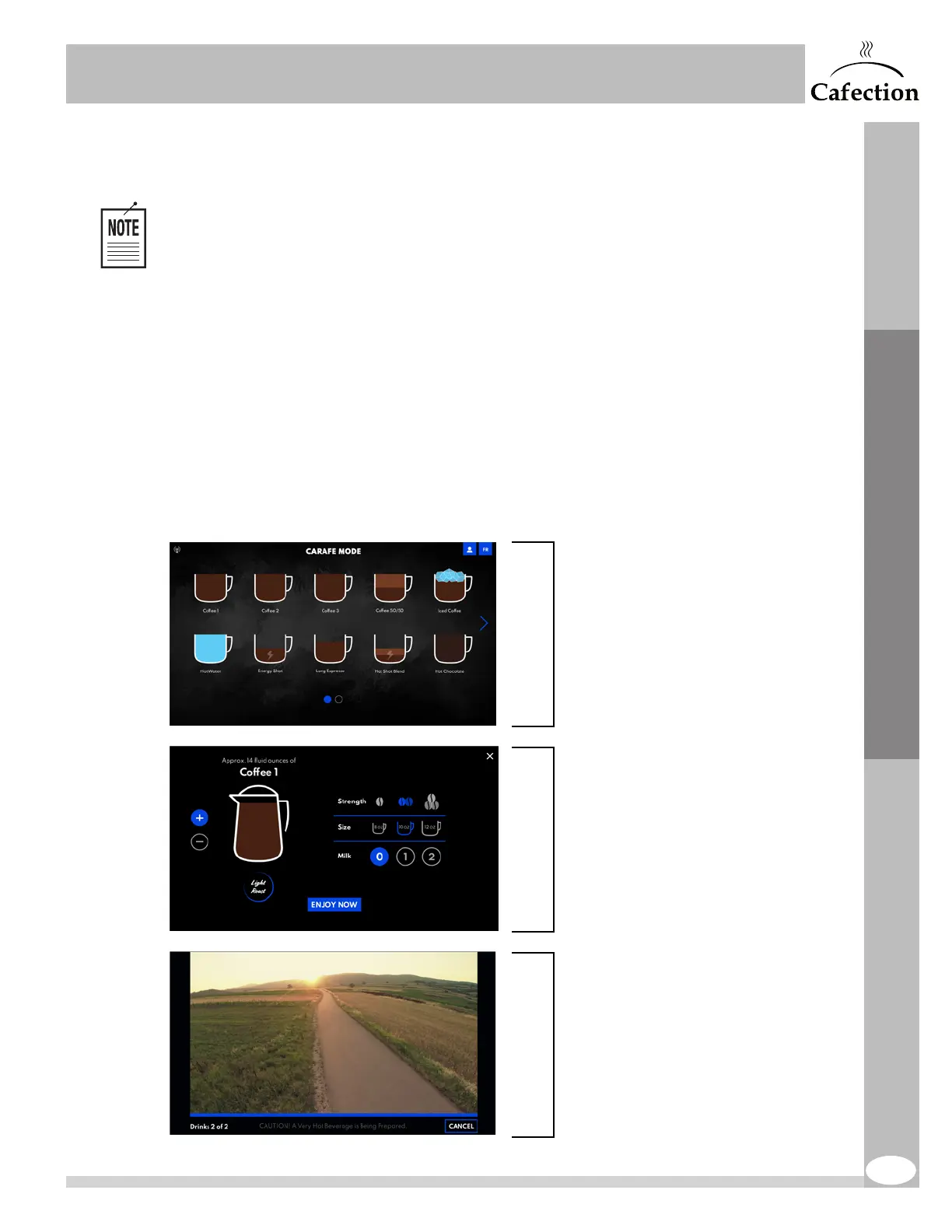
To fill a carafe, follow the steps below. If the order needs to be canceled while the brewing is in
process, press on the "Cancel" button. The machine will finish its current brewing cycle and will not
start another one.
User Interface
1. Select Beverage.
2. Select Beverage Options.
- Blend, Strength and Size (if applicable).
Quantity of drinks can be adjusted using
the + and - buttons.
(Options may not all be available
according to the selected beverage.)
Press "Prepare Carafe" to start
preparation of the beverage.
3. Wait until all drinks have been prepared.


 To Next Page