41
www.cafection.com 800-561-6162
DE2112INSA Rev. 0 2022-01
SERVICE & INSTALLATION MANUAL - Emblem
6.6.2 Tool Sub Tab
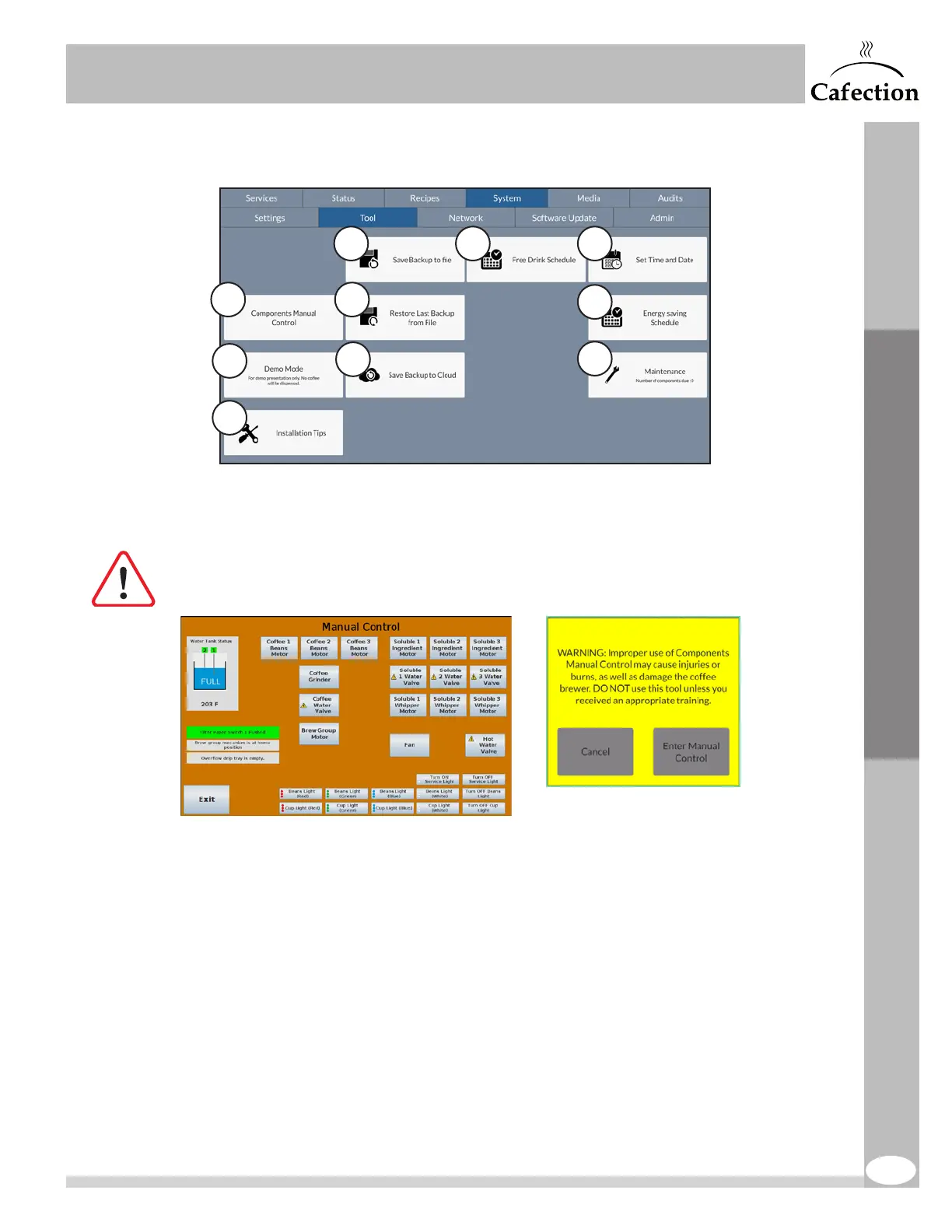
1. This button is used to enter Manual Control mode and manually test the machine’s
components.
This mode is intended for advanced technicians.
Risk of damages to the machine or injuries.
2. This button is used for demo presentations. The user can go through drink selection,
and no coffee will be dispensed.
3. This button is used to configure the coffee brewer during the initial setup. It provides
installation tips and requirements.
4. This button creates a backup file on the coffee brewer. The following data are saved
in the backup: values of each recipe, configurations, brew cycles, Energy Saving
schedules, Free Vend schedules, maintenance data and machine users list.
5. This button restores the latest backup file created on the coffee brewer. All the data
saved on the date indicated on the button will be restored.
1
2
3
4
6
5
7
8
9
10
Service Mode


 To Next Page