INNOVATION TOTAL LITE Rev. 1 2021-10
25
www.cafection.com 800-561-6162
SERVICE & INSTALLATION MANUAL for Cafection’s Total Lite
Initial Setup
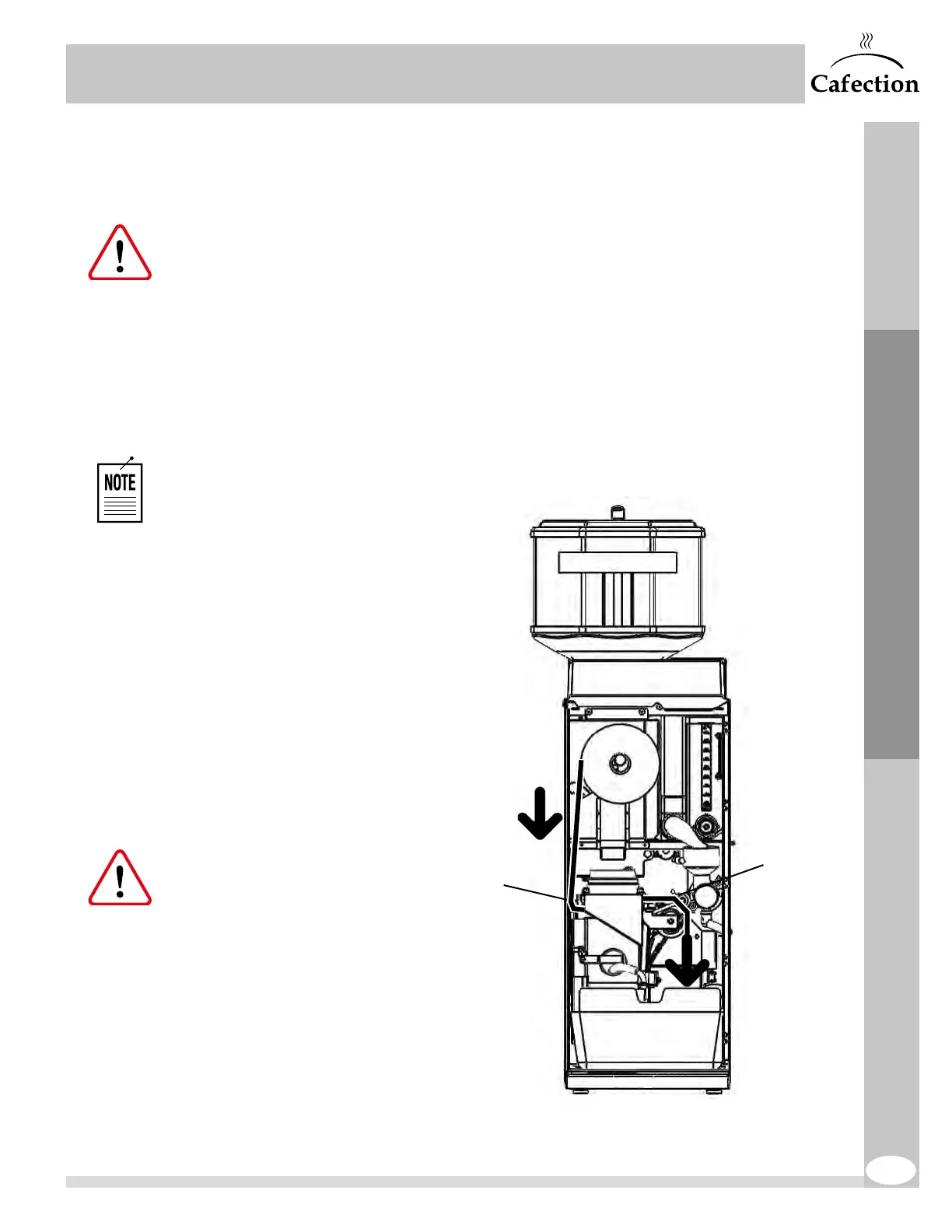
4.13 Filter Paper Installation
Make sure the brewer is ON.
1. Open the door and remove the front pannel.
2. Place the filter paper roll on the bracket so it dispenses on the left-hand side (see the diagram
below).
3. Access Service mode (see section6.2), press the "Filter Paper Install" button and follow the
instructions on the screen.
The brew chamber will not lift
up if the switch does not detect
any filter paper.
4. Pass the filter paper under the left
guide bracket of the brew group,
under the brew chamber and
under the wheel guides by gently
lifting them using the yoke.
5. Pull on the paper and carry it
through the chute hole and into
the waste bin.
6. Make sure the paper is feeding
straight and stays within the
guide bracket.
Improper filter paper feeding
will cause a vacuum leak and
may cause grounds to spill
inside the equipment.
Yoke
Guide
bracket



 To Next Page