Personal Ambulatory Oxygen System Provider Technical Manual
74
PN 20631679 Rev D
Remove and Replace Power Manager Printed Circuit Board
1 Remove and Replace Combo Power Manager board set
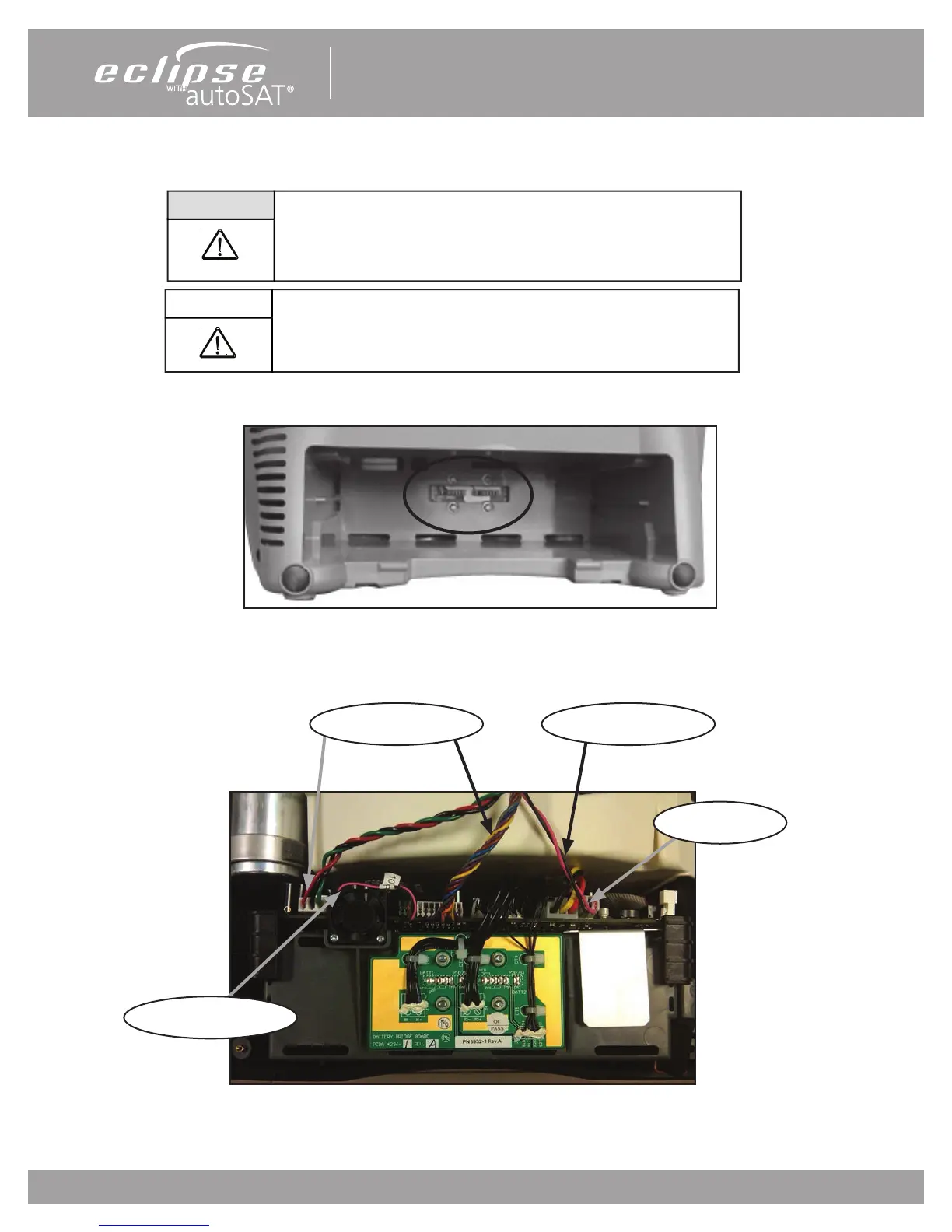
1.1 Remove the Power Cartridge and unscrew the 4 screws (PN: 6974-312-SEQ) holding the BBB pcb to the case shown in Fig 47.
Fig 47: Screws
1.2 Remove the Unit cover as described in section, “Remove and Replace the Unit Cover”.
1.3 Disconnect the 5 wire harnesses as shown in Figure 48.
Fig 48: Cable locations
Disconnect power supplies and remove Power Cartridge before
removing the unit cover. Do not touch exposed circuits during
maintenance without ESD protection.
WARNING:
Compressor Cable
External Power Cable
Cooling Fan Cable
CAUTION
The Eclipse 5 contains electrostatic sensitive components. Do not open
or handle except at a static free workstation.
Compressor Cable


 To Next Page