25
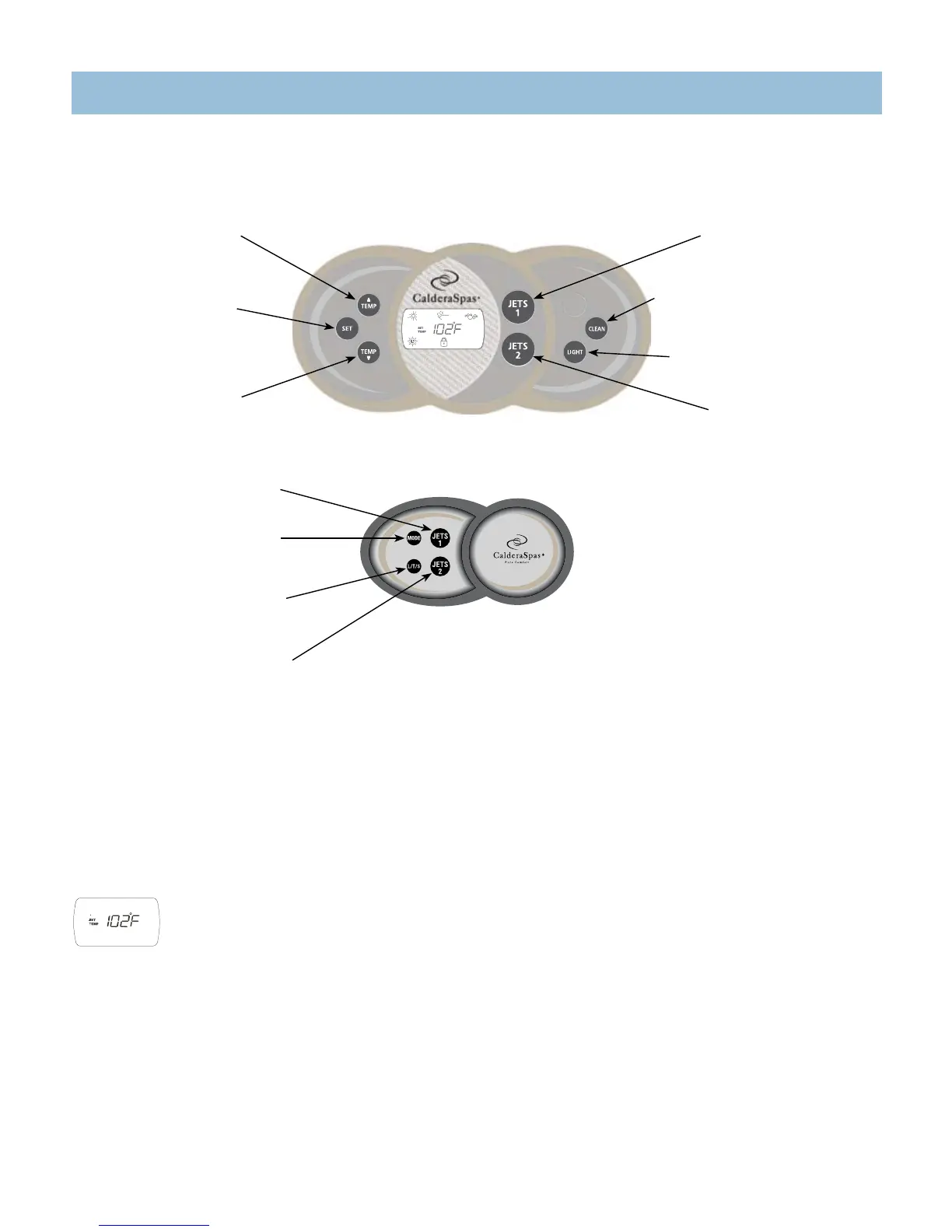
Auxiliary Panel
TEMP
▲
button
Increases the temperature
SET button
Used to initiate advanced
panel features.
TEMP
▼
button
Decreases the temperature
Elation
®
Main Control Panel
JETS 1 button
Activates jet pump 1
MODE button
Switches between spa
mode and stereo mode
L/T/S button
Activates lighting, CD
track and radio scan
JETS 2 button
Activates jet pump 2
& Waterfall
JETS 1 button
Activates jet pump 1
CLEAN button
Activates a ten-minute clean-up cycle
LIGHT button
Activates the interior & exterior
lighting
JETS 2 button
Activates jet pump 2
and waterfall
CONTROL PANELS
OPERATING INSTRUCTIONS
MAIN CONTROL PANEL BUTTONS AND DISPLAY
Your spa control system consists of an illuminated Light Emitting Diode (LED) and convenient push buttons that allow you to set the water temperature, as well as the
hydrotherapy jets, mood lighting, and optional jets from the spa control panel.
DISPLAY INVERSION
You may invert the main, four-digit display for easier viewing from inside the spa. Press and hold the “SET” button for three seconds until the display is inverted. Press
and hold the “SET” button for three seconds a second time to invert the four-digit display back to its original position.
TEMPERATURE CONTROL
The set temperature range is from 80°F (27°C ) to 104°F (40°C). The set temperature of the spa water will automatically be 100°F (38°C) the first
time power is applied. This is the setting programmed at the factory. After the spa has been set up and used, the last temperature value set by the
user will be stored in memory. If power is disconnected from the spa, it will automatically revert to the last set temperature when power is reapplied.
(Temperatures of any setting may rise slightly depending on the current use and condition of your spa and on outside temperature.)
Todisplaythesettemperatureofthespa,pressthe“TEMP▲“or“TEMP▼“button.Thesettemperaturewillbedisplayed,unlessthespaislocked(inwhichcase
the word SPA is displayed with the lock symbol). The set temperature display will automatically return to actual temperature after five seconds. To increase the set
temperatureofthespawater,pressthe“TEMP▲“button.Eachtimethebuttonispressed,thesettemperaturedisplaywillincrementbyonedegree.Ifthebuttonisheld
down, the set temperature display will increase by one degree every half-second.
Todecreasethesettemperatureofthespawater,pressthe“TEMP▼“Eachtimethebuttonispressed,thesettemperaturedisplaywilldecrementbyonedegree.Ifthe
button is held down, the set temperature display will decrease by one degree every half-second.
Ifthesettemperaturevaluewillnotchange,checktheTEMPLOCKandSPALOCKfeatures.Wheneitherofthesefeaturesisapplied,thetemperaturecontrolis
disabled.




 To Next Page