The data and information reported in this installation manual are susceptible to change at any time and without obligation on CAME cancelli automatici s.p.a. to notify users.
16
ENGLISH
#,3%.3
:,
/03%.3
-/4/2&53%
!&
/.
!##&53%!&
,).%&53%
!&
/0%.
/0#,
!&
6 6 6
-.
%
%.#2!$)/
!#4
3,/73%.3
#"/!2$&53%M!&
,4
,
,4
.
Only for highlighted cards.
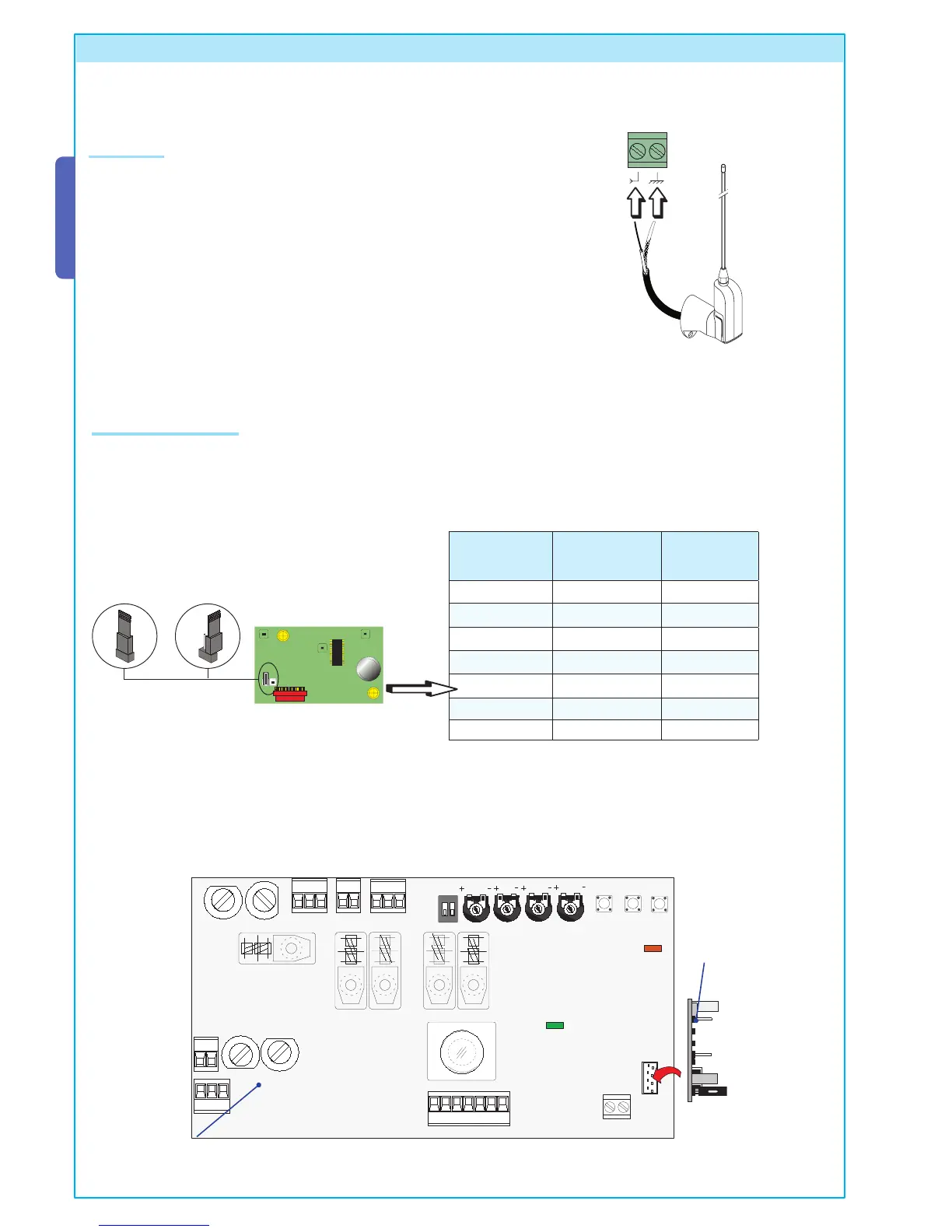
Position the jumper as show in the illustration depending on the series of transmitters used (see figure).
Frequency/MHz
Radiofrequency
card
Series of
transmitters
FM 26.995 AF130 TFM
FM 30.900 AF150 TFM
AM 26.995 AF26 TOP
AM 30.900 AF30 TOP
AM 433.92 AF43S / AF43SM TAM / TOP
AM 433.92 AF43SR ATOMO
AM 40.685 AF40 TOUCH
8 Activating the remote control
Radiofrequency card
Electrical board
TOP TAM
Connect the radiofrequency card to the electrical board AFTER SHUTTING OFF THE POWER (or disconnecting the batteries).
N.B.: The circuit board recognizes the readiofrequency card only when it is running in electrical power.
Connect the antenna with the RG58 cable to the apposite terminals on the board.
Antenna
Radiofrequecy card



 To Next Page