Section01 TECHNICAL MANUAL
Subsection 02 (AIR CONTROLLED SUSPENSION (ACS))
TROUBLESHOOTING WITH
B.U.D.S.
ACS System Leak Test
1. Connect vehicle to B.U.D.S. Refer to
COMMU-
NICATION TOOLS AND B.U.D.S. SOFTWARE
subsection of the appropriate Shop Manual.
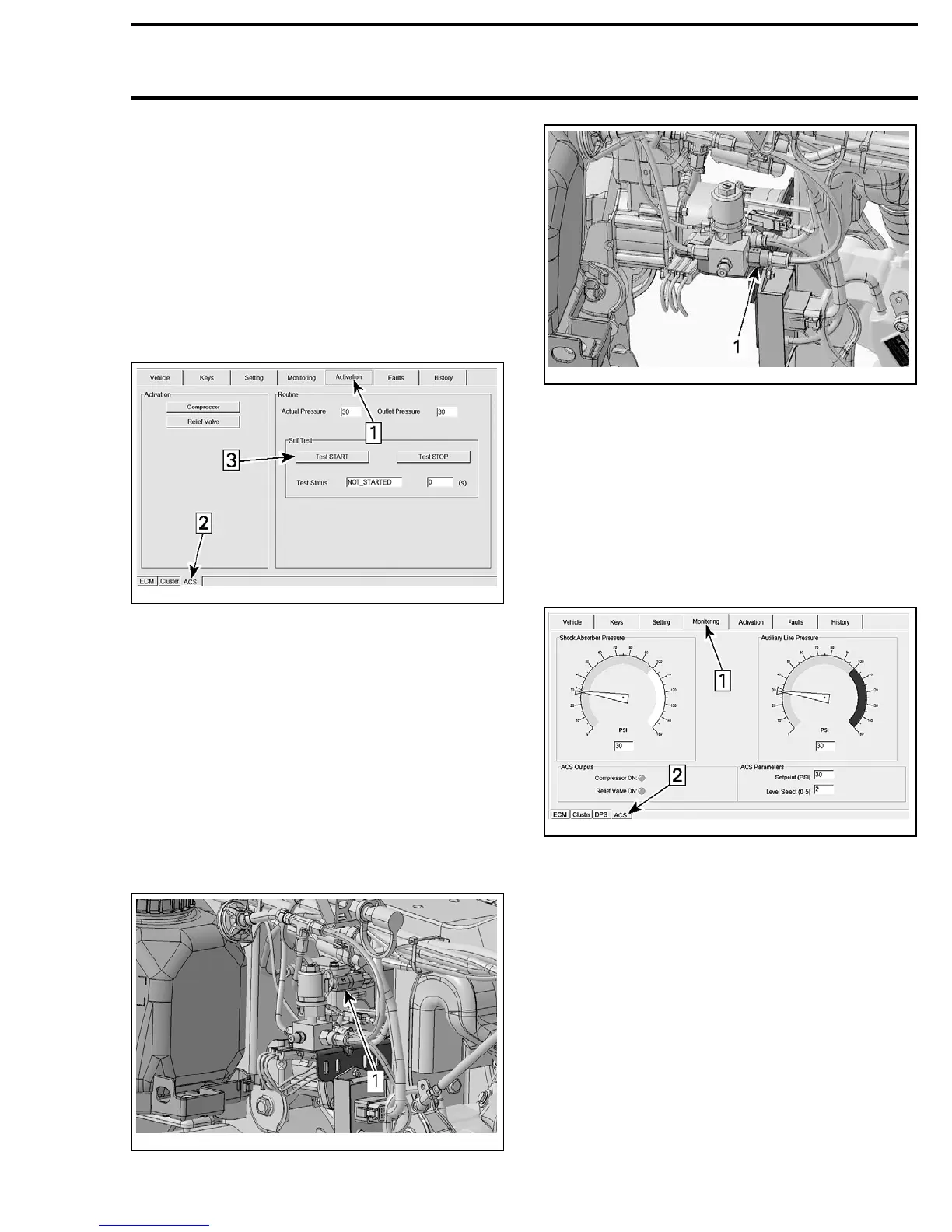
2. Select Activation page.
3. Select ACS folder.
4. Press Test START button to proceed.
vmr2010-004-201_a
Step 1: Activation page
Step 2: ACS folder
Step 3: Leak Test START button
After pressing Test START button, the com-
pressor will pressurize the air system at 6.5 bar
(90PSI) for approximately 2 minutes and B.U.D.S.
will monitor the system for any leakage. The
result will be indicated in the TEST STATUS box.
If a leak is detected, pressurize the system again
and inspect hoses and fittings with soapy water
to locate the faulty component.
If no leak is detected from hoses or fittings, in-
spect the compressor check valve and the auxil-
iary line check valve with soapy water.
vmr2010-004-202_b
1. Compressor check valve
vmr2010-004-401_a
1. Auxiliary line check valve
ACS Air Pressure Monitoring
To monitor air pressure in the system during trou-
bleshooting operation, proceed as follows:
1. Connect vehicle to B.U.D.S. Refer to
COMMU-
NICATION TOOLS AND B.U.D.S. SOFTWARE
subsection of the appropriate Shop Manual.
2. Select Monitoring page.
3. Select ACS folder.
vmr2010-004-301_a
Step 1: Monitoring page
Step 2: ACS folder
PROCEDURES
ACS SOLENOID VALVE
ACS Solenoid Valve Operation Test
1. Connect vehicle to B.U.D.S. Refer to
COMMU-
NICATION TOOLS AND B.U.D.S. SOFTWARE
subsection of the appropriate Shop Manual.
2. Select Activation page.
3. Select ACS folder.
4. Press Relief Valve button to proceed.
vmr2010-004 31




 To Next Page