M52 Microprocessor User's Guide
M52UMCT Oct-03 13
The Control Panel
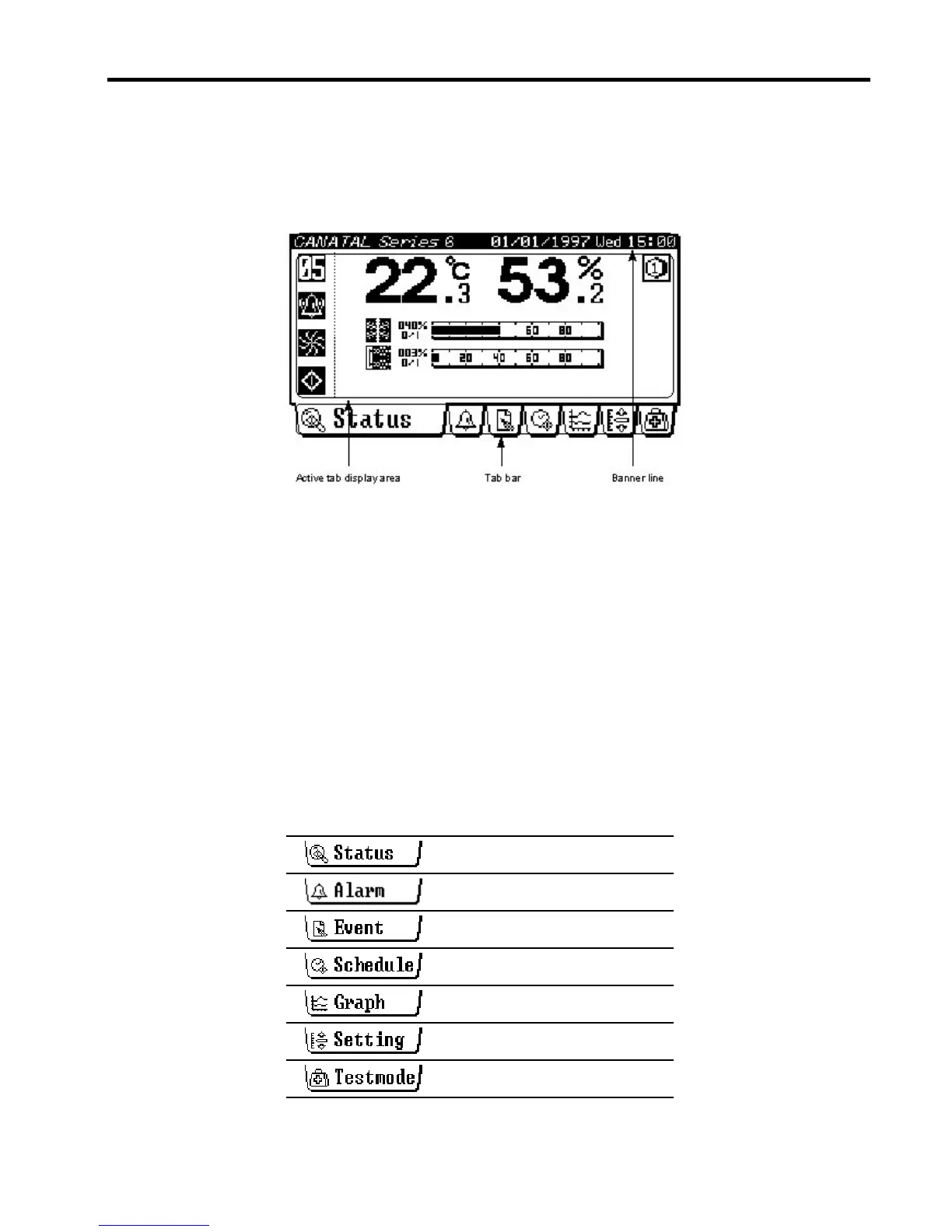
The control panel is formed by a graphic LCD display and an overlay touch screen keypad.
The layout of the screen consists of three distinctive regions - the Banner line, the Active tab
display area and the Tab bar. The tabs are set-up like the tabs in a 3-ring binder. Each
section contains different information.
Banner line
The Banner line shows the system type and the current date and time. Date is in
DD/MM/YYYY format and time in 24-hour HH:mm format.
Active tab display area
Data and information are grouped into tabs for ease of retrieval. The Active tab display area
shows information corresponding to the current selected tab.
Tab bar
Tab bar shows the available tabs and allows user to switch tab display by pressing the
corresponding tab icon. There are 7 tabs in the Tab bar:
Alarm Tab
Operating Status Tab
Temperature and Humidity Graph Tab
Historical Event Tab
Timer On/Off Schedule Tab
Testmode Tab
Settings Tab



 To Next Page