M52 Microprocessor User's Guide
M52UMCT Oct-03 38
Sensor Calibration Sequence
Temperature
1. Power off unit and set the jumper on the temperature and humidity sensor board to “Zero”
position. The pin 1 and 2 of the sensor board should read approximately 1000 ohms which
corresponds to 0°C for the Hycal PT100 sensor.
2. Switch unit on and and after one minute login security level 1. Go to the sensor page under the
[Test mode] tab and press the “Def.” And then “Set 0” key next to the temp1 reading. The
Temp1 reading should now read 0° C
3. Power off the machine and reset the jumper on the sensor board to normal position.
The zeroing of the temperature sensor is now complete. You can further fine tune sensor to what you
actually measure by simply entering the measured temperature in ° C in the Main Temp setting under the
[Setting] tab.
Relative Humidity
There is no zeroing function for the humidity sensor.
1. Login security level 1. Go to the sensor page under the [Test mode] tab and press the “Def.”
Key next to the Humid. 1 reading.
If required, fine tune sensor to what you actually measure by simply entering the measured relative
humidity in the Main Humidity setting under the [Setting] tab.
Data Re-initialization
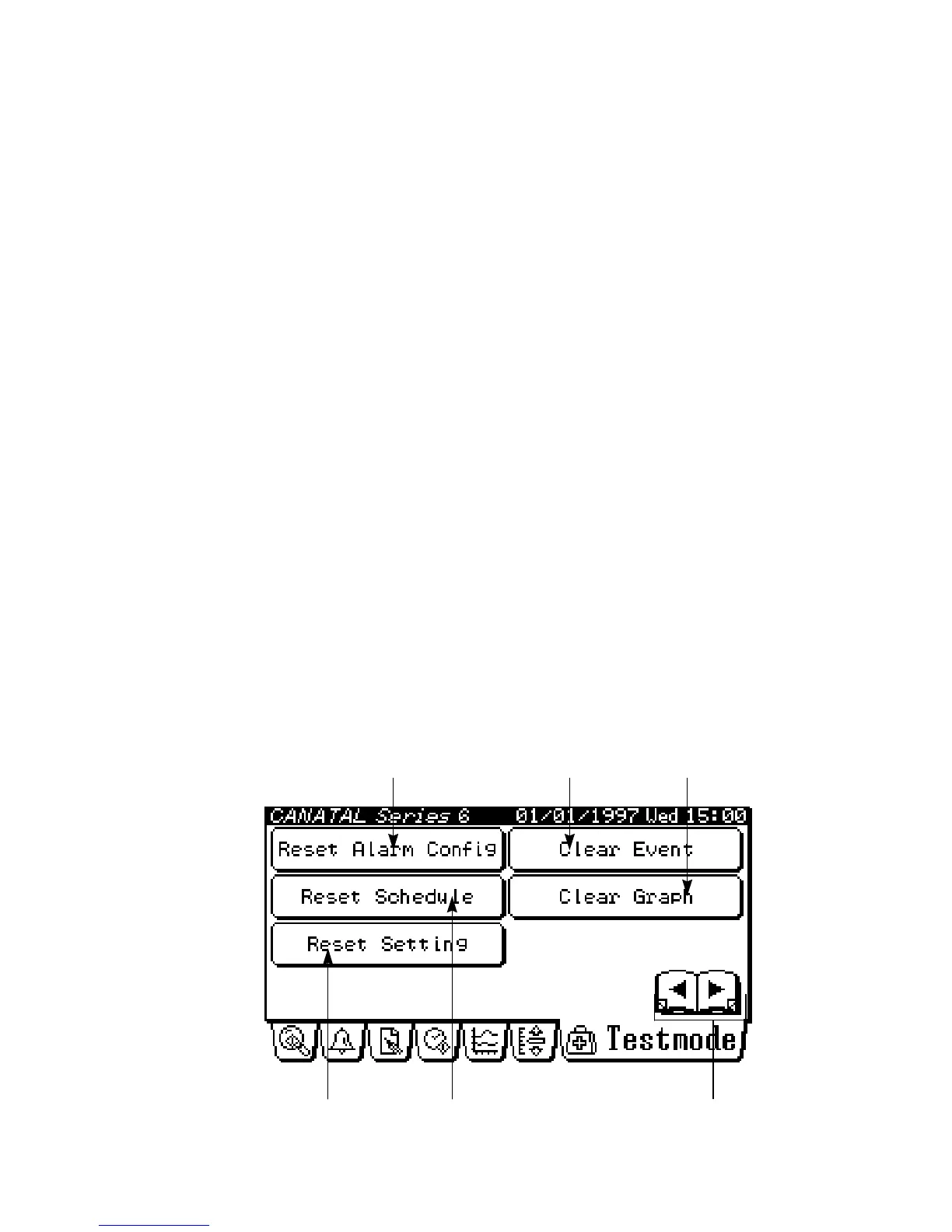
The data re-initialization page under the {Testmode} tab is as follows:
Load default settings Change page
Load default alarm configuration Clear event data
Load default timer schedule
Clear graph data



 To Next Page