M52 Microprocessor User's Guide
M52UMCT Oct-03 16
Co-Work™ Address Icon
This shows the Co-Work™ operation mode and network address.
Duty Master
(e.g. Address 1)
Standby Master
(e.g. Address 1)
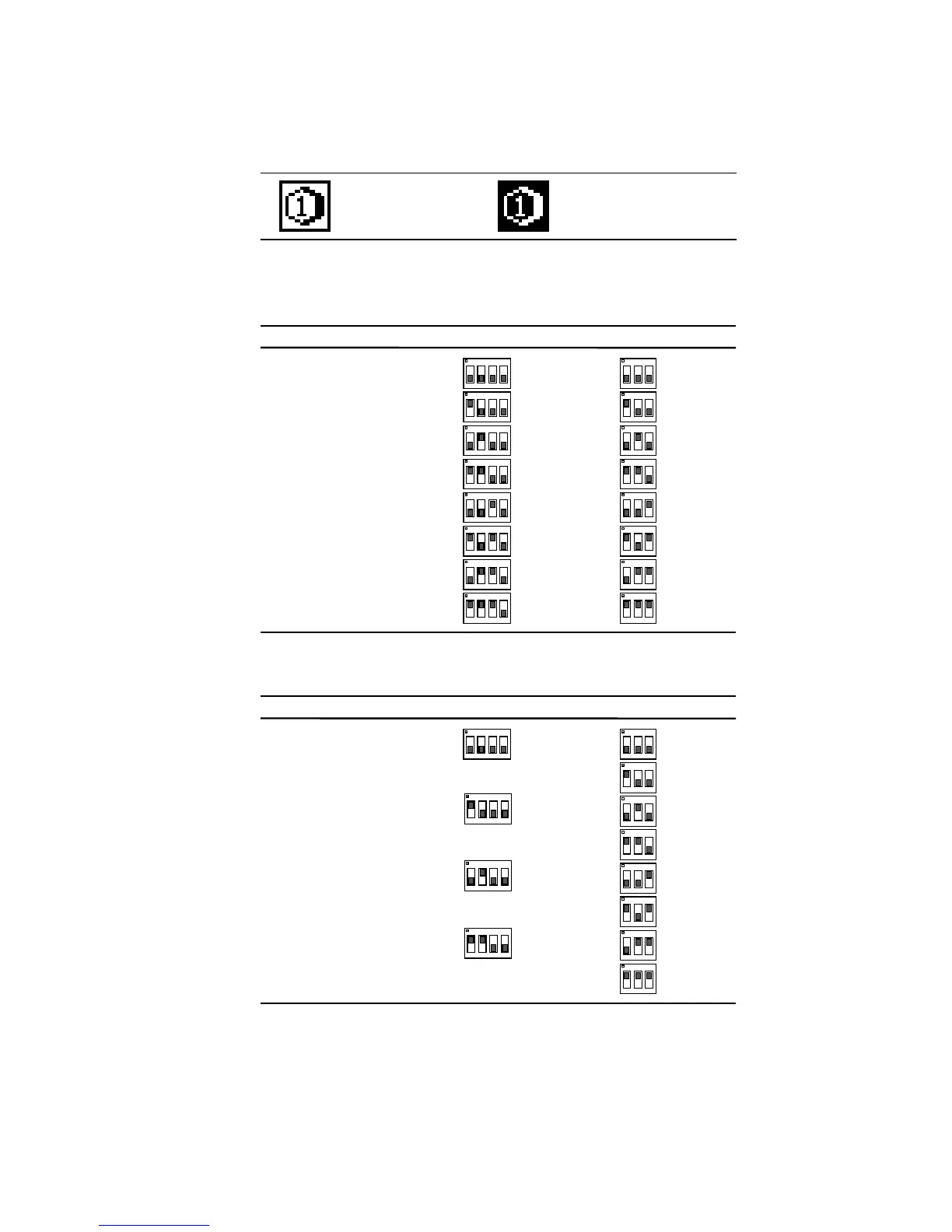
Every master unit in the Co-Work™ network must have a unique address which can be set
through the DIL switches on the main board and I/O expansion board.
1234
ON
1234
ON
1
ON
1234
ON
1234
ON
1234
ON
1234
ON
1234
ON
1234
123
ON
123
ON
ON
123
ON
123
123
ON
ON
123
ON
123
ON
123
2
3
4
5
6
7
8
Co-Work Address I/O Expansion BoardMain Board
M1
M2
M3
M4
M8
M6
M7
M5
D1
D2
D3
D4
D8
D6
D7
D5
Note: Above table is valid for Series 6, 7, 8 and 11 (Single Compressor Units) up to 8 units
1
ON
1234
ON
1234
ON
1234
ON
1234
123
ON
123
ON
ON
123
ON
123
123
ON
ON
123
ON
123
ON
123
2
3
4
Co-Work Address I/O Expansion BoardMain Board
D1
D2
D3
D4
D8
D6
D7
D5
M1
M2
M4
M3
Note: Above table is valid for Series 9 (Dual Compressor Units) up to 4 units



 To Next Page