M52 Microprocessor User's Guide
M52UMCT Oct-03 36
Digital I/O Board Diagnostic
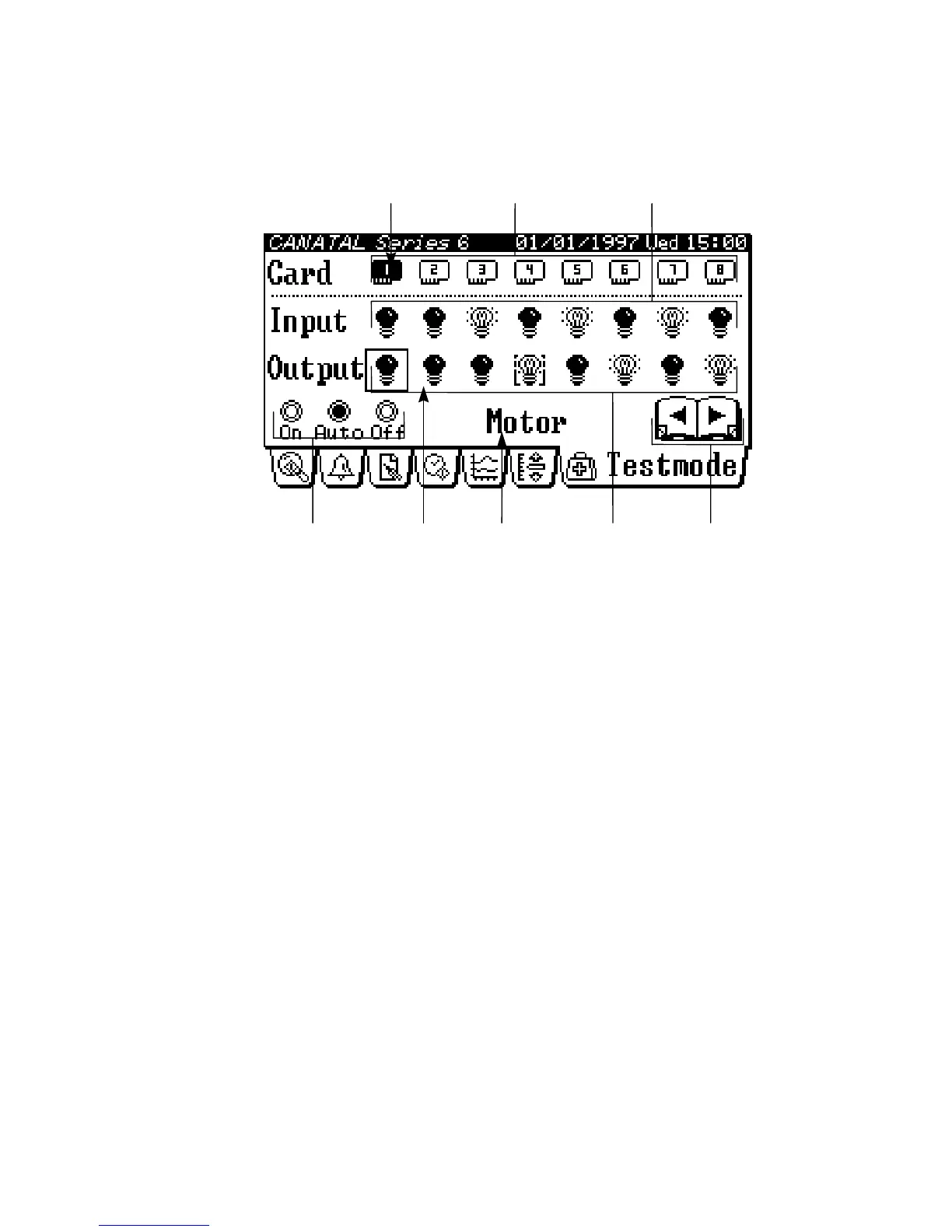
The digital I/O board diagnostic page under the {Testmode} tab is as follows:
Selected I/O
Selected slave board
vailable slave boards
Change pageDescription lineState selector
Switched inputs
Switched outputs
Under the digital I/O board diagnostic page, you can:
- Select any of the linked digital I/O board to review.
- Review the status of the switched inputs on the selected digital I/O board.
- Review the status of the switched outputs on the selected digital I/O board, and
override control of the outputs by using the state selector.
Test Mode Unit on/off
There is increased functionality on the I/O board diagnostics. It is possible to turn units
off from this section regardless of the On/Off mode setting by pressing the Card icon for
the unit you want to stop. When logged on to a level 1 password you will see the unit #
appear at the bottom of the screen that corresponds to the I/O card(s) selected. A state
selector appears and you can turn off the unit by selecting off. When the over-ride is
selected the I/O card will appear with square brackets around it indicating it is in over-
ride. To select a specific input or output for any card simply press the input or output
light bulb after selecting the card.



 To Next Page