CandCNC
Page 4
E
Digital Plasma
Module
To DCP-01
To DTHC
Module
ARC OK
Input JACK
Divided Volts
CandCNC
Front
Arc OK
+12 PWR
To CPC or RAV-02
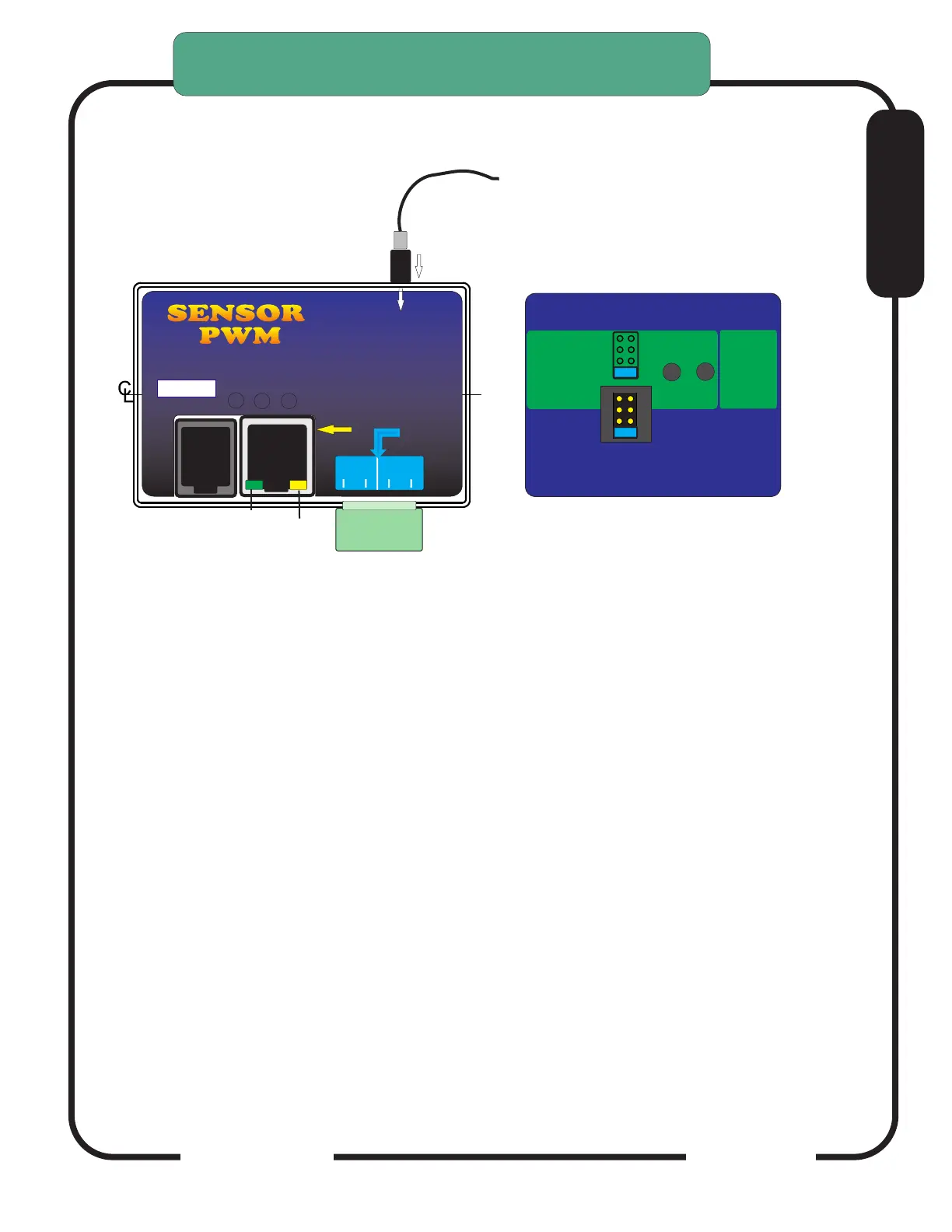
THC SENSOR PWM MODULE TEST/CAL
THC PWM Module (Plasma Pickup Module) can be put in TEST/CAL mode
without removing the card from the case.
Turn the case over and look on the back. There are two recessed test buttons
find the button marked VOLTS.
Unplug the Divided Volts (from the plasma) either the 2 pin plug or the stereo
plug. Leaving the Divided Volts plugged in will Skew the reading.
Push and release Volts Test, this puts the unit in test/cal mode. The yellow
Test Active on the front will flash. You should see 126 to 128 volts displayed on
the TORCH VOLTS in the CommandCNC screen
Pushing the button again will take the unit out of test/cal mode and the LED will
stop flashing and the TORCH VOLTS reading will return to Zero.
In TEST mode the PWM signal to the DTHCIV is tested. If you unit passes the
Volts Test then the Cat5 cable and DTHCIV module are operating properly. If
the voltage is still wrong or zero when the torch fires then the cable to plasma is
bad or the voltage divider in the plasma is bad.
The test is based on a simulated PWM from the circuit so if the prescale divider
setting is wrong the calibration will show correct but when the torch is fired
the voltage will be wrong.
THC SENSOR PWM MODULE VOLTS
TEST/CAL
ARC
OK
VOLTS
TEST
Press and release
Volts Test. Front panel
LED Test Active
will light
Press and
Hold for
ARC OK
TEST
Check jumper settings
to match plasma divider ratio
THC Sensor PWM REV21
For use with
DTHC II
DTHC IV
50:1
20:1
7:1
Hypertherm
TD & Others
Not Used XX
RAV-01/02
(Factory Default)
SENSORSENSOR
PWM PWM
Digital Plasma Module
Torch
ON
+5
To DCP-01
To DTHC
Module
Test
Active
ARC OK
To Plasma
Cable
Input JACK
Divided Volts
CandCNC
Arc OK
(Transfer)
TORCH
SWITCH
MOD 2
To Plasma


 To Next Page