CandCNC
Page 6
CandCNC THC SENSOR
PWM and PWMII
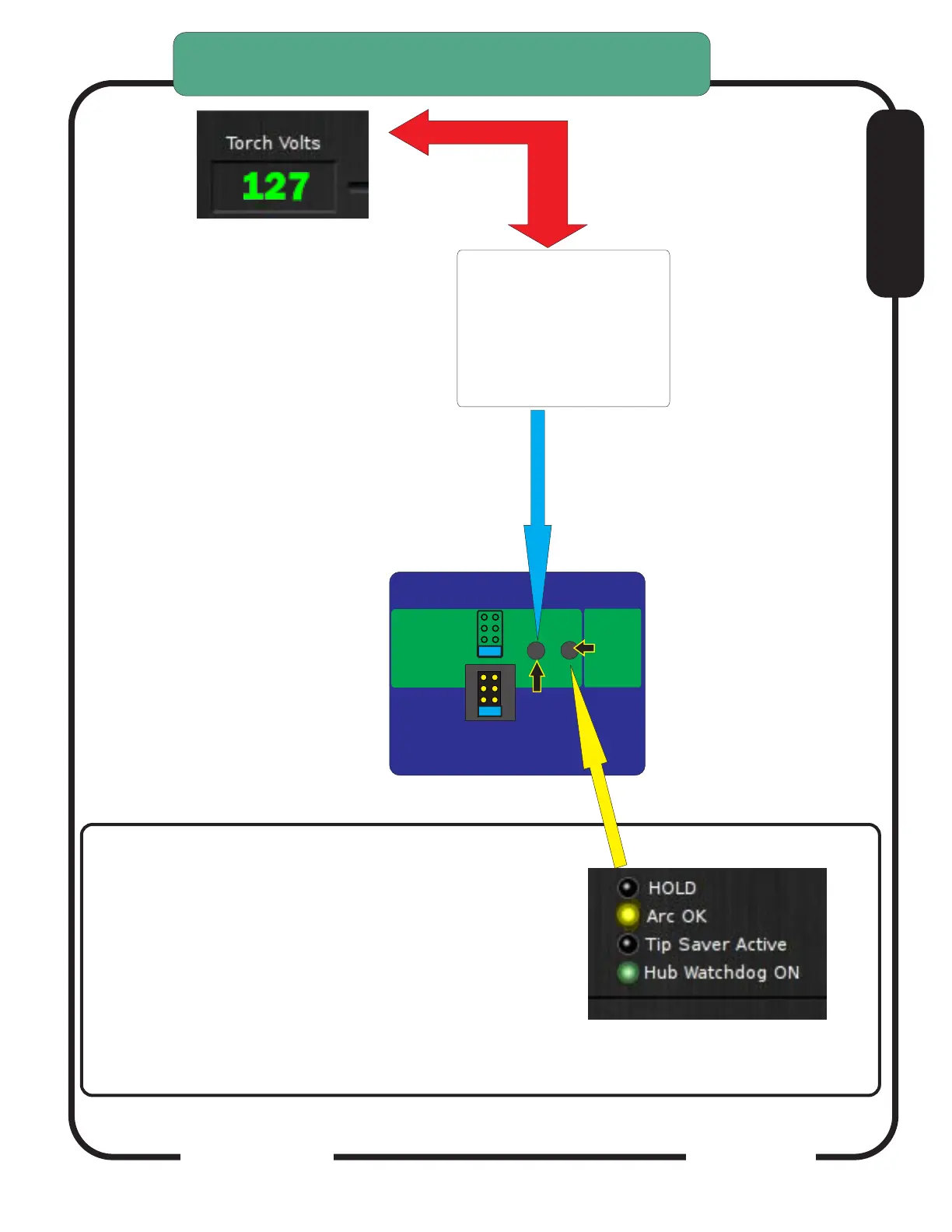
CHECKING ARC OK SIGNAL BACK TO DTHCIV
CARD:
1. Turn case over.
2 With RJ45 (UTP cable) connected to DTHCIV and
unit powered up, depress the ARC OK TEST
BUTTON on the card. The ARC OK LED on the
MACH screen should light. The ARC OK test LED
on the front of the case will light.
Depress and Hold TEST button
to test PWM circuit back to
DTHCIV. Volts ACT LED on
front will flash and DTHC
screen in CommanCNC should
display a voltage. Calibrated
units (see DTHC calibration
section) should display 126 to
128 volts during test.
Case not shown for clearity
SENSOR
PWM
Screen may be different
THC SENSOR PWM MODULE VOLTS
TEST/CAL
ARC
OK
VOLTS
TEST
Press and HOLD
Volts Test. Front panel
blue LED Volts ACTive
will flash
Press and
Hold for
ARC OK
TEST
Check jumper settings
to match plasma divider ratio
THC Sensor PWM REV21
For use with
DTHC IV
DTHC V
50:1
20:1
7:1
Hypertherm
TD & Others
TD/Victor 30:1
RAV-01/02
(Factory Default)
E


 To Next Page