18
Screen Displays
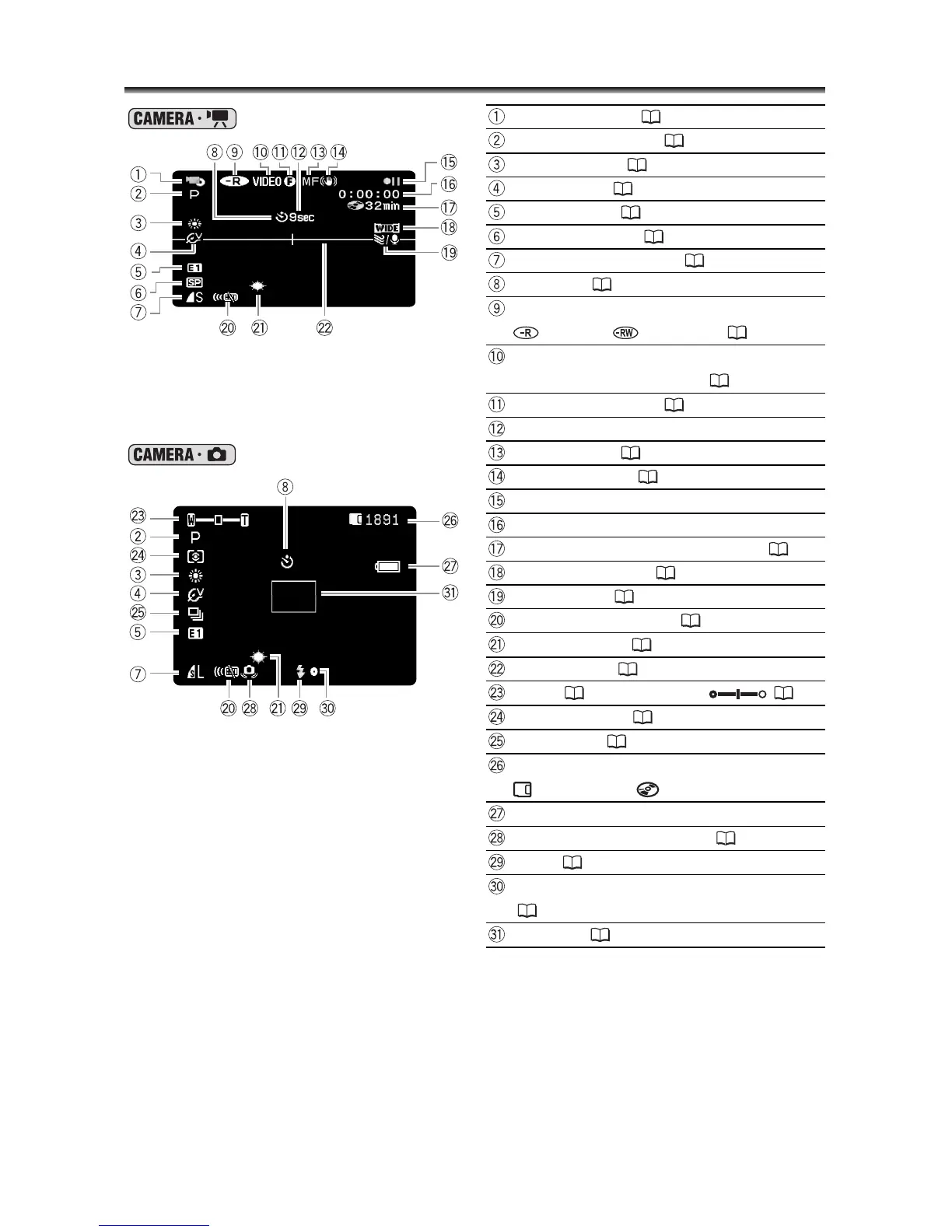
Recording Movies
Operating mode ( 12)
Recording program ( 46)
White balance ( 64)
Image effect ( 66)
Digital effects ( 71)
Recording mode ( 61)
Still image quality/size ( 76)
Self timer ( 59)
Disc type
DVD-R, DVD-RW ( 6)
Disc specification
(VIDEO mode, VR mode) ( 6)
Finalized disc mark ( 98)
Recording reminder
Recording Still Images
Manual focus ( 54)
Image stabilizer ( 81)
Disc operation
Time code (hours : minutes : seconds)
Remaining recording time on disc ( 33)
Widescreen mode ( 38)
Wind screen ( 81)
Remote sensor mode ( 25)
Mini video light ( 56)
Level marker ( 83)
Zoom ( 37), Exposure ( 53)
Metering mode ( 63)
Drive mode ( 67)
Number of still images available
on the card, on the disc
Remaining battery charge
Camcorder shake warning ( 80)
Flash ( 57)
AF/AE locked during still image recording
(55)
AF frame ( 55)



 To Next Page