Menu Operations
32
¡ When using the LCD monitor, you can use the <5> dial even while
the <4> switch is <1>.
¡ The LCD monitor cannot be used as a viewfinder for shooting.
¡
You can adjust the brightness of the LCD monitor to one of five levels. (p.102)
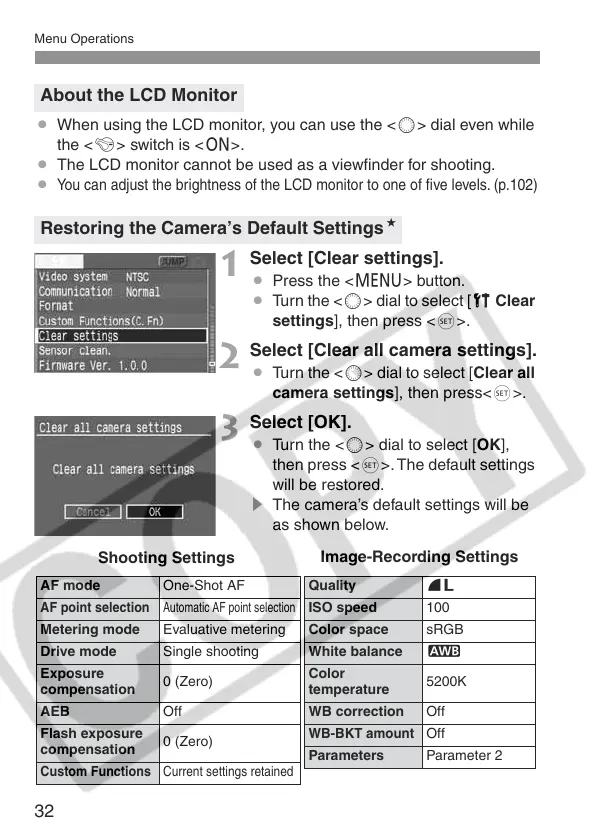
1
Select [Clear settings].
¡ Press the <M> button.
¡ Turn the <5> dial to select [c Clear
settings], then press <0>.
2
Select [Clear all camera settings].
¡ Turn the <5> dial to select [Clear all
camera settings], then press<0>.
3
Select [OK].
¡ Turn the <5> dial to select [OK],
then press <0>. The default settings
will be restored.
s The camera’s default settings will be
as shown below.
About the LCD Monitor
Restoring the Camera’s Default SettingsN
AF mode One-Shot AF
AF point selection
Automatic AF point selection
Metering mode Evaluative metering
Drive mode Single shooting
Exposure
compensation
0 (Zero)
AEB Off
Flash exposure
compensation
0 (Zero)
Custom Functions
Current settings retained
Quality 73
ISO speed 100
Color space sRGB
White balance Q
Color
temperature
5200K
WB correction Off
WB-BKT amount
Off
Parameters Parameter 2
Shooting Settings
Image-Recording Settings















 To Next Page