36
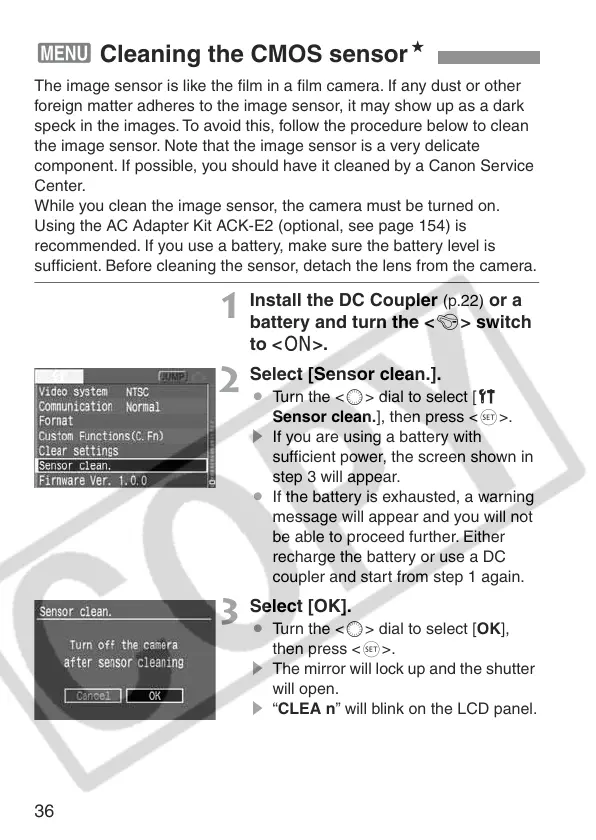
The image sensor is like the film in a film camera. If any dust or other
foreign matter adheres to the image sensor, it may show up as a dark
speck in the images. To avoid this, follow the procedure below to clean
the image sensor. Note that the image sensor is a very delicate
component. If possible, you should have it cleaned by a Canon Service
Center.
While you clean the image sensor, the camera must be turned on.
Using the AC Adapter Kit ACK-E2 (optional, see page 154) is
recommended. If you use a battery, make sure the battery level is
sufficient. Before cleaning the sensor, detach the lens from the camera.
1
Install the DC Coupler (p.22) or a
battery and turn the <4> switch
to <1>.
2
Select [Sensor clean.].
¡ Turn the <5> dial to select [c
Sensor clean.], then press <0>.
s If you are using a battery with
sufficient power, the screen shown in
step 3 will appear.
¡ If the battery is exhausted, a warning
message will appear and you will not
be able to proceed further. Either
recharge the battery or use a DC
coupler and start from step 1 again.
3
Select [OK].
¡ Turn the <5> dial to select [OK],
then press <0>.
s The mirror will lock up and the shutter
will open.
s “CLEA n” will blink on the LCD panel.
3 Cleaning the CMOS sensorN







 To Next Page