46
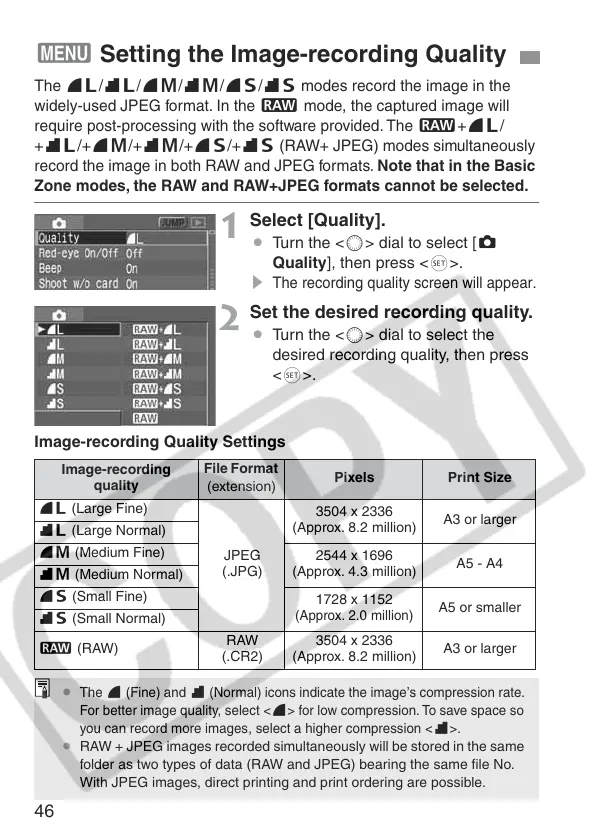
The
73
/
83
/
74
/
84
/
76
/
86
modes record the image in the
widely-used JPEG format. In the
1
mode, the captured image will
require post-processing with the software provided. The
1+73
/
+83/+74/+84/+76/+86
(RAW+ JPEG) modes simultaneously
record the image in both RAW and JPEG formats. Note that in the Basic
Zone modes, the RAW and RAW+JPEG formats cannot be selected.
1
Select [Quality].
¡ Turn the <5> dial to select [z
Quality], then press <0>.
s
The recording quality screen will appear.
2
Set the desired recording quality.
¡ Turn the <5> dial to select the
desired recording quality, then press
<0>.
3 Setting the Image-recording Quality
Image-recording Quality Settings
Image-recording
quality
File Format
(extension)
Pixels
Print Size
73 (Large Fine)
JPEG
(.JPG)
3504 x 2336
(Approx. 8.2 million)
A3 or larger
83 (Large Normal)
74 (Medium Fine)
2544 x 1696
(Approx. 4.3 million)
A5 - A4
84 (Medium Normal)
76 (Small Fine)
1728 x 1152
(Approx. 2.0 million
)
A5 or smaller
86 (Small Normal)
1 (RAW)
RAW
(.CR2)
3504 x 2336
(Approx. 8.2 million)
A3 or larger
¡
The
7
(Fine) and
8
(Normal) icons indicate the image’s compression rate.
For better image quality, select <
7
> for low compression. To save space so
you can record more images, select a higher compression <
8
>.
¡ RAW + JPEG images recorded simultaneously will be stored in the same
folder as two types of data (RAW and JPEG) bearing the same file No.
With JPEG images, direct printing and print ordering are possible.















 To Next Page