33
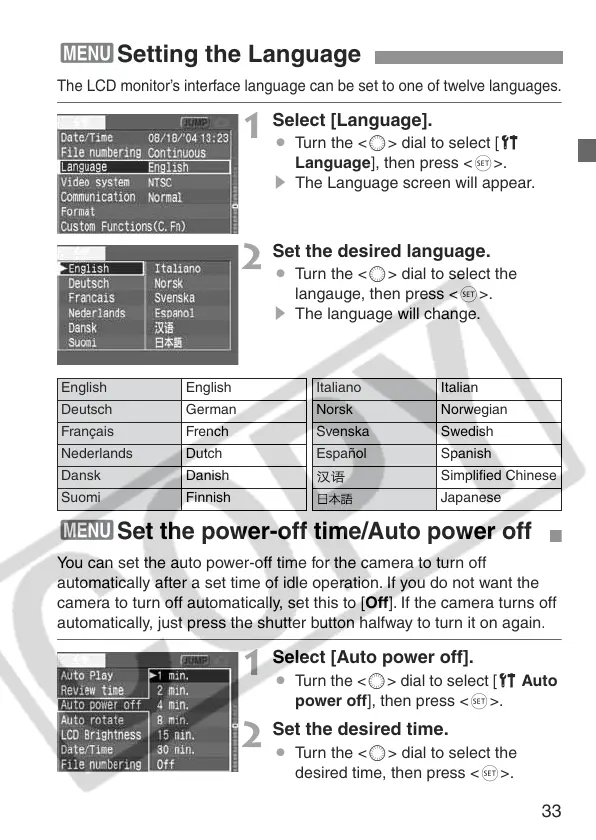
The LCD monitor’s interface language can be set to one of twelve languages.
1
Select [Language].
¡ Turn the <5> dial to select [c
Language], then press <0>.
s The Language screen will appear.
2
Set the desired language.
¡ Turn the <5> dial to select the
langauge, then press <0>.
s The language will change.
3Setting the Language
English English Italiano Italian
Deutsch German Norsk Norwegian
Français French Svenska Swedish
Nederlands Dutch Español Spanish
Dansk Danish Simplified Chinese
Suomi Finnish Japanese
3
Set the power-off time/Auto power off
You can set the auto power-off time for the camera to turn off
automatically after a set time of idle operation. If you do not want the
camera to turn off automatically, set this to [Off]. If the camera turns off
automatically, just press the shutter button halfway to turn it on again
.
1
Select [Auto power off].
¡ Turn the <5> dial to select [c Auto
power off], then press <0>.
2
Set the desired time.
¡ Turn the <5> dial to select the
desired time, then press <0>.















 To Next Page