3 Custom White BalanceN
52
¡ If the exposure obtained in step 3 is underexposed or overexposed, a
correct white balance might not be obtained.
¡ If an image was captured while the processing parameter was set to [B/
W] (p.59), it cannot be selected in step 5.
Instead of a white object, an 18% gray card (commercially available) can
produce a more accurate white balance.
3 Setting the Color Temperature
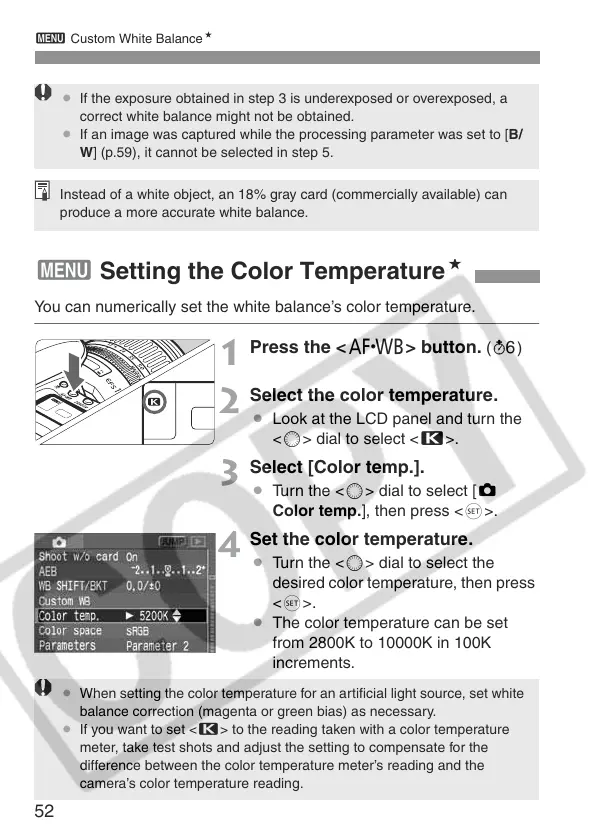
You can numerically set the white balance’s color temperature.
1
Press the <E> button. (9)
2
Select the color temperature.
¡ Look at the LCD panel and turn the
<5> dial to select <P>.
3
Select [Color temp.].
¡ Turn the <5> dial to select [z
Color temp.], then press <0>.
4
Set the color temperature.
¡ Turn the <5> dial to select the
desired color temperature, then press
<0>.
¡ The color temperature can be set
from 2800K to 10000K in 100K
increments.
¡ When setting the color temperature for an artificial light source, set white
balance correction (magenta or green bias) as necessary.
¡ If you want to set <P> to the reading taken with a color temperature
meter, take test shots and adjust the setting to compensate for the
difference between the color temperature meter’s reading and the
camera’s color temperature reading.















 To Next Page