84
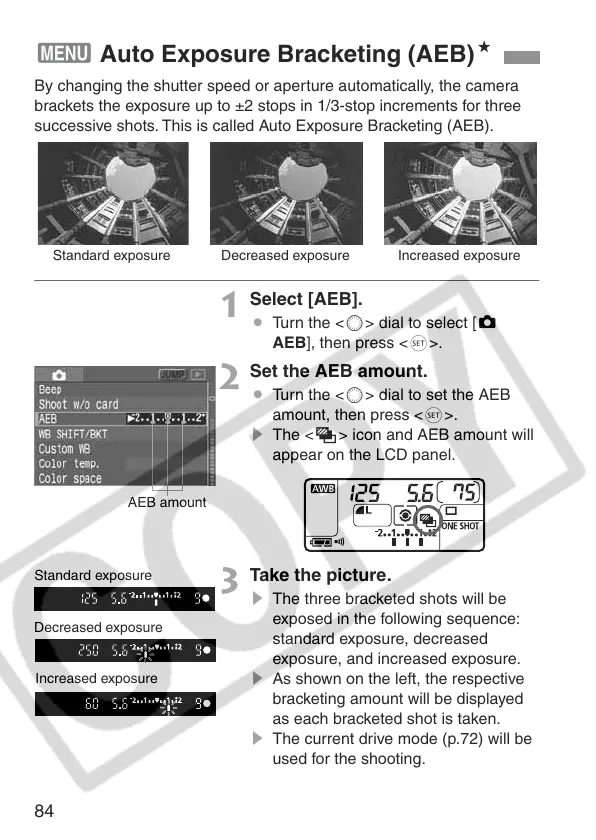
By changing the shutter speed or aperture automatically, the camera
brackets the exposure up to ±2 stops in 1/3-stop increments for three
successive shots. This is called Auto Exposure Bracketing (AEB).
1
Select [AEB].
¡ Turn the <5> dial to select [z
AEB], then press <0>.
2
Set the AEB amount.
¡ Turn the <5> dial to set the AEB
amount, then press <0>.
s The <h> icon and AEB amount will
appear on the LCD panel.
3
Take the picture.
s The three bracketed shots will be
exposed in the following sequence:
standard exposure, decreased
exposure, and increased exposure.
s As shown on the left, the respective
bracketing amount will be displayed
as each bracketed shot is taken.
s The current drive mode (p.72) will be
used for the shooting.
3 Auto Exposure Bracketing (AEB)N
Standard exposure Decreased exposure Increased exposure
AEB amount
Standard exposure
Decreased exposure
Increased exposure















 To Next Page