55
3 White Balance Auto BracketingN
4
Take the picture.
s
When B/A bracketing has been set, the
three images will be recorded onto the
CF card in the following sequence:
Standard WB, B (blue) bias, and A
(amber) bias. If M/G bracketing has
been set, the sequence will be
Standard WB, M (magenta) bias, and
G (green) bias.
¡ The current drive mode (p.72) will be
used for the shooting.
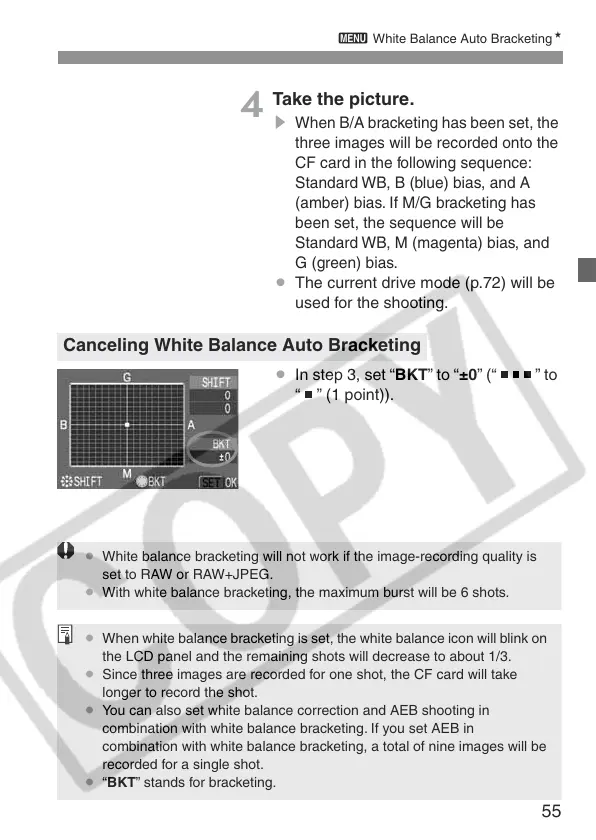
¡ In step 3, set “BKT” to “±0” (“ ” to
“ ” (1 point)).
Canceling White Balance Auto Bracketing
¡ White balance bracketing will not work if the image-recording quality is
set to RAW or RAW+JPEG.
¡ With white balance bracketing, the maximum burst will be 6 shots.
¡ When white balance bracketing is set, the white balance icon will blink on
the LCD panel and the remaining shots will decrease to about 1/3.
¡ Since three images are recorded for one shot, the CF card will take
longer to record the shot.
¡ You can also set white balance correction and AEB shooting in
combination with white balance bracketing. If you set AEB in
combination with white balance bracketing, a total of nine images will be
recorded for a single shot.
¡ “BKT” stands for bracketing.







 To Next Page