Displaying the Status Screens
182
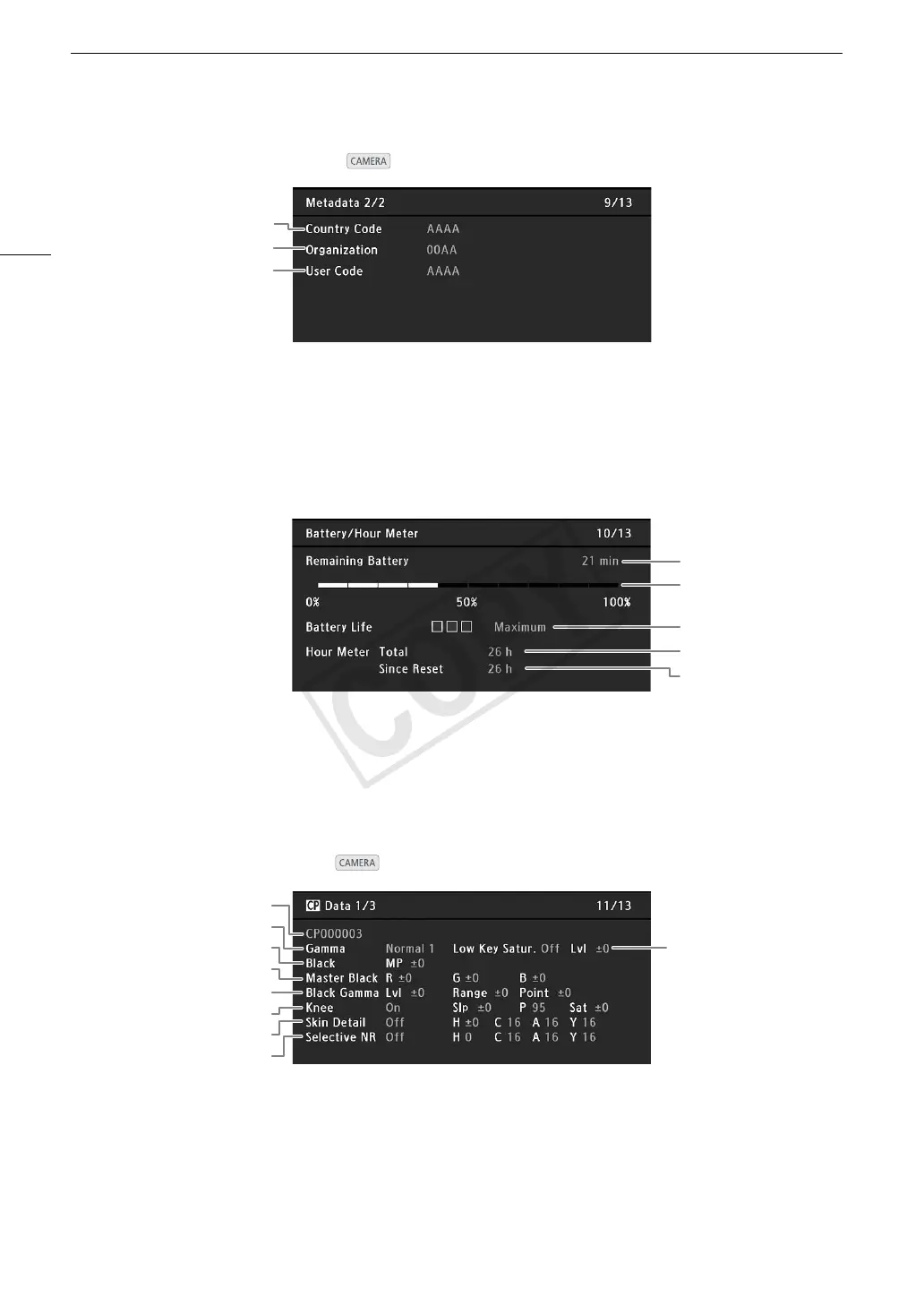
[Metadata 2/2] Status Screen ( mode only)
[Battery/Hour Meter] Status Screen
[/ Data 1/3] Status Screen
( mode only)
2
1
3
1Country code (A 170)
2 Organization code
3User code
1
2
3
4
5
1 Remaining recording time
2 Remaining battery level indicator
3 Battery life indicator
4 Total operation time (A 176)
5 Operation time since using [Reset Hour Meter]
(A 176)
1
3
2
5
6
7
8
4
9
1 Custom picture file name (A 114)
2Gamma (A 117)
3 Master pedestal (A 118)
4 Master black RGB levels (A 118)
5 Black gamma settings (level, range and point)
(A 118)
6 Knee settings (slope, point and saturation) (A 119)
7 Skin detail settings (hue, chroma, area and
Ylevel) (A 120)
8 Selective NR settings (hue, chroma, area and
Ylevel) (A 120)
9Low key saturation (A 118)


 To Next Page