EasyManua.ls Logo

Canon FT - Shutter and Aperture Control; Shutter Speed Dial Operation

Canon FT
44 pages
Print Icon
To Next Page IconTo Next Page
To Previous Page IconTo Previous Page
Loading...
Shutter
and
Aperture
Adjustment
Exposures are
adjusted
by
the
shutter
and
aperture
.
The
shutter
controls
the
exposure
time
and
the
aperture
con·
trois
the
amount
of
incoming
light
. The Canon FT uses
the
zero-
adjustment
coupled
meter,
a very
simple
method
of
obtaining
proper
exposures
.
Shutter
Speed Dial
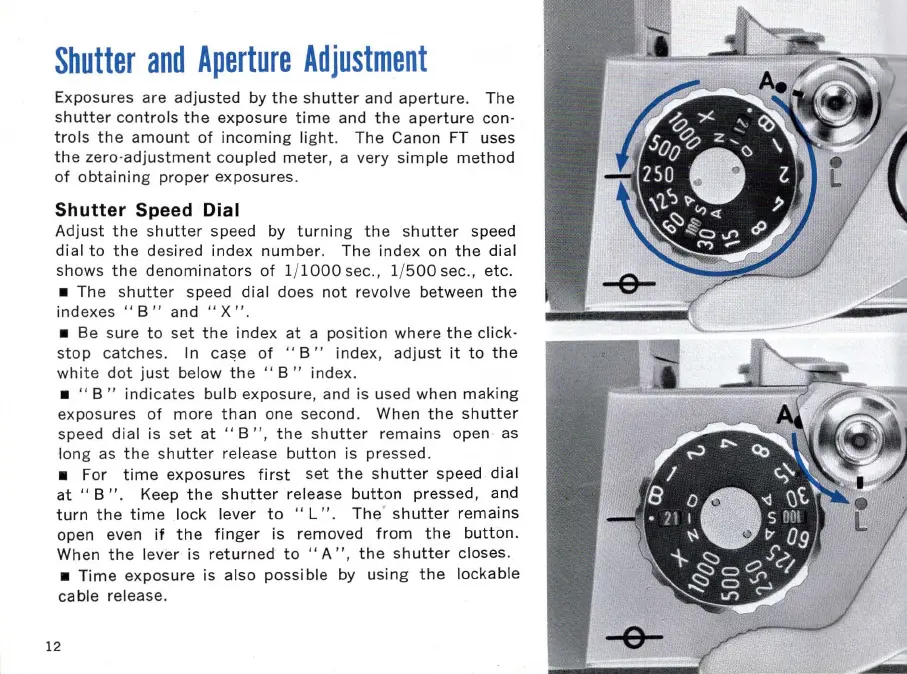
Adjust
the
shutter
speed by
turning
the
shutter
speed
dial
to
the
desired
index
number
. The
index
on
the
dial
shows
the
denominators
of
1/
1000
sec., 1/
500
sec.,
etc
.
The
shutter
speed
dial
does
not
revolve between
the
indexes
..
B " and .. X
".
Be sure
to
set
the
index
at
a
position
where
the
click-
stop
catches
. In
ca~e
of
..
B"
index
,
adjust
it
to
the
white
dot
just
below
the
"
B"
index
.
.. B "
indicates
bulb
exposure, and is used when
making
exposures
of
more
than
one second. When
the
shutter
speed
dial
is
set
at
.. B
",
the
shutter
remains
open as
long
as
the
shutter
release
button
is pressed.
For
time
exposures
first
set
the
shutter
speed
dial
at
..
B " . Keep
the
shutter
release
button
pressed, an.d
turn
the
time
lock
lever
to
..
L"
.
The
'
shutter
remains
open even
if
the
finger
is removed
from
the
button.
When
the
lever is
returned
to
.. A " ,
the
shutter
closes.
Time
exposure
is also
possible
by
using
the
lockable
cable release.
12

Related product manuals