EasyManua.ls Logo

Canon FT - Exposure Setting Procedures; Shutter Speed Priority Exposure

Canon FT
44 pages
Print Icon
To Next Page IconTo Next Page
To Previous Page IconTo Previous Page
Loading...
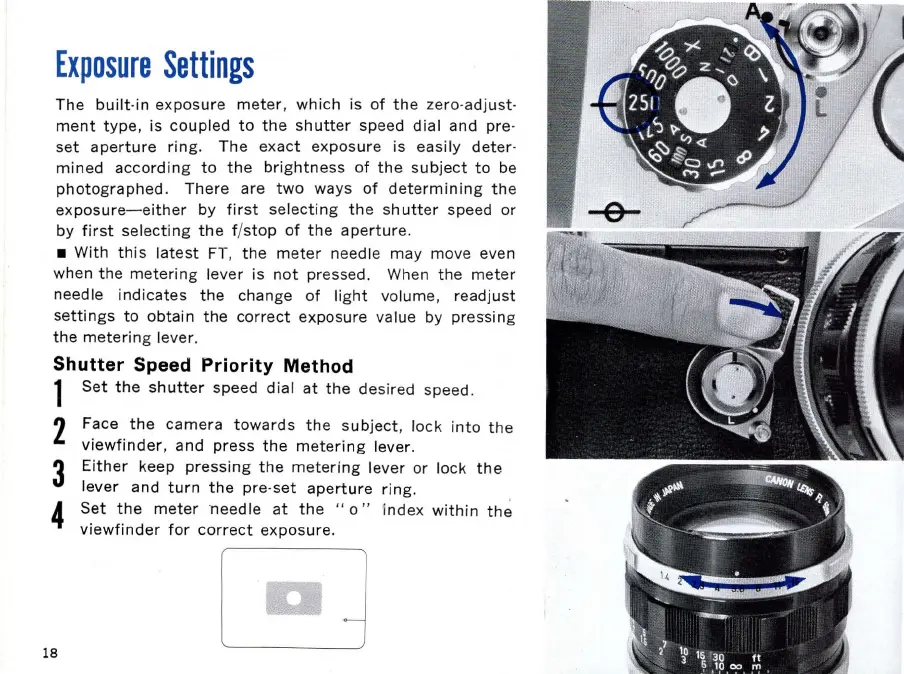
Exposure
Settings
The
built
-i
n
exposure
meter,
which
is
of
the
zero-adjust-
ment
type,
is
coupled
to
the
shutter
speed
dial
and pre-
set
aperture
ring.
The
exact
exposure
is easily deter-
mined
according
to
the
brightness
of
the
subject
to
be
photographed.
There
are
two
ways
of
determining
the
exposure-either
by
first
selecting
the
sh
utter
speed or
by
first
selecting
the
fj
stop
of
the
aperture
.
With
this
latest
FT,
the
meter
needle may move even
when
the
metering
lever is
not
pressed. When
th
e
meter
needle
indicates
the
change
of
light
volume,
readjust
settings
to
obtain
the
correct
exposure value by pressing
the
meter
ing
lever.
Shutter
Speed
Priority
Method
1
Set
the
shutter
speed
dial
at
the
des
ired speed.
2 Face
the
camera
towards
the
subject
,
lock
into
the
viewfinder,
and
press
the
metering
lever.
3
Either
keep
pressing
the
metering
lever or lock
the
lever
and
turn
the
pre-set
aperture
ri
ng
.
4
Set
the
meter
needle
at
the
"
0"
I
nde
x
within
the
viewfinder
for
correct
exposure.
18

Related product manuals