EasyManua.ls Logo

Canon FT - Built-In Exposure Meter Guide; Setting Film Speed for Metering

Canon FT
44 pages
Print Icon
To Next Page IconTo Next Page
To Previous Page IconTo Previous Page
Loading...
Using
Built-In
Exposure
Meter
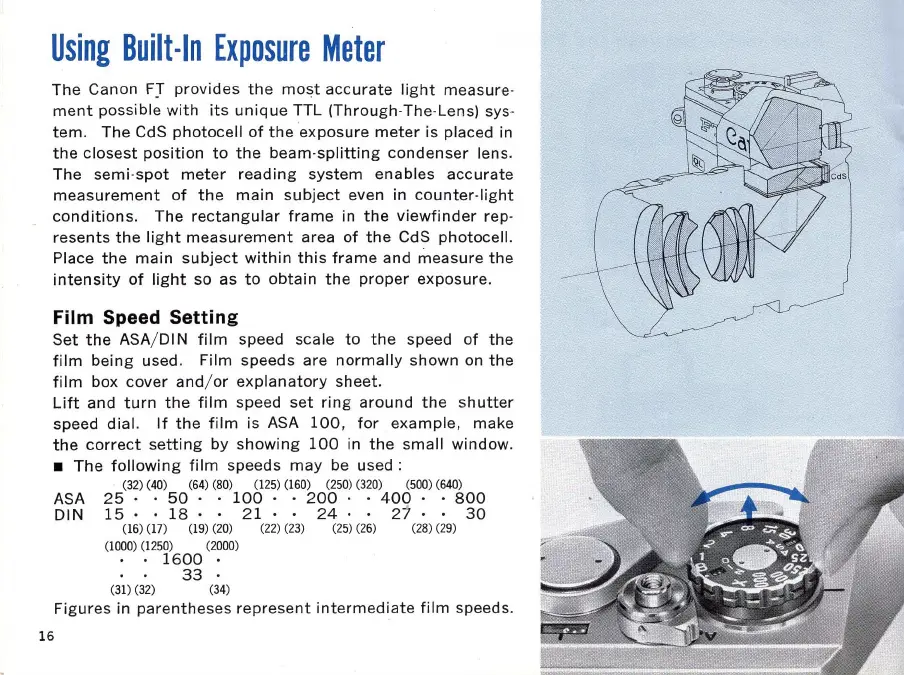
The Canon
FJ
provides
the
most
acc
urate
light
measure-
ment
possible
with
its
unique
TTL (Through-The-Lens) sys-
tem_
The
CdS
photocell
of
the
exposure
meter
is placed in
the
closest
position
to
the
beam-splitting
condenser
lens_
The
semi
-
spot
meter
reading
system
enables
accurate
measurement
of
the
main
subject
even in
counter-light
conditions_ The
rectangular
frame
in
the
viewfinder
rep-
resents
the
light
measurement
area
of
the
CdS
photocell.
Place
the
main
subject
within
this
frame
and
measure
the
intensity
of
light
so as
to
obtain
the
proper
exposure
.
Film Speed Setting
Set
the
ASA/ DIN
film
speed scale
to
the
speed
of
the
film
being
used. Film
speeds
are
normally
shown
on
the
film
box
cover
and
/ or
explanatory
sheet
.
Lift
and
turn
the
film
speed
set
ring
around
the
s
hutter
speed
dia
l.
If
the
film
is ASA
100,
for
example
, make
the
correct
setting
by
showing
100
in
the
small
window
.
The
following
film
speeds
may
be used :
(32) (40) (64)
(8
0) (125) (160) (250) (3
20
) (500) (640)
ASA
25·
50·
.
100
.
200·
400
.•
800
DIN
15·
18
· .
21
·
24
· . 27 ·
30
16
(
16
) (17) (
19
) (20) (22) (23) (2
5)
(2
6) (28)
(2
9)
(1000)
(1
250) (2000)
1600
.
33
.
(31)
(3
2) (34)
Figures in
parentheses
repres
e
nt
intermediate
film
speeds.

Related product manuals