EasyManua.ls Logo

Canon FT - Mercury Battery Installation and Check

Canon FT
44 pages
Print Icon
To Next Page IconTo Next Page
To Previous Page IconTo Previous Page
Loading...
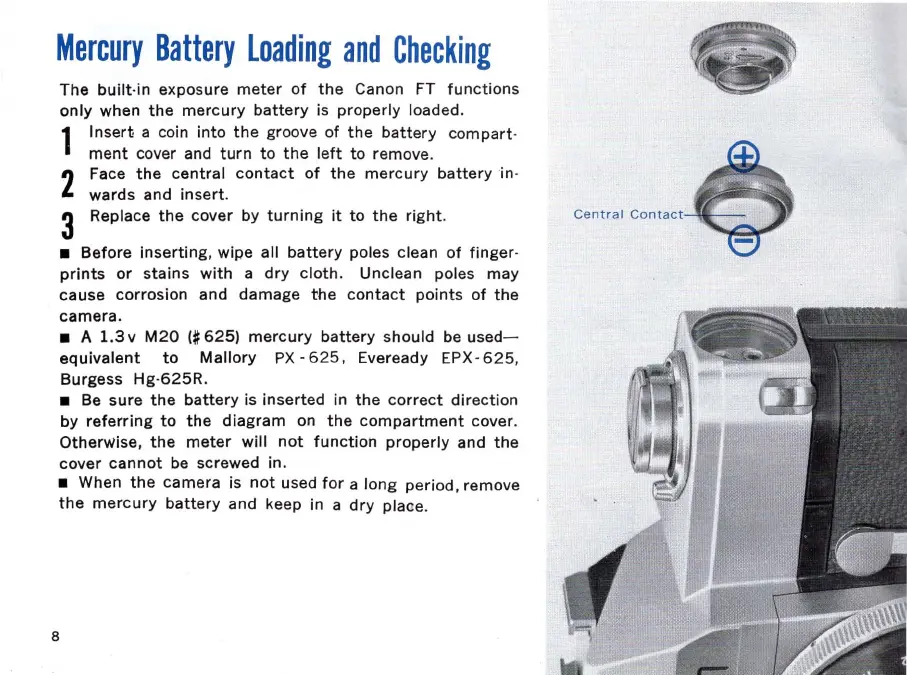
Mercury
Battery
loading
and
Checking
The
built·in
exposure
meter
of
the
Canon FT
functions
only
when
the
mercury
battery
is
properly
loaded.
1
Insert
a coin
into
the
groove of
the
battery
compart
·
ment
cover and
turn
to
the
left
to
remove.
2
Face
the
central
contact
of
the
mercury
battery
in·
wards
and
insert.
3 Replace
the
cover by
turning
it
to
the
right
.
Before
inserting,
wipe all
battery
poles clean
of
finger
·
prints
or
stains
with
a
dry
cloth.
Unclean poles
may
cause
corrosion and
damage
the
contact
points
of
the
camera.
A
1.3
v
M20
(#
625)
mercury
battery
should be used-
equivalent
to
Mallory
P
X'
625 , Eveready EPX·
625
,
Burgess
Hg·625R.
Be sure
the
battery
is
inserted
in
the
correct
direction
by
referring
to
the
diagram
on
the
compartment
cover.
Otherwise,
the
meter
will
not
function
properly
and
the
cover
cannot
be screwed in.
When
the
camera
is
not
used
for
a
long
period
. remove
the
mercury
battery
and keep in a
dry
plaC!e
.
8
Centra
l
Contact
~l--
-

Related product manuals