EasyManua.ls Logo

Canon FT - Camera Care and Maintenance; Lens Cleaning Instructions

Canon FT
44 pages
Print Icon
To Next Page IconTo Next Page
To Previous Page IconTo Previous Page
Loading...
Camera
Body
Number
__
~
__
_
Lens
Number
__
__
_____
_
Date
of
Purchase
_______
_
Dealer
's
Name
_________
_
Proper
Care
of
the
Camera
Moisture
and
dust
are
harmful
to
your
camera.
If
your
camera
is
to
be
stored
for
a long
time
,
it
shou
ld be re o
moved
from
its
case,
and
si lica gel or
another
drying
agent
shou
ld be
placed
alongside
it.
When
you use
your
camera
on a
rainy
day,
.or
at
the
beach,
moisture
and
salt
air
adhere
to
it,
wh
ich
can
result
in
stains,
rust,
and
corrosion.
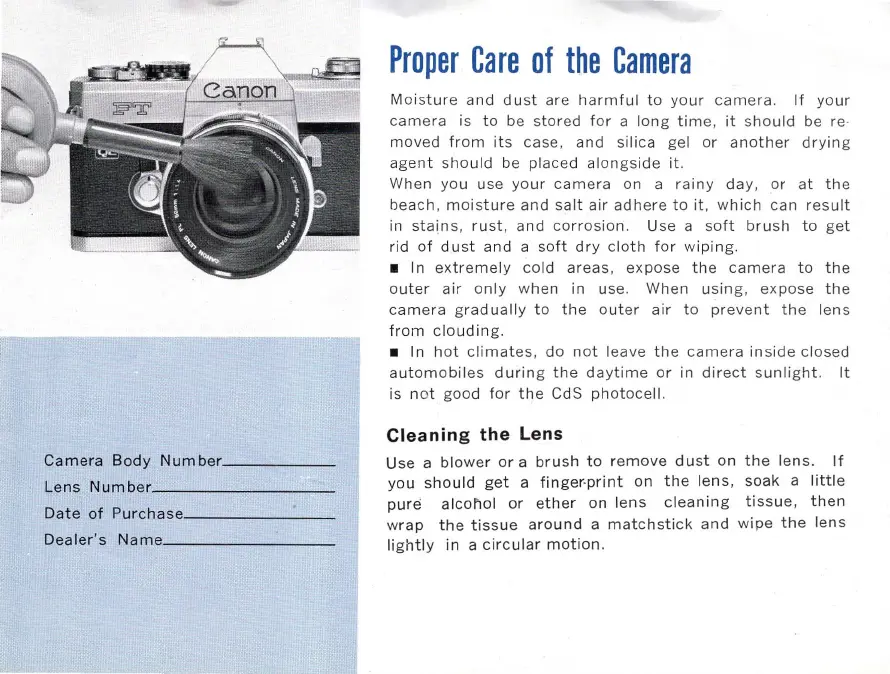
Use a
soft
brush
to
get
rid
of
dust
and
a
soft
dry
c
loth
for
wiping.
I n
extremely
cold
areas,
expose
the
camera
to
the
outer
air
only
when
in
us
e.
When
u
sing,
expose
the
camera
grad
ually
to
the
outer
air
to
prevent
the
l
ens
from
clouding
.
In
hot
cl
imat
es,
do
not
leave
the
camera
in
side
closed
automobiles
during
the
daytime
or
in
direct
sunlight.
It
is
not
good
for
the
CdS
photocell.
Cleaning
the
Lens
Use
a bl
ower
or
a
brush
to
remove
dust
on
the
lens
.
If
you
shou
ld
get
a
finger-print
on
the
lens,
soak
a
little
pure
alcoliol
or
ether
on
lens
cleaning
tissue
,
then
w
rap
the
tissue
around
a
matchstick
and
wipe
the
lens
lightly
in a c ir
cular
motion
.

Related product manuals