EasyManua.ls Logo

Canon FT - F;Stop Priority Exposure

Canon FT
44 pages
Print Icon
To Next Page IconTo Next Page
To Previous Page IconTo Previous Page
Loading...
fjStop
Priority
Method
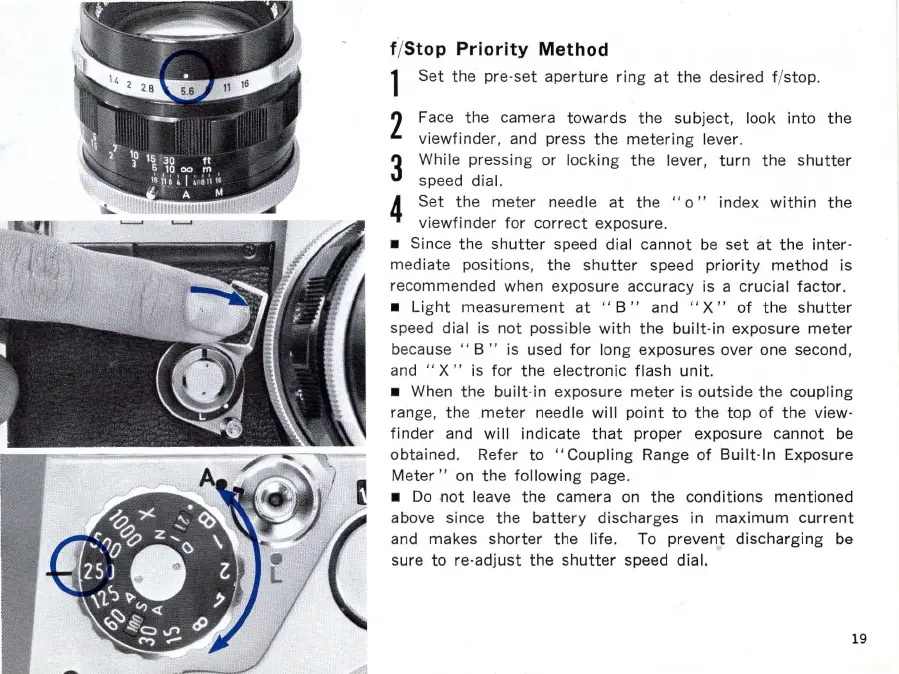
1
Set
the
pre·
set
aperture
ring
at
the
desired f/stop.
2 Face
the
camera
towards
the
subject,
look
into
the
viewfinder,
and press
the
metering
lever.
3 While
pressing
or
locking
the
lever,
turn
the
shutter
speed dial.
4
Set
the
meter
needle
at
the
"0"
index
within
the
vi
ewfinder
for
correct
exposure.
Since
the
shutter
speed dial
cannot
be
set
at
the
inter·
mediate
positions,
the
shutter
speed
priority
method
is
recommended when exposure accuracy is a
crucial
factor.
Light
measurement
at
" B " and
"X"
of
the
shutter
speed dial is
not
possible
with
the
built·in
exposure
meter
because"
B"
is used
for
long exposures over one second,
and
"X"
is
for
the
electronic
flash
unit.
When
the
built
·in exposure
meter
is
outside
the
coupling
range,
the
meter
needle
will
point
to
the top
of
the
view·
finder
and
will
indicate
that
proper exposure
cannot
be
obtained. Refer
to
"Co
upling
Range
of
Built
·
ln
Exposure
Meter"
on
the
following
page.
Do
not
leave
the
camera on
the
conditions
mentioned
above since
the
battery
discharges in
maximum
current
and makes
shorter
the
life
. To
prevent
discharging
be
sure
to
re·
adjust
the
shutter
speed dial.
19

Related product manuals