EasyManua.ls Logo

Canon FT - Lens Usage and Exchange; Exchanging Camera Lenses

Canon FT
44 pages
Print Icon
To Next Page IconTo Next Page
To Previous Page IconTo Previous Page
Loading...
Uses
of
lenses
Changing Lenses
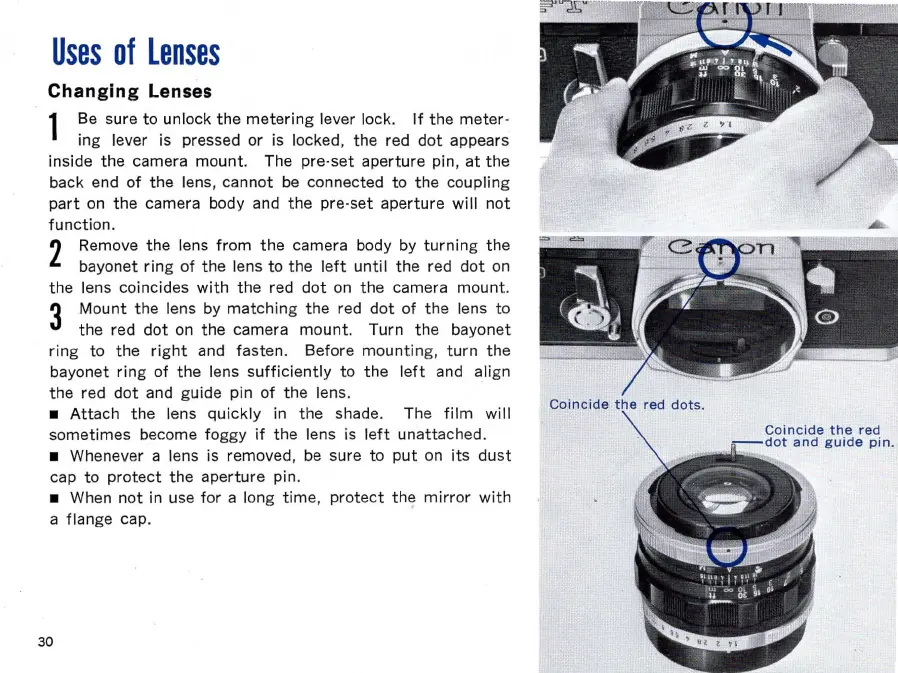
1 Be sure
to
unlock
the
metering
lever lock.
If
the
meter
-
ing lever is pressed or is locked, the red
dot
appears
inside
the
camera mount. The
pre·set
aperture
pin,
at
the
back end
of
the
lens,
cannot
be connected
to
the
coupling
part
on
the
camera body and
the
pre-
set
aperture
will
not
function
.
2 Remove
the
lens
from
the
camera body by
turning
the
bayonet
ring
of
the
lens to
the
left
until
the
red
dot
on
the
lens coincides
with
the
red
dot
on
the
camera
mount
.
3
Mount
the
lens by
matching
the
red
dot
of
the
lens to
the
red
dot
on
the
camera
mount.
Turn
the
bayonet
ring
to
the
right
and fasten. Before
mountin
g,
turn
the
bayonet
ring
of
the
lens
sufficiently
to
the
left
and align
the
red
dot
and guide pin
of
the
lens.
Attach
the
lens
quickly
in
the
shade. The
film
will
sometimes become foggy
if
the
lens is
left
unattached
.
Whenever a lens is removed, be sure to
put
on i
ts
dust
cap
to
protect
the
aperture
pin.
When
not
in use
for
a long
time
,
protect
the
mirror
with
a flange cap.
30

Related product manuals